Best Time to Send Emails for Response (2026)
Stop guessing when to send emails. Get data-backed timing strategies from 2026 research that improve response rates across all scenarios.

If you're searching for the best time to send emails for response, you're not really looking for a time slot. You're trying to solve a harder problem: How do I get more people to actually reply without sending more emails or being annoying?
This guide tackles that deeper question. It's not a "Tuesday at 10 a.m." listicle. We'll start from how inboxes actually work in 2026, examine current data, then give you concrete playbooks and experiments you can run yourself.
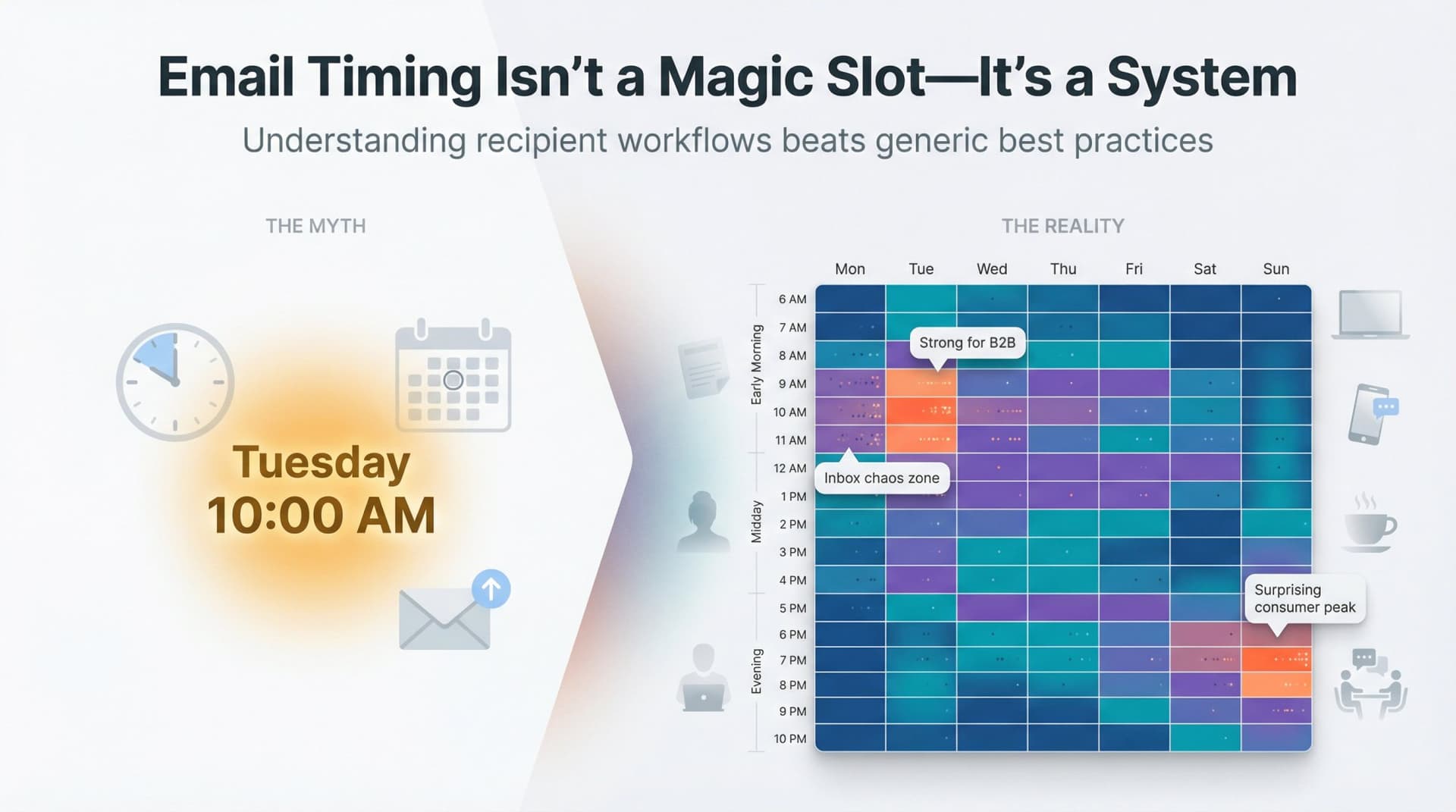
When to Send Emails: Quick Guide for Busy People
If you only have 60 seconds, here are starting points (not commandments).
All times are recipient local time.
Best Time to Send Business Emails for Response
For warm relationships, introductions, and sales follow-ups, start by testing mornings around 8:30-10:30 a.m. or early afternoon around 1:30-3:30 p.m. Tuesday through Thursday tend to perform best. Avoid Monday mornings when inboxes are chaotic, and Friday afternoons when people have mentally checked out. Very late night sends that create pressure are also worth skipping.
Best Time to Send Cold Emails for Maximum Response
Recent cold email research from 2025 shows average open rates hover around 40-60%, but response rates typically land between 1-5%. One large survey found the best reply rate was 2.3% when sent between 5-8 a.m. on Monday, with performance declining outside morning and midweek windows.
For cold B2B outreach, focus on Monday to Wednesday. Test early morning sends between 6-9 a.m. and late morning between 9-11 a.m., with 4-6 p.m. as a backup window for follow-ups.
Best Time to Send Marketing Emails and Newsletters
Large email providers analyzing billions of sends consistently see midweek performing best. Tuesday, Wednesday, and Thursday get slightly higher opens and clicks on average, with 9-11 a.m. and 1-3 p.m. as the most common winning time bands. In some consumer segments, evening and Sunday evening perform surprisingly well.
So for broadcast marketing, start with Tuesday-Thursday, 9-11 a.m. in the recipient's timezone. For consumer or retail audiences, test evenings and Sunday p.m. too.
Those are starting points, not the answer. To get serious about replies, you need to understand why timing works at all, and how to discover the best window for your specific audience. That's what the rest of this guide covers.
Why Email Timing Matters More Than You Think
Email Is a Queue, Not a Magic Slot Machine
Think about your own inbox for a moment.
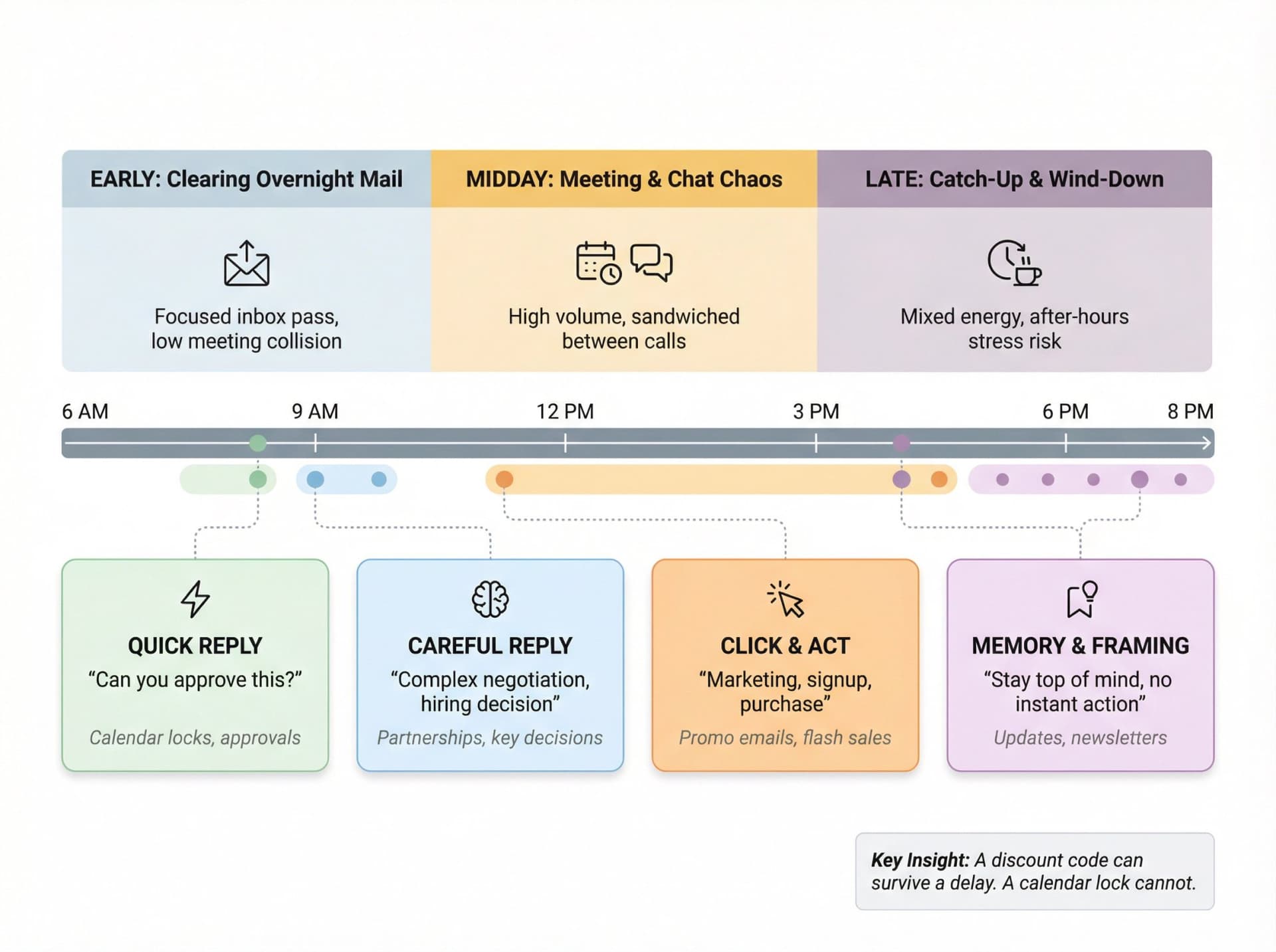
On a typical workday you might wake up and glance at email in bed. Then sit down at your desk and clear overnight stuff. Spend 9-3 in meetings and chat. Grab 10-minute bursts between calls to triage. Do a catch-up pass late afternoon or in the evening.
The people emailing you are competing to appear near the top of the queue, at a moment when you have cognitive space to read and decide, in a context where replying feels safe and quick. If any of those three elements are missing, timing won't save you.
What Email Timing Actually Controls
Timing doesn't magically make bad emails work. What it can influence is visibility (how far down the inbox your message sits when they next open email), cognitive load (whether they're in "skim and archive" mode or "decide and reply" mode), and collision with other channels (are they drowning in meetings and chat at the same time?).
Recent Microsoft telemetry data across 31 markets puts this in sharp relief. By 6 a.m., 40% of people who are online are already reviewing email for the day. The average worker receives about 117 emails per day, most skimmed in under 60 seconds. And around half of all meetings land between 9-11 a.m. and 1-3 p.m., precisely when most people have their natural productivity spike.
So the core tradeoff looks like this: Send early and you hit them when they're clearing overnight mail. Send midday and you risk getting sandwiched between meetings and chat storms. Send late and you collide with catch-up behavior and after-hours stress.
What Your Email Timing Goal Should Be
You're not optimizing for opens. You're usually optimizing for one of four things: a quick reply ("Can you approve this?" or "Can we meet?"), a careful reply (complex negotiation, hiring decision, partnership proposal), a click and act (marketing emails where the action is a click, signup, or purchase), or memory and framing (updates where the goal is staying top of mind, not necessarily instant action).
Each of those interacts differently with timing. A discount code for sneakers can survive a delay. A calendar lock for a scarce executive slot cannot.
Email Send Time Statistics: What 2024-2025 Data Shows
Let's ground this in current numbers, then layer first principles on top.
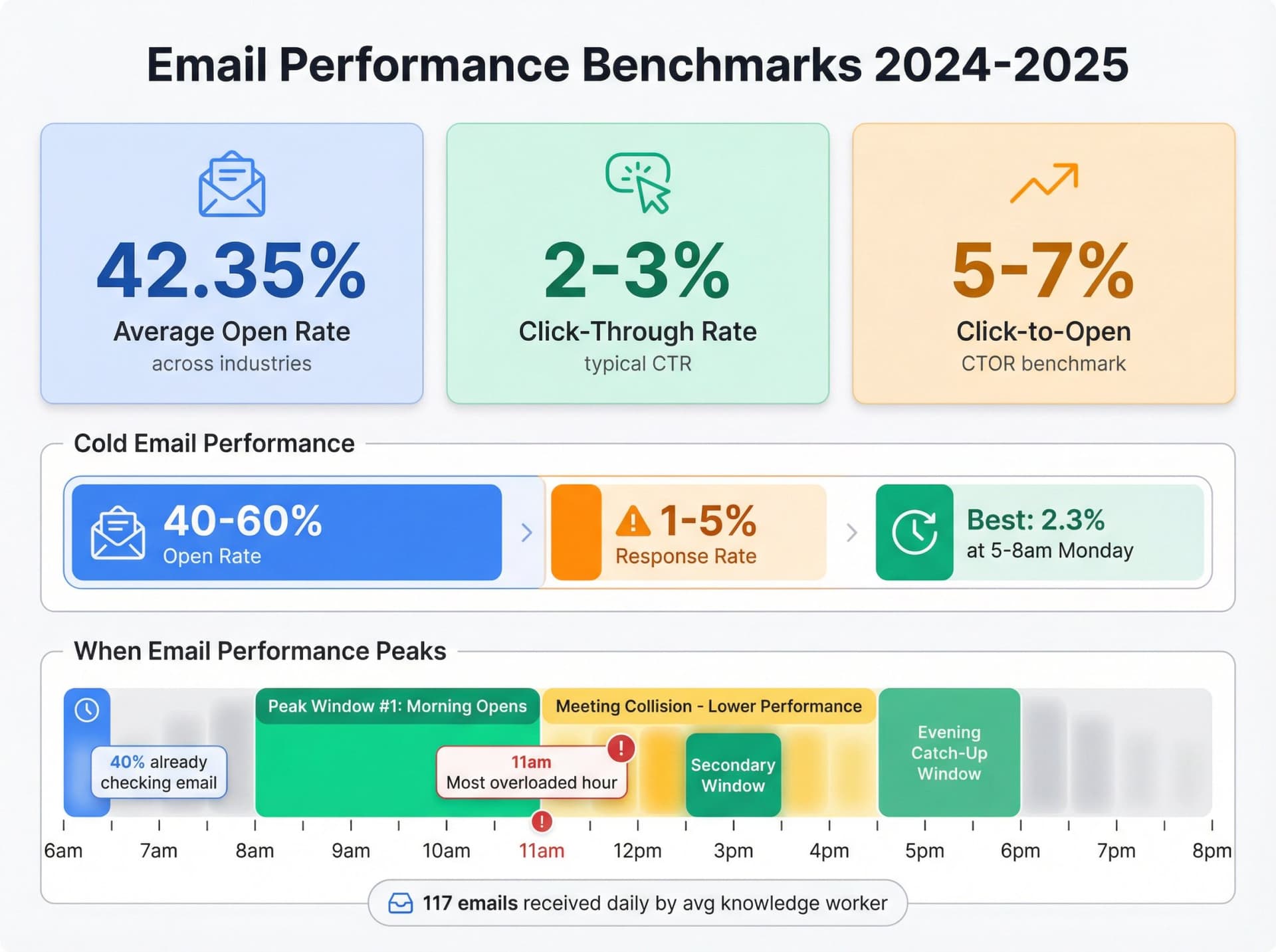
Email Open Rates and Click Rates in 2025
Industry benchmarks for 2025 report:
| Metric | Average Rate |
|---|---|
| Open rate across industries | ~42.35% |
| Click-through rate | ~2-3% |
| Click-to-open (CTOR) | ~5-7% |
Another major benchmark puts the global average open rate around 39.7% in early 2024. So at a high level, for typical email marketing, roughly 4 in 10 will open and a small single-digit percentage will actually click.
Important caveat: Privacy changes like Apple Mail Privacy Protection inflate opens by preloading tracking pixels, so clicks and replies are much more reliable than opens.
For this guide, we'll treat reply rate and click/conversion rate as the main health metrics.
Cold Email Response Rates: What to Expect in 2025
A large 2025 consumer survey on cold emails found that consumers receive an average of 15 cold emails per week, with average open rates of 40-60% and response rates of just 1-5%. The best time to send cold email was 5-8 a.m. on Monday, where reply rate averaged 2.3%.
A 2024 cold email analysis paints a similar picture. The best time often lands between 9 a.m. and 12 p.m., with Monday to Wednesday as the strongest days. About 75% of outreach emails are opened in the first hour, and over 40% of replies also happen within that first hour.
The takeaway is straightforward. Cold email has brutally low response by default, with a 2-3% reply rate being normal. Timing clearly matters at the margin because the first hour after send is critical, putting a premium on aligning with their next active email session. Morning on early weekdays is a consistently good bet, but it's not universal.
How Knowledge Workers Actually Use Email in 2025
Combine the cold email stats with how people are working now.
The 2025 Microsoft Work Trend Index and related reports show that email is still the "front door" to work. By 6 a.m., a large chunk of workers are already scanning email, and the average knowledge worker receives well over 100 emails per day. Many professionals now spend 10-12 hours a week on email-related tasks, nearly a full day and a half in a standard workweek.
Microsoft's telemetry also reveals that 9-11 a.m. and 1-3 p.m. are packed with meetings, and message activity peaks late morning, making 11 a.m. one of the most overloaded hours. After-hours and weekend email use is rising too. Nearly 20% of employees actively working on weekends check email before noon, and about 5% are back in email Sunday evenings.
This explains why "best time to send" studies often disagree. If you send at 9 a.m., you may catch someone in a focused email pass. The same 9 a.m. for a different persona may be swallowed by meetings and chat.
Best Day and Time to Send Emails: What Email Platforms Report
Let's line up what large senders (who see billions of emails) are observing lately.
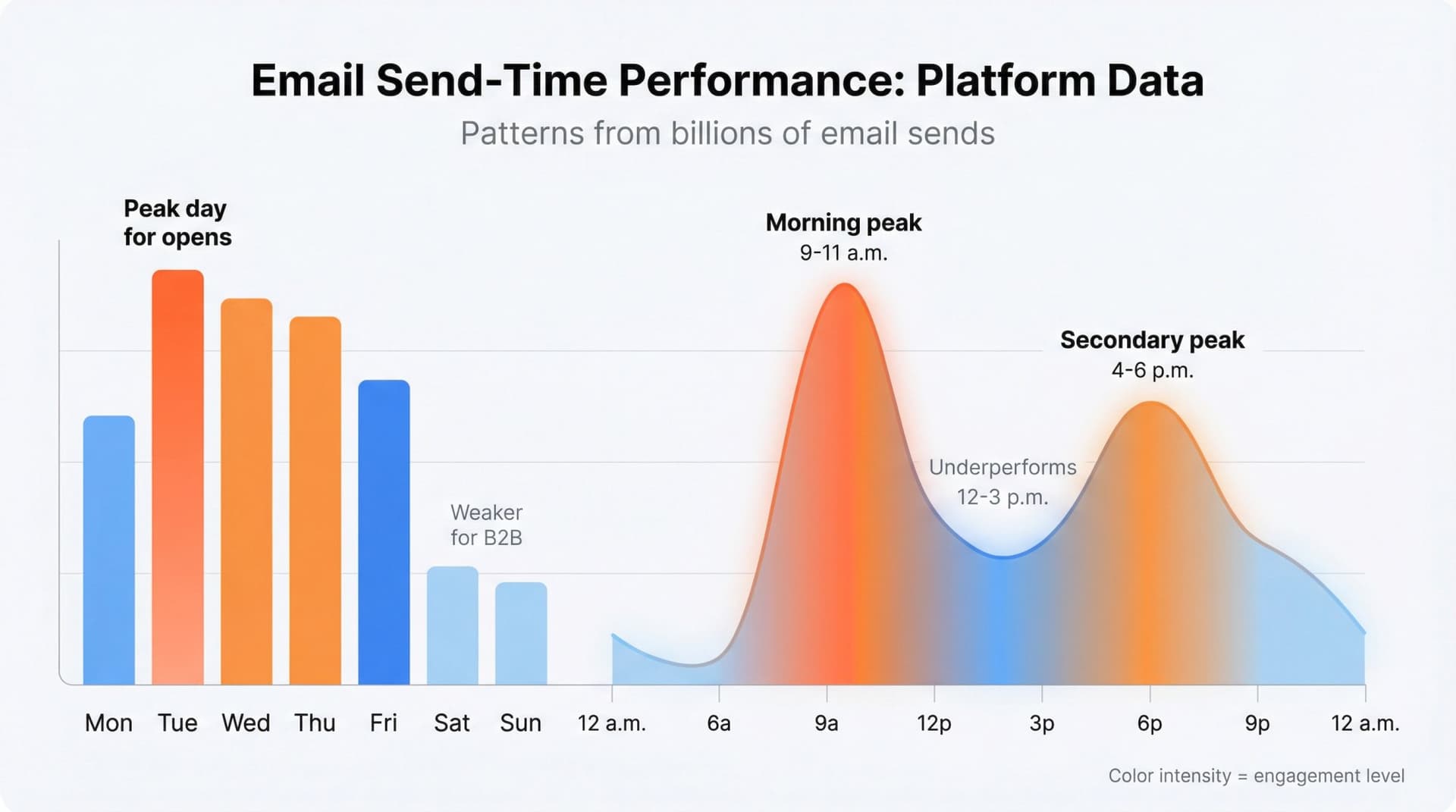
Best day of the week to send emails
Twilio SendGrid's 2025 analysis points to Tuesday as consistently strong for open rates, with midweek generally outperforming Monday and Friday. Other studies find midweek days perform best overall, with Tuesday and Thursday often leading on metrics like orders and conversions. Several analyses show Wednesday and Thursday edging ahead for ecommerce, though Monday and Tuesday are close behind. And several studies agree weekends are weaker for B2B but can be very strong for some consumer ecommerce segments, especially Sunday evening.
If you're sending to people at work, Tuesday, Wednesday, Thursday are the safest starting point. If you're B2C ecommerce or creator-focused, you should definitely test weekend evenings instead of assuming they're bad.
Best time of day to send emails
Across multiple email providers, the patterns are consistent. There are very reliable morning peaks in opens around 9-11 a.m., with secondary peaks in early afternoon (about 1-3 p.m.) and late afternoon/early evening (about 4-6 p.m.). Cold email specific data shows the strongest performance early morning, even as early as 5-8 a.m. Monday, but still with good results through 9-11 a.m.
Industry analysis concludes that 8-11 a.m. and 4-6 p.m. are the most consistently effective windows across multiple studies, while 12-3 p.m. tends to underperform for many use cases, likely because it collides with meetings and midday clutter.
Why There's No Universal Best Email Send Time
At this point, you can see why "Tuesday at 10 a.m." answers are comforting but misleading.
Three big reasons. Your audience is not "average," because the 42% open rate is across everything from churches to fintech SaaS and your segment may behave quite differently. Your goal matters, because if you need a thoughtful reply you may want to avoid the most overloaded hours, even if opens are high. And everyone else is also clustering around these "good" times, with some research even suggesting sending at odd minutes past the hour to avoid big infrastructure spikes when everyone schedules on the dot.
So a better way to think about "best time" is: Start from the global patterns, then shrink them down to the realities of your own audience and your own data.
Let's build that system.
How to Find Your Best Email Send Time in 4 Steps
Instead of memorizing times, work through these steps.
Step 1: Define What Email Success Means to You
For each type of email, decide if you care most about first reply rate, reply speed, clicks, or purchases and booked meetings. Different metrics can imply different ideal times. Legal review requests might be best when lawyers are more likely to be at their desk in the afternoon. Flash sale coupons might be best when people are on the sofa, scrolling on their phone in the evening.
Be explicit.
Step 2: Map Your Recipient's Daily Schedule
Pick your main persona and sketch a normal weekday calendar.
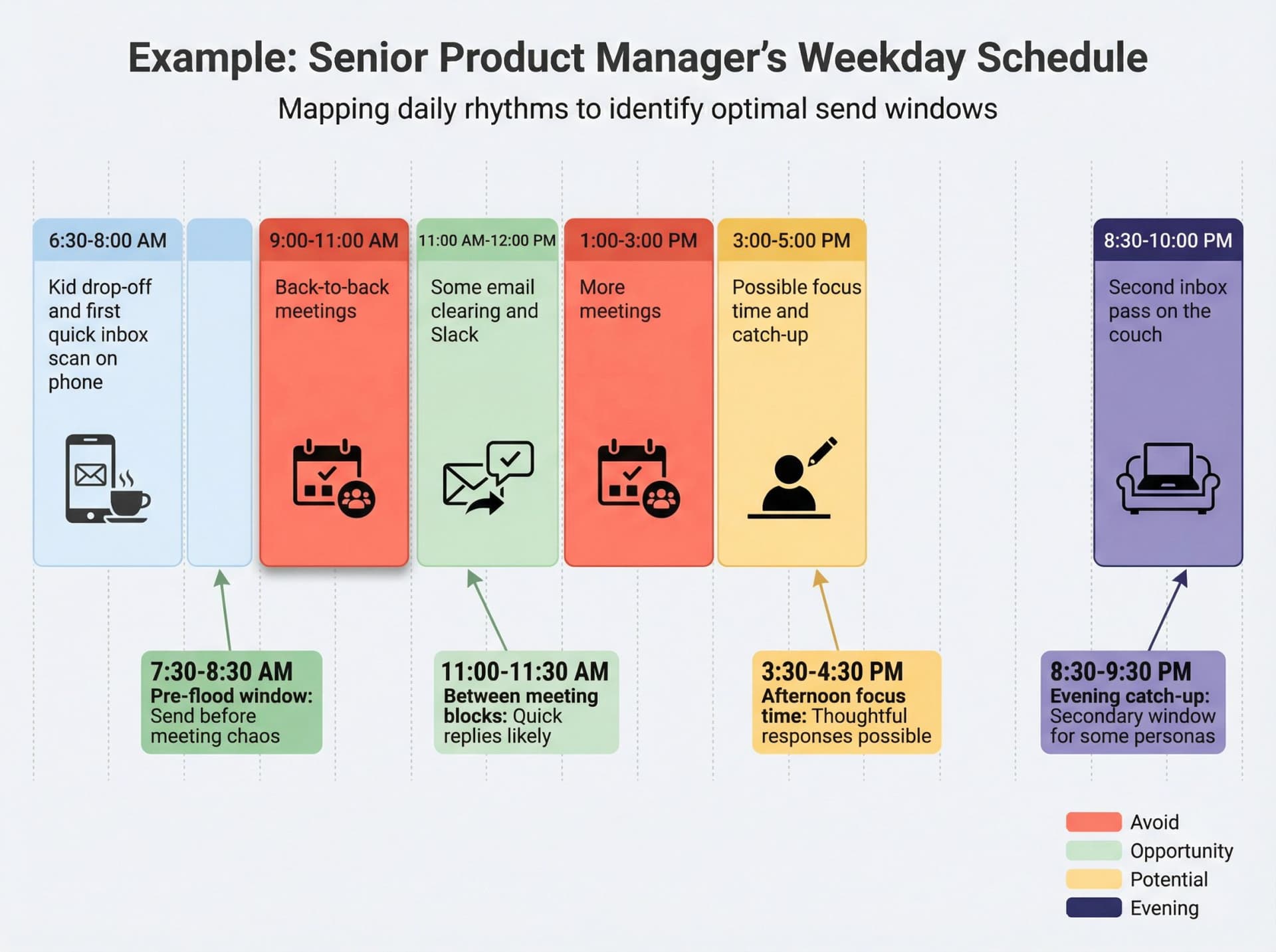
Example: Senior product manager in a US tech company
| Time | Activity |
|---|---|
| 6:30-8:00 | Kid drop-off and first quick inbox scan on phone |
| 9:00-11:00 | Back-to-back meetings |
| 11:00-12:00 | Some email clearing and Slack |
| 1:00-3:00 | More meetings |
| 3:00-5:00 | Possible focus time and catch-up |
| 8:30-10:00 p.m. | Second inbox pass on the couch |
That gives you logical test slots: pre-flood (7:30-8:30 a.m.), between meeting blocks (around 11:00-11:30 a.m.), afternoon focus time (3:30-4:30 p.m.), and evening catch-up (8:30-9:30 p.m.).
Now contrast this with a DTC consumer. They may hardly check personal email inside working hours. They might be most engaged Saturday morning and weekday evenings while shopping.
Step 3: Compare Your Audience to Global Email Timing Patterns
From the benchmarks, midweek tends to beat Monday and Friday for business audiences, 9-11 a.m. and 1-3 p.m. are the dominant engagement windows globally, and cold email has a strong tilt to early week, early day.
Your starting matrix might look like this. For B2B one-to-one, try Tuesday-Thursday, 8:30-10:30 a.m. and 2-4 p.m. For B2B cold outreach, test Monday-Wednesday, 6-9 a.m. and 9-11 a.m. For B2C marketing, test Tuesday-Thursday, 10 a.m.-2 p.m. and Sunday evening.
Step 4: Track Your Email Performance Data and Refine
This is where Inbox Zero becomes useful instead of guessing forever.
With Inbox Zero Email Analytics, you can see how many emails you send and receive by hour and day, which senders and domains fill your inbox, and which types of email dominate your traffic.
Even simple questions like "At what hours do my urgent threads pile up the fastest?" or "At what hours do I tend to respond quickly vs slowly?" can tell you where your own rhythm actually lives.
Pair that with your email marketing platform's aggregate stats and you can see for a given campaign how open, click, and reply rates differ by send time. For your manual sends, how long people take to reply depending on when you wrote.
Best Time to Send Emails by Type: Specific Scenarios
Let's get practical. Here are concrete starting points for common use cases, plus how to evolve them.
Best Time to Send Sales Emails and Cold Outreach
The objective here is replies and booked meetings.
Start with Monday to Wednesday, testing three slots: early (7-9 a.m.), classic (9-11 a.m.), and backup (4-6 p.m.).
Cold email data shows early morning windows perform best for responses, especially Mondays. Multiple studies say opens and clicks cluster early morning and late afternoon. You want to hit their first inbox triage pass or end-of-day catch-up, not the midday chaos.
Use schedule send so your emails arrive when they wake up, even if you prefer writing in the afternoon. For high-level executives who work odd hours, test Sunday evening or late evening in their timezone, but only if you know their culture. Some data shows Sunday night peaks as people prep for the week.
With Inbox Zero's AI automation, you can keep all your outbound threads where you owe a response in a dedicated "To Reply" pile. That matters more than timing if you're dropping balls. The system automatically labels every thread that needs a response, so nothing falls through the cracks.
Best Time to Send Emails to Colleagues and Partners
Partners, investors, colleagues: timing here is less about "tricking" the inbox and more about respect and clarity. Start with Tuesday-Thursday, 8:30-10:30 a.m. in their timezone. Avoid Monday 9-11 a.m. unless urgent, and avoid speculative outreach late at night, which signals poor boundary management in many cultures.
Warm contacts will usually reply if the content is strong, but you still get more mindshare if you land when they have planning energy, not when they're escaping work.
If you have a reply tracking system like Inbox Zero, you can do your own reply batching at fixed times (for example, 11 a.m. and 4 p.m.). That gets you off the constant-checking treadmill and makes your own timing more predictable to others.
Best Time to Send Job Application Emails
Here you're competing with piles of other applicants. Send early in the recruiter's morning, often 7:30-9:30 a.m. local time, and prefer early in the week so you're in the first batch of candidates they triage. For networking intros, still stick with Tuesday-Thursday mornings.
Hiring managers frequently do candidate review in blocks. Being in the first chunk doesn't guarantee success, but it improves odds you're read before fatigue kicks in. Recruiters often clear inbox first thing, then move to calls.
Best Time to Send Newsletter Emails
You're fighting both volume and habit here. Large providers see midweek mornings as strong for newsletters, especially Tuesday 10-11 a.m., but the advantage is relatively small. For some creator and consumer lists, Sunday evening wins because people are planning the week and catching up. Industry benchmarks mention some campaigns performing better on Sunday nights than weekdays.
Start with Tuesday-Thursday 9-11 a.m. Test Sunday 6-9 p.m. if your content is personal, reflective, or planning-oriented. And if your audience is largely outside traditional 9-5, test evening send times.
When to Send Transactional Emails
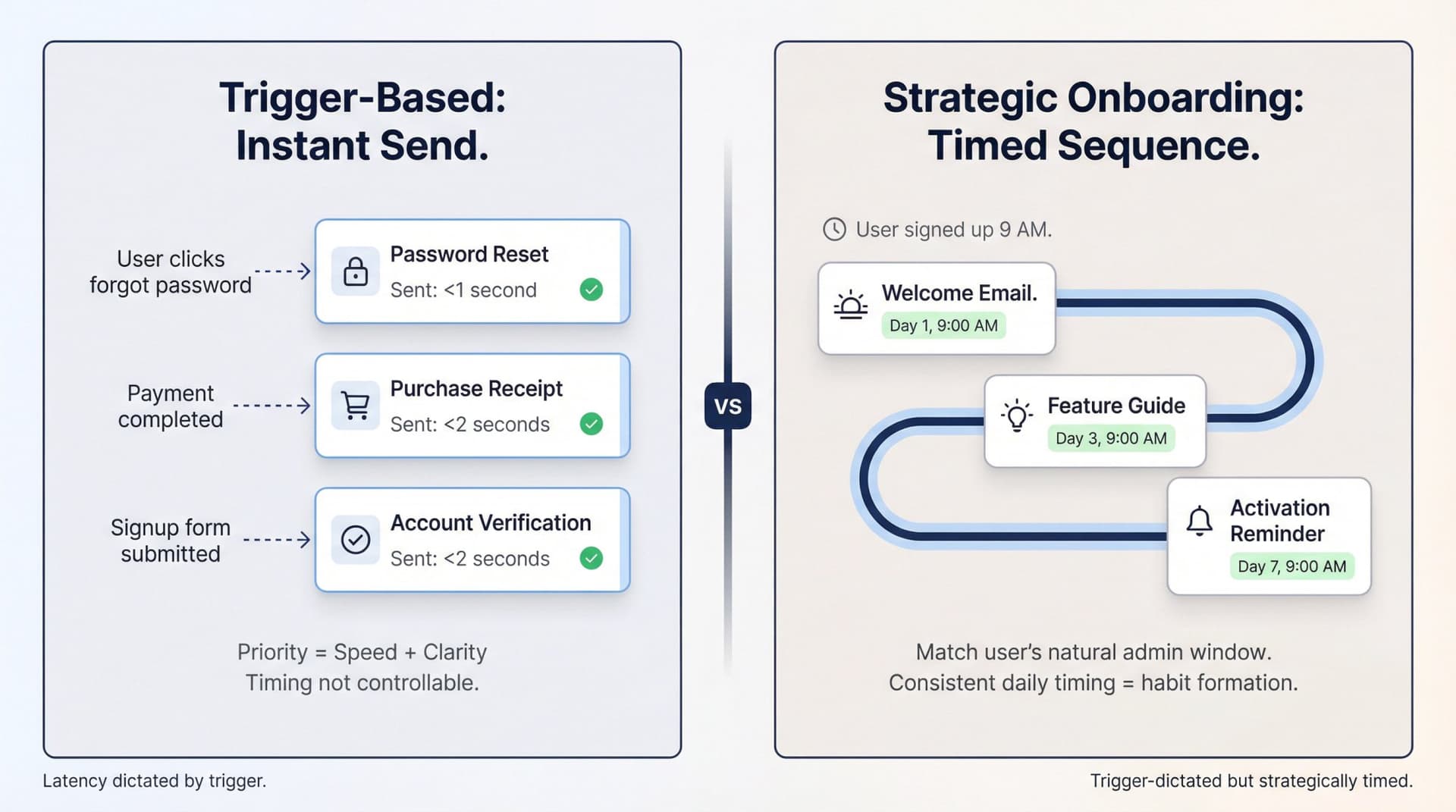
For things like password resets, purchase receipts, and onboarding flows, timing is usually dictated by the trigger, not you. What matters more is latency (how fast the email arrives) and clarity.
The exception is multi-step onboarding and activation sequences. Here you can time follow-ups for the same time of day the user first engaged, which often aligns with their natural "admin" window.
How to Test Email Send Times Like a Pro
Most teams dabble. If you want to turn timing into a real advantage, you need simple but disciplined testing.
Two Ways to Learn About Email Timing
There are two ways to learn. The first is to observe existing behavior: look at historical campaigns by hour and day, and look at when replies tend to arrive when you send "whenever." The second is to run controlled tests, deliberately splitting your list and sending identical emails at different times. Both are useful, but they answer slightly different questions.
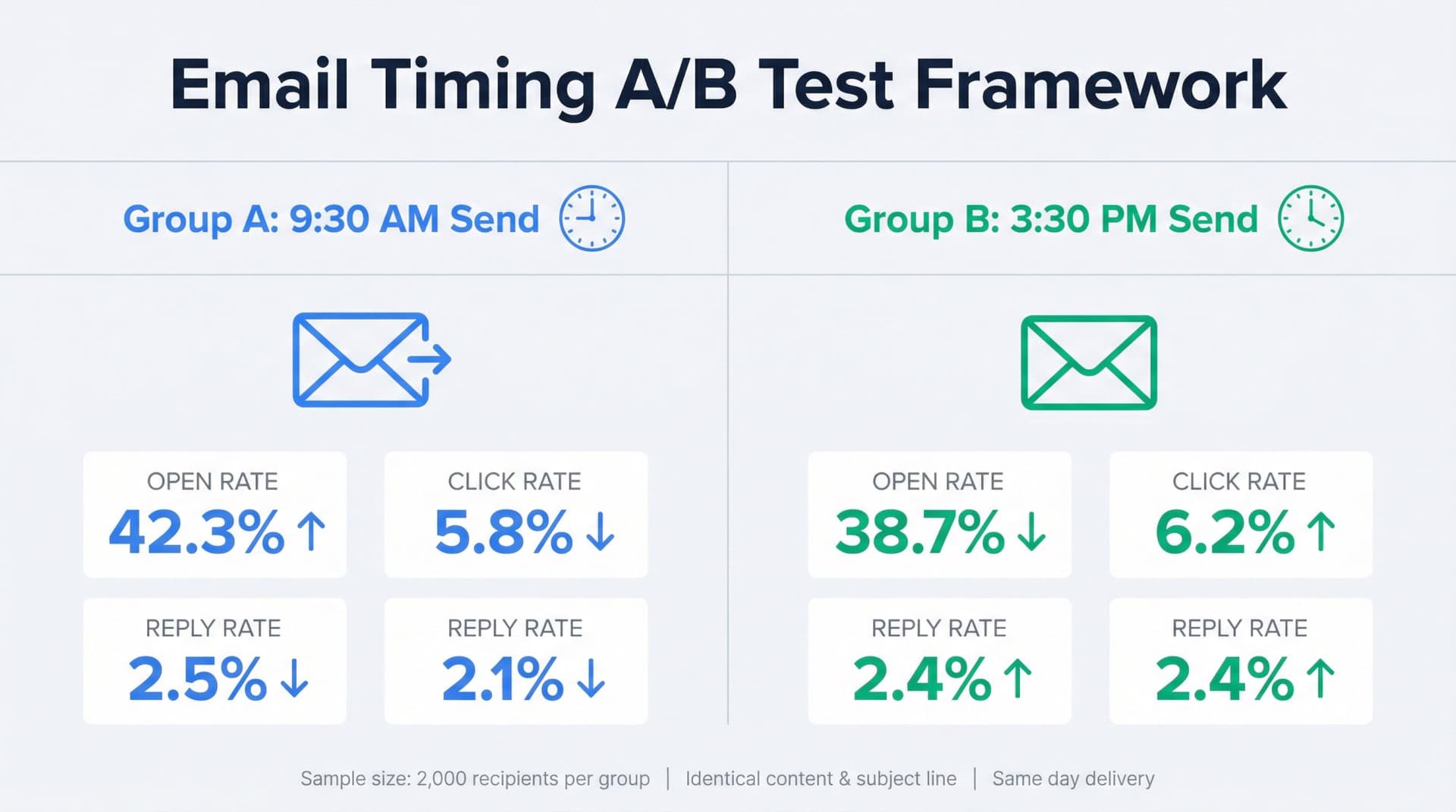
How to Run an Email Timing A/B Test
For a newsletter or campaign, choose one variable (for example, send at 9:30 a.m. vs 3:30 p.m.), randomly split your segment into two equally sized groups, send identical content at two different times on the same day, and measure open rate (with privacy caveats), click rate, conversion rate, and unsubscribes.
Repeat across several sends so you don't confuse "good subject line" with "good time." For cold email, do the same with reply rate and meeting booked rate. Make sure sequence structure stays the same.
Email Testing Sample Size: When to Stop
You don't need a formal statistician, but you do want to avoid chasing noise. Try to get at least a few thousand recipients per variant for newsletters, if possible. For small lists, think of timing changes as hypothesis generating, not final truth. You're just trying to avoid obviously bad slots (like Friday 4 p.m. for B2B).
Email Timing Test Mistakes to Avoid
The most common mistake is changing multiple things at once (new subject line, new design, new timing), because you won't know which change mattered. Another is comparing different days with tiny samples, since sending one email on Tuesday and one on Wednesday tells you nothing. And relying only on opens is risky too, because with Apple privacy protections, clicks, replies, and conversions are the primary metrics worth tracking.
How to Use Inbox Zero for Better Email Timing
Inbox Zero sits on top of Gmail or Outlook and acts like an AI-powered layer that classifies, labels, drafts, and tracks replies. That makes it useful for the one-to-one and team email side of the timing problem.
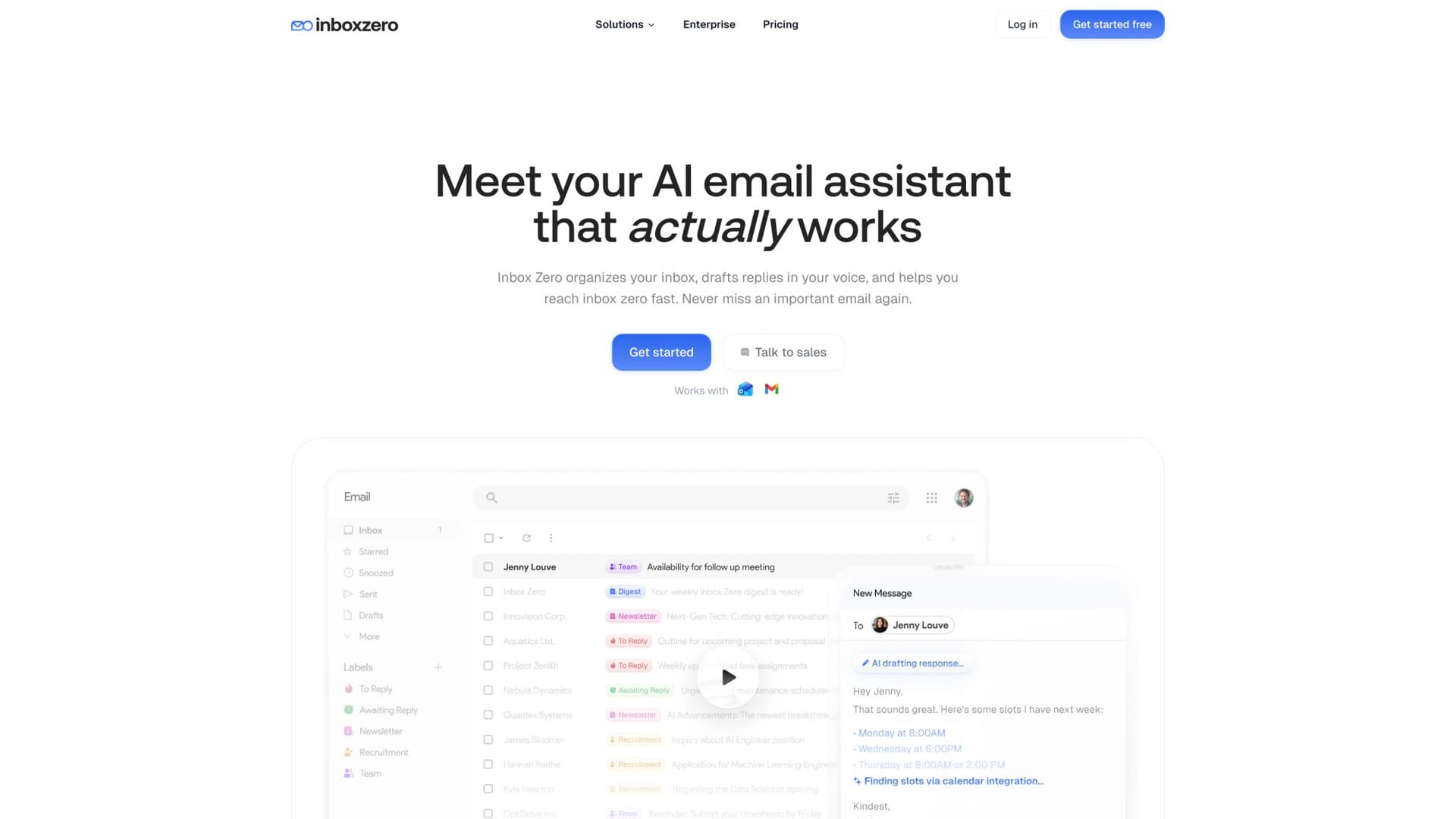
Here's how to use it.
Track When Your Inbox Gets Busiest
With Email Analytics, you can see when your inbox gets slammed by hour and day, how many messages you send and receive, and which senders or domains dominate your volume.
Spot your own "prime reply hours" by checking when you tend to respond fastest. Spot overload windows where incoming volume spikes and you consistently fall behind. Use this to decide when to batch your replies and when to avoid sending new asks.
For example, if you see that your team gets most inbound customer emails between 9 and 11 a.m., you might schedule your outbound customer success check-ins for 2-4 p.m. when the queue is under control.
How to Never Miss an Important Reply
Timing doesn't matter if you forget to follow up. Inbox Zero's AI automation labels every thread where you owe a reply (To Reply) and every thread where you're waiting on someone else (Awaiting Reply). You can then spend your chosen reply blocks clearing To Reply, and use nudges on overdue Awaiting Reply threads at strategic times (for example, early afternoon in the recipient's timezone).
That closes the loop timing alone cannot fix.
Clean Your Inbox So Timing Actually Works
If your own inbox is chaos, it doesn't really matter when people send to you. We've built features to help you reduce noise and cluster similar messages together, including a Bulk Email Unsubscriber and a Cold Email Blocker.
This has two timing benefits. It becomes easier to batch-process categories at fixed times: newsletters at 3 p.m., receipts at 4 p.m., customers and team at 10 a.m. and 2 p.m. And it makes it more likely that important sends to you land in a cleaner inbox, which indirectly improves response times for your contacts too.
Use Inbox Zero Tabs to Control Your Email Schedule
The free Inbox Zero Tabs for Gmail extension adds custom tabs to Gmail using any search or label. You can create tabs like To Reply, Newsletters, Receipts, and Team.
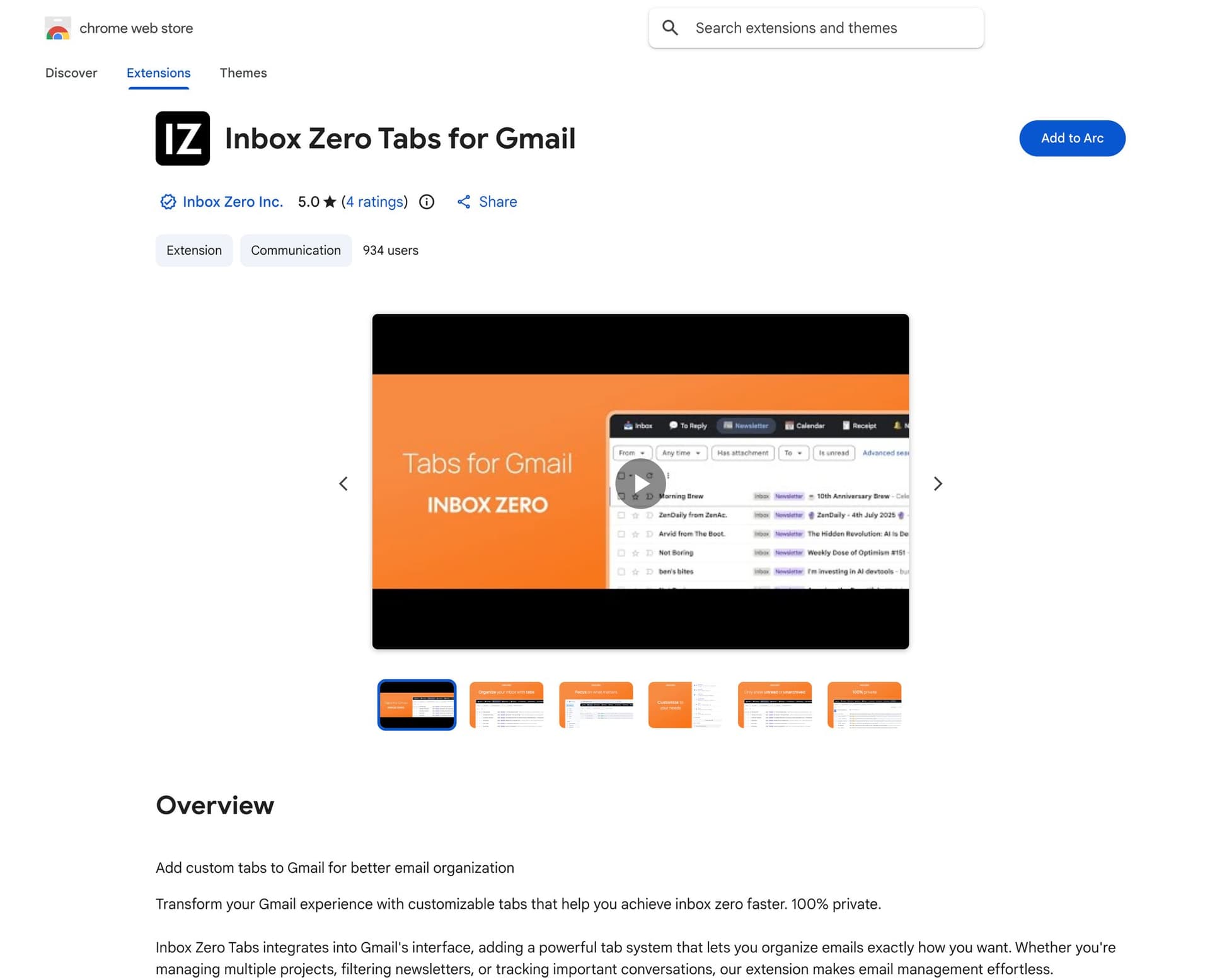
Because tabs can be limited to unarchived mail, you get a clean, focused view of what's still open. You can then choose which tab you open at which time of day. For example, 10-10:30 a.m. every day for the To Reply tab, and 3-3:30 p.m. a few times a week for Newsletters to skim or archive.
This batching habit is a first-principles way to control your side of the timing equation instead of being jerked around by alerts.
Email Timing Myths You Should Stop Believing
Myth 1: There's One Perfect Time to Send Emails
Even within the same provider's dataset, the "best time" often shifts by industry, region, and audience. Research finds strong Tuesday performance on average but shows plenty of variation under the surface. Use the global patterns as starting points, then trust your own numbers.
Myth 2: Never Send Emails on Weekends
For B2B SaaS and enterprise buyers, weekends are usually weaker. But for B2C ecommerce and some creators, weekend mornings and Sunday nights can be among the best converting windows. Industry benchmarks note Sunday evenings outperforming weekdays in some retail campaigns. If you never test weekends with a consumer audience, you're leaving signal on the table.
Myth 3: Email Timing Fixes Bad Content
No timing will rescue an unclear ask, bloated copy, a weak subject line, or poor targeting. Cold email stats show that most consumers simply ignore or delete cold emails, regardless of timing. Roughly half report they usually don't engage at all. Treat timing as an amplifier, not a substitute for relevance.
Before testing send times, use our free subject line checker to catch a weak or unclear subject.
Myth 4: Late Night Emails Are Always Rude
There's a real cultural shift happening. Microsoft data shows evening and weekend work is increasingly common, with many workers doing quiet catch-up outside core hours. At the same time, laws and norms around the "right to disconnect" are stronger in some countries.
If you know someone prefers strict boundaries, schedule sends inside their workday. If you know they treat evenings as focused time, a scheduled 8 p.m. email can be fine as long as it's intentional. When uncertain, err on the side of respecting rest, and use scheduling tools so that your own late-night work doesn't become someone else's anxiety.
Why Everyone Sends Emails at the Same Time
As more systems offer "send time optimization," the popular windows get crowded. Research explicitly notes that sending at odd minutes past the hour can help avoid deliverability and congestion spikes.
A simple tactic: instead of 9:00 a.m., try 9:07 or 9:23. Instead of exactly 4:00 p.m., try 3:52. It won't change the world, but it avoids being in the thickest clumps of automated traffic.
30-Day Plan: How to Improve Email Response Rates
Here's a compact plan you can actually follow.
Week 1: Measure Your Current Email Performance
Turn on or review Email Analytics and your marketing platform analytics. Answer these questions: When do I send most of my important emails now? When do replies actually come in? Which times correlate with slow responses? And enable Inbox Zero's AI automation so anything that needs a reply is clearly labeled.
Week 2: Create Your Email Timing Hypotheses
For each major use case (one-to-one sales, internal team communication, customer updates, newsletter), write one simple hypothesis. For example: "Sending my investor updates on Tuesday 9:30 a.m. will get faster replies than Friday afternoon" or "Sending cold outreach on Monday 7-9 a.m. will beat Wednesday 2-4 p.m." Don't overcomplicate it.
Week 3: Test Different Email Send Times
On one campaign or email batch, split the list and send at two different times. Track reply rate, click rate, conversion, and unsubscribes.
On the one-to-one side, at least consciously vary your send times and note where replies felt faster or more thoughtful.
Week 4: Set Your Optimal Email Schedule
Update your "default" send times based on what you saw. Use schedule send in Gmail or Outlook, or set up rules with delayed actions if you're automating sequences. Maintain at least two daily reply blocks where you clear To Reply and check Awaiting Reply. And keep a simple habit of glancing at analytics monthly to see if behavior shifts.
You won't find a magic timestamp, but you'll end up with a small set of proven windows per audience, a tighter follow-up loop so even "off-time" sends don't die, and less cognitive load from guessing.
What's the Best Time to Send Emails? Final Answer
If you remember nothing else, take this:
Timing is about showing up at the right moment in someone's mental workflow, not hitting a universal sweet spot.
For most business audiences in 2026, midweek mornings and early afternoons in the recipient's timezone are your safest starting bets. For cold outreach, early week, early morning tends to win, but you're still fighting low single-digit reply rates. For consumers, evenings and weekends are absolutely worth testing.
Your own data, plus a disciplined follow-up system like Inbox Zero's AI automation and proper Email Analytics, will beat generic benchmarks over time.
Use this guide as your starting map. Then let your own inbox, your own recipients, and your own analytics tell you where the real "best time" is for you.
Ready to take control of your email timing and never miss an important reply? Start with Inbox Zero to get AI-powered email analytics, reply tracking, and inbox automation that works with your schedule, not against it.
Relay.app Is Shutting Down: Deadlines, Data Export, and Alternatives
Relay.app is shutting down in 2026. See the deadlines for free and paid users, what to export, and which alternatives fit your email and automation workflows.
2026-07-16T18:46:02Z

Best AI Email Assistants in 2026 (Tested)
The best AI email assistants in 2026, tested and compared. Honest pros, cons, and pricing for Inbox Zero, Superhuman, Fyxer, Shortwave, Lindy, Missive, SaneBox, Serif, Perplexity, Gemini in Gmail, and Microsoft Copilot, with picks by use case.
2026-07-05T08:00:00Z

Top 16 Email Management Software of 2026
Discover the top 16 email management software of 2025 designed to boost productivity and simplify your inbox.
2026-06-24T09:00:00Z
7 Best Fyxer Alternatives in 2026
The best Fyxer.ai alternatives in 2026, compared. AI email assistants, team inboxes, and inbox cleaners, with honest notes on price, features, and who each one is for.
2026-06-01T08:00:00.000Z