GDPR Email Deletion Rules for Companies (2026)
Build a GDPR-compliant email deletion program that works. Covers retention policies, right-to-erasure workflows, and automated enforcement systems.

If you're handling emails containing EU residents' personal data, your organization is sitting on a GDPR compliance liability. Every email with a name, address, or conversation about someone is personal data under GDPR's strict rules, and "we keep everything forever" isn't a strategy anymore. It's a violation waiting to happen.
So what brought you here? You need to stop email hoarding before it becomes a compliance crisis, build a retention policy that actually holds up to regulators, or figure out how to handle right-to-erasure requests without breaking your systems. Maybe you're trying to set up deletion across Google Workspace or Microsoft 365 without accidentally destroying legal holds.
This guide walks you through the practical mechanics. It's not legal advice, but it is the operational blueprint you need to run a real email deletion program that works with actual systems.
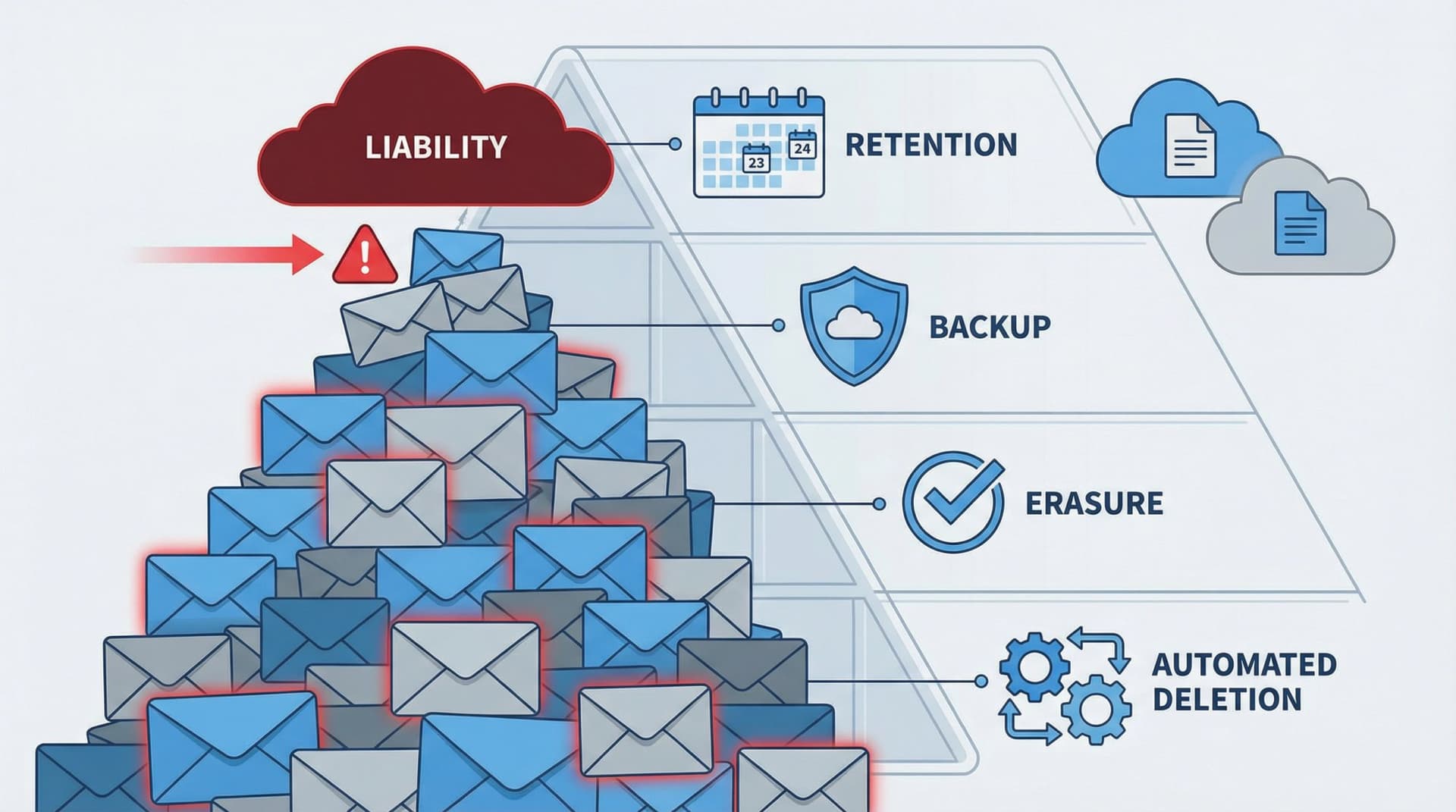
Why GDPR Email Retention Rules Aren't Simple
GDPR's storage limitation principle says personal data must be kept no longer than necessary for the purpose you collected it for. Notice what's missing: a universal retention period for emails.
The requirement is a system, not a number. You need to define what kinds of emails you have, why you keep each category, how long you keep it, and what happens after that retention period. Then you have to set it up technically (including backups and vendor systems) and prove you actually do it with logs and controls. This is fundamentally different from picking an arbitrary timeframe and deleting everything.
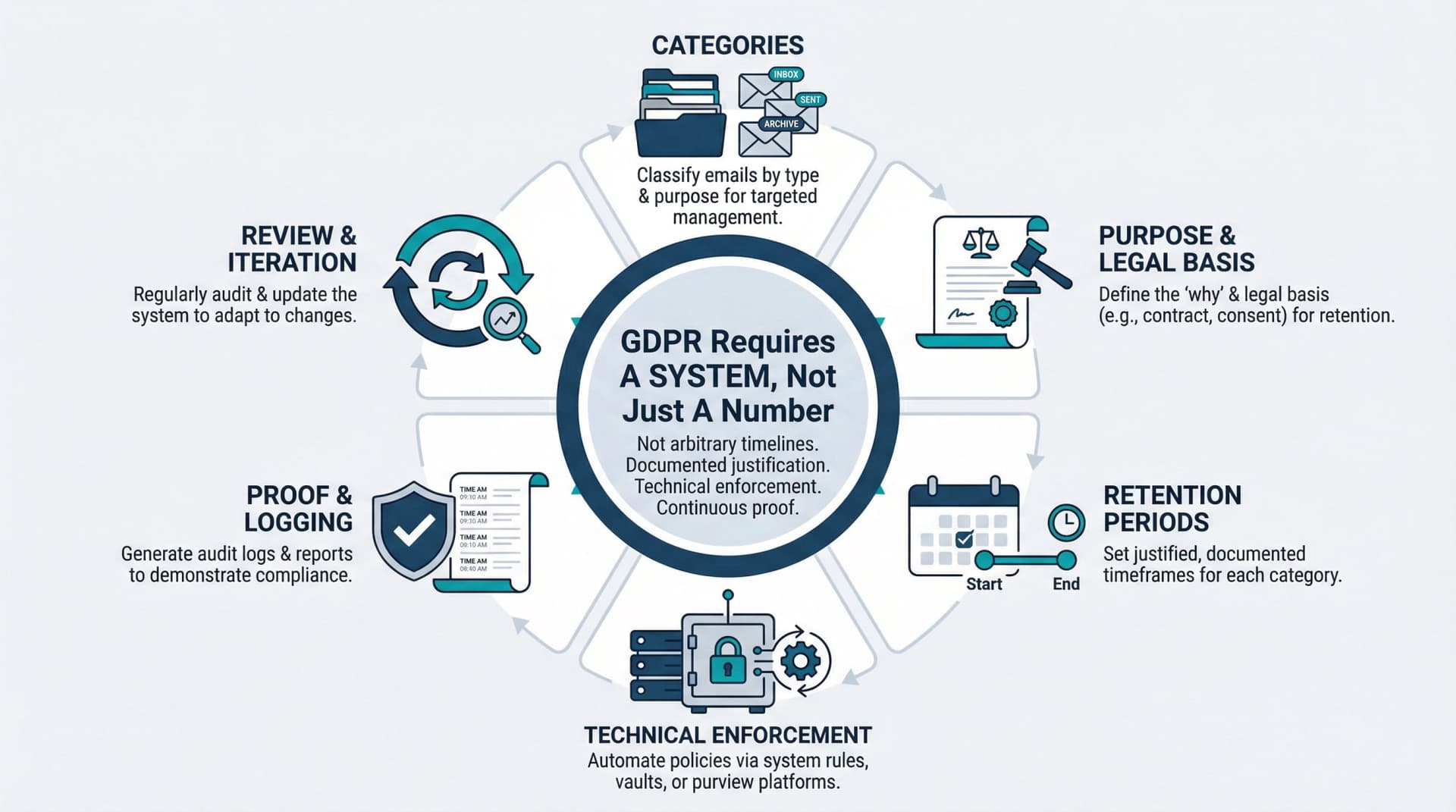
What Are the Core GDPR Rules for Email Deletion?
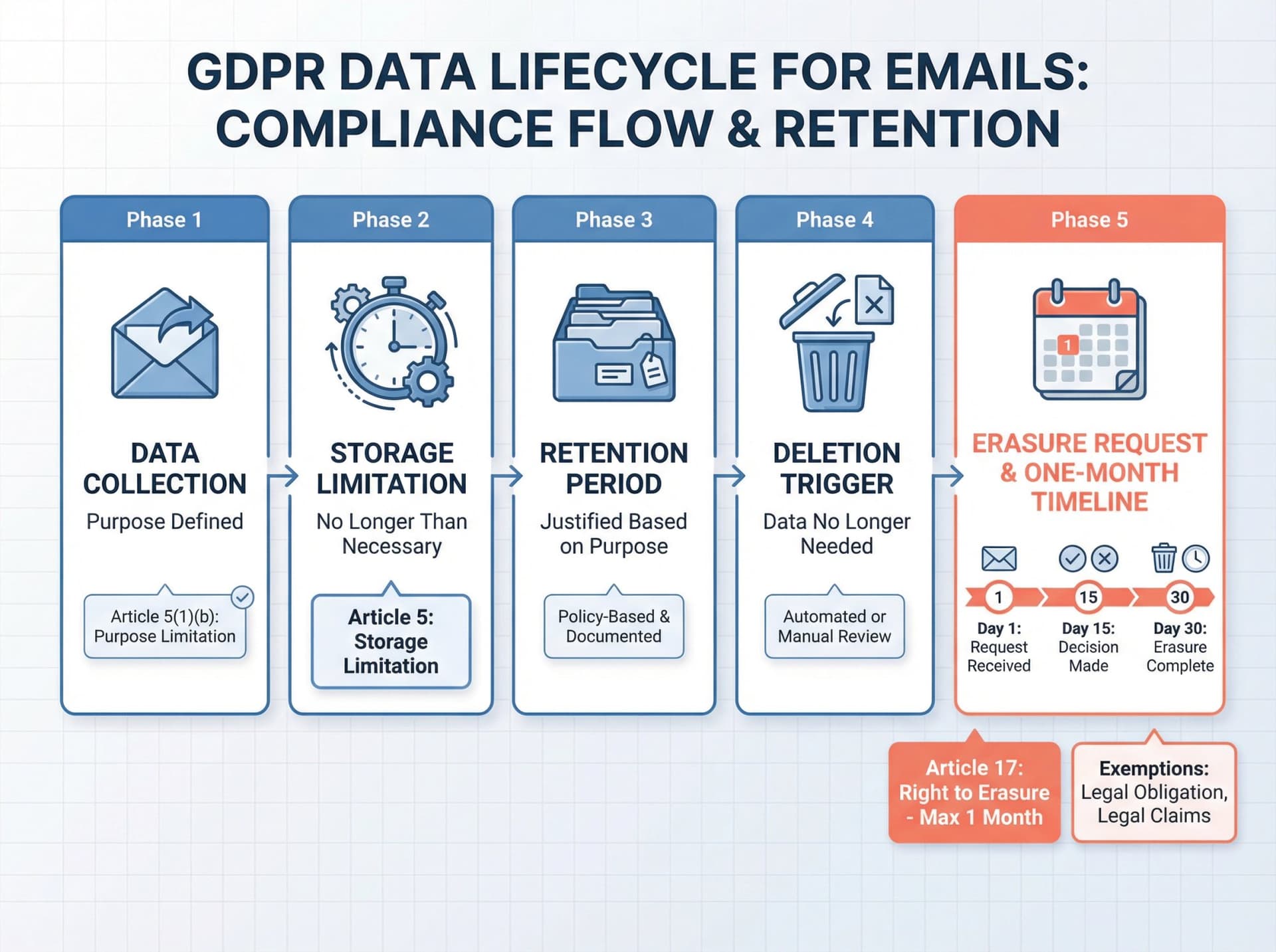
How Long Can You Keep Personal Data? (Article 5)
Personal data must be kept no longer than is necessary for the purposes for which it was collected. In plain terms, you can't keep emails containing personal data forever just because you might need them someday. You need a justified purpose to retain them.
When Must You Delete Personal Data? (Article 17)
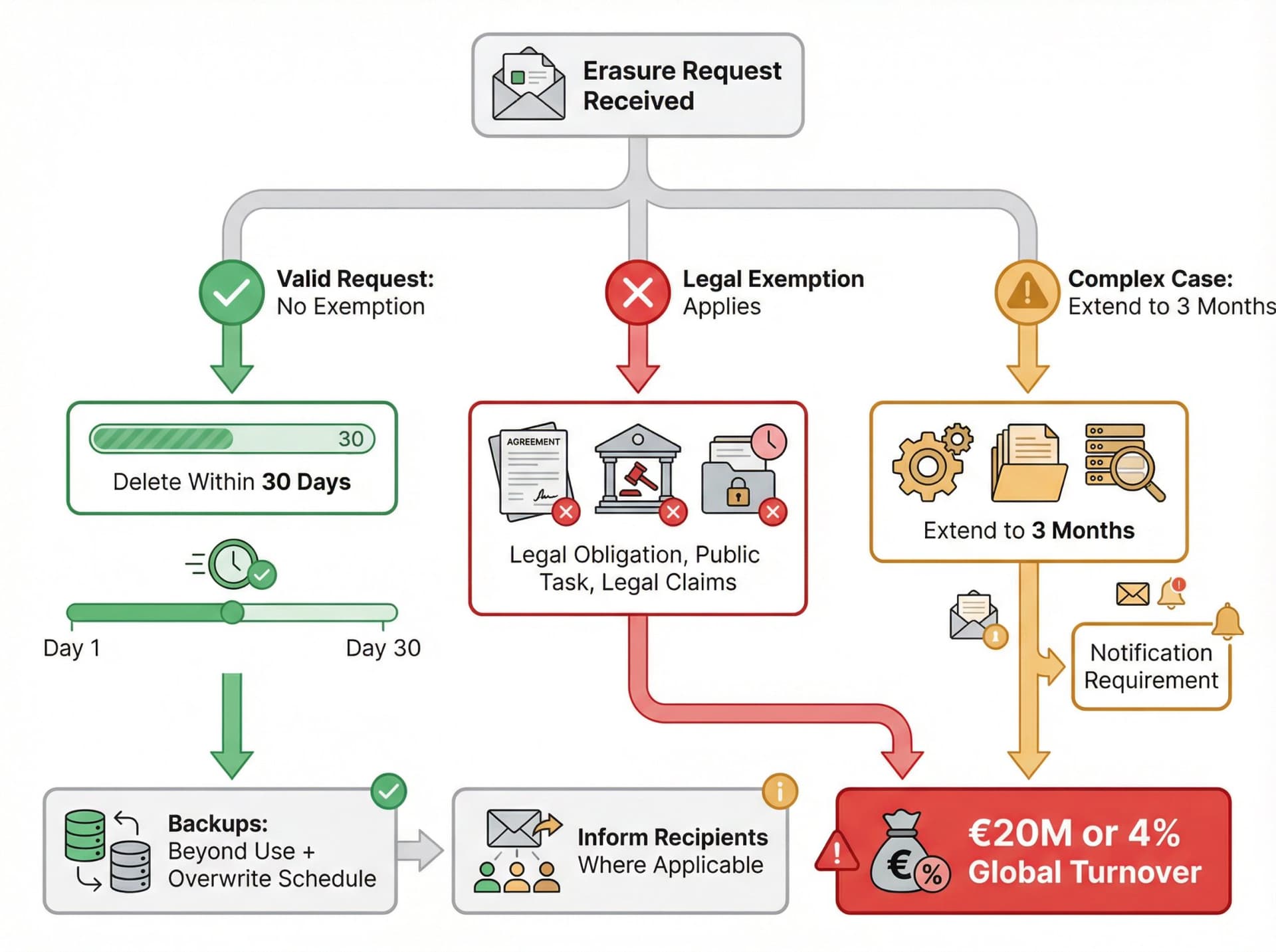
Individuals can request deletion of their personal data without undue delay. In practice, regulators interpret this as roughly one month for most cases. If someone asks your company to delete their data (which could include emails about or sent by them), you generally have one month to comply, unless an exception applies.
What this means for email: if an email contains personal data you no longer need, GDPR says it should be erased. If an individual exercises their right to be forgotten, you must search your email systems and delete any personal data about that person, unless you have a legal exemption.
What Counts as Deleting an Email Under GDPR?
This is where teams mess up. In email, "delete" can mean at least four different things:
| Deletion Type | What It Means | GDPR Compliant? |
|---|---|---|
| User delete | Moves to trash or deleted items folder | No - still exists |
| Hard delete | Purged from mailbox UI and recoverable folders | Closer, but check backups |
| Retention delete | System policy automatically removes after set time | Yes, if backups handled |
| Backup reality | Data still exists in backups until overwritten | Acceptable if "beyond use" |
Regulators acknowledge that deletion in electronic systems isn't always instant or perfectly clean. The key concept they use is putting the data "beyond use" and being honest about what that means in your system.
Archiving offline is still processing under GDPR. You only do it if you can justify it with a lawful basis.
Why Keeping Emails Forever Violates GDPR
Many organizations habitually archive or stockpile emails indefinitely, but under GDPR this "keep everything" mindset can lead to violations. The UK's Information Commissioner's Office explicitly warns that storing emails longer than necessary, without a deletion plan, breaches the storage limitation principle.
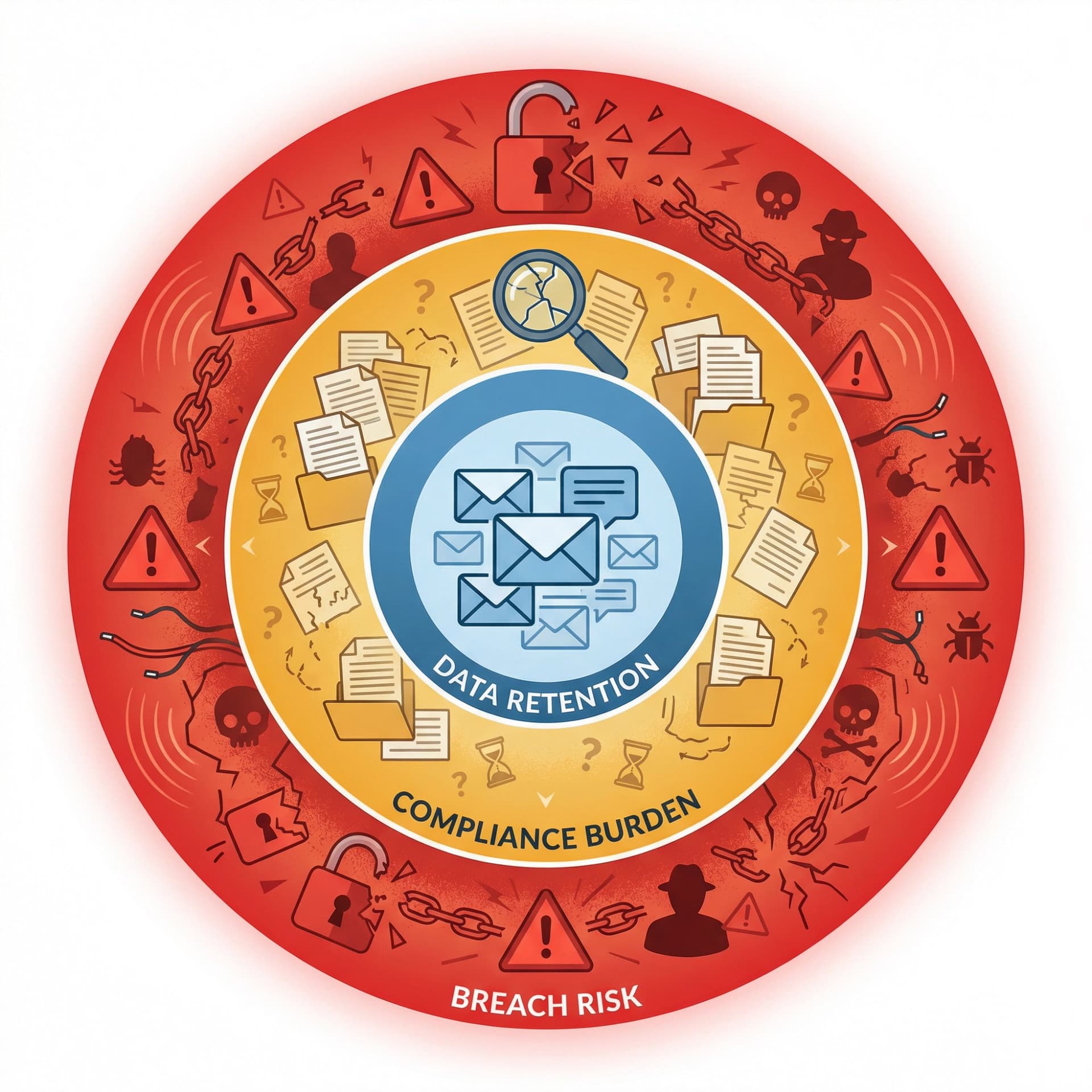
What Are the Risks of Keeping Emails Too Long?
The more personal data you keep, the greater your exposure in the event of a breach. Every old email containing customer data or employee personal info is a potential liability. GDPR regulators have issued fines partly for over-retention because keeping personal data longer than needed increases security risks. France's CNIL, for instance, fined companies for retaining customer data twice as long as necessary without justification. In one case, a company kept former customer data for six years with no good reason when three years would've been sufficient.
A massive email stash also makes compliance significantly harder. If someone asks "Give me all data you have about me" or "Delete everything about me," can you search years of email and respond within a month? Without a deletion regimen, complying with Data Subject Access Requests or erasure requests becomes overwhelming.
At Inbox Zero, we've seen how unmanageable inboxes create real operational problems. Our AI email assistant helps organizations set up automated rules for email management, but even with automation, you need a solid retention foundation first.
Old emails often contain sensitive information like credentials, personal details, and contract discussions. Limiting how long emails live in mailboxes reduces breach impact. If an email account gets hacked, five years of archives pose a bigger threat than five weeks of recent messages. Less data stored equals less data exposed if something goes wrong.
Companies must proactively delete or archive emails containing personal data once they're no longer needed. "We never got around to deleting it" won't work as a defense.
What Are the Legal Requirements for Email Deletion?
How Does Storage Limitation Apply to Email?
GDPR says personal data must be kept in identifiable form no longer than necessary for the purposes of processing. There's an exception for archiving, research, or statistics with safeguards, but standard business email doesn't qualify.
When Do You Need Legal Permission to Keep Emails?
Retention isn't free. You need a lawful basis for continued processing like contract, legal obligation, or legitimate interests. If the email is no longer needed for the purpose, you're likely out of lawful basis and should delete or anonymize.
When Can Someone Request Email Deletion?
People can request erasure in specific situations: when the data is no longer necessary, when consent has been withdrawn, when they object to marketing, or when processing was unlawful. But there are exemptions for legal obligation, public interest tasks, and legal claims.
How Long Do You Have to Delete Data?
You must respond without undue delay and within one month, with a possible extension (typically up to two more months) for complex cases if you tell the person within the first month.
What About Backups and Email Deletion?
The ICO explicitly addresses backups: if a valid erasure request applies, you have to take steps for backup systems too. If the data can't be immediately overwritten, you still need to put it beyond use and ensure it's only sitting there until overwritten on an established schedule.
What Happens When You Share Personal Data?
GDPR includes an obligation to communicate erasure to recipients where applicable, with practicality limits.
What Must Email Service Providers Do?
If a vendor processes email content on your behalf, they have obligations including assisting you in responding to data subject rights requests.
How Do You Prove GDPR Email Compliance?
Controllers and processors often must maintain records of processing activities (Article 30). Security measures must be appropriate to risk, including resilience and ability to restore availability (Article 32). The downside of failure is real: GDPR administrative fines can go up to 20 million euros or 4% of global annual turnover, whichever is higher.
What Are the UK GDPR Email Deletion Rules?
The ICO flags that some UK guidance is under review because the Data (Use and Access) Act came into law on 19 June 2025. Don't ignore that if you operate under UK GDPR.
The practical mechanics of deletion and retention still look very similar, but keep an eye on updated UK guidance if you're UK-based.
Where Does Email Personal Data Actually Live?
If you try to "delete an email" but only delete it in one mailbox folder, you didn't actually delete it in the GDPR sense. You need to map the full sprawl of where personal data from emails ends up.
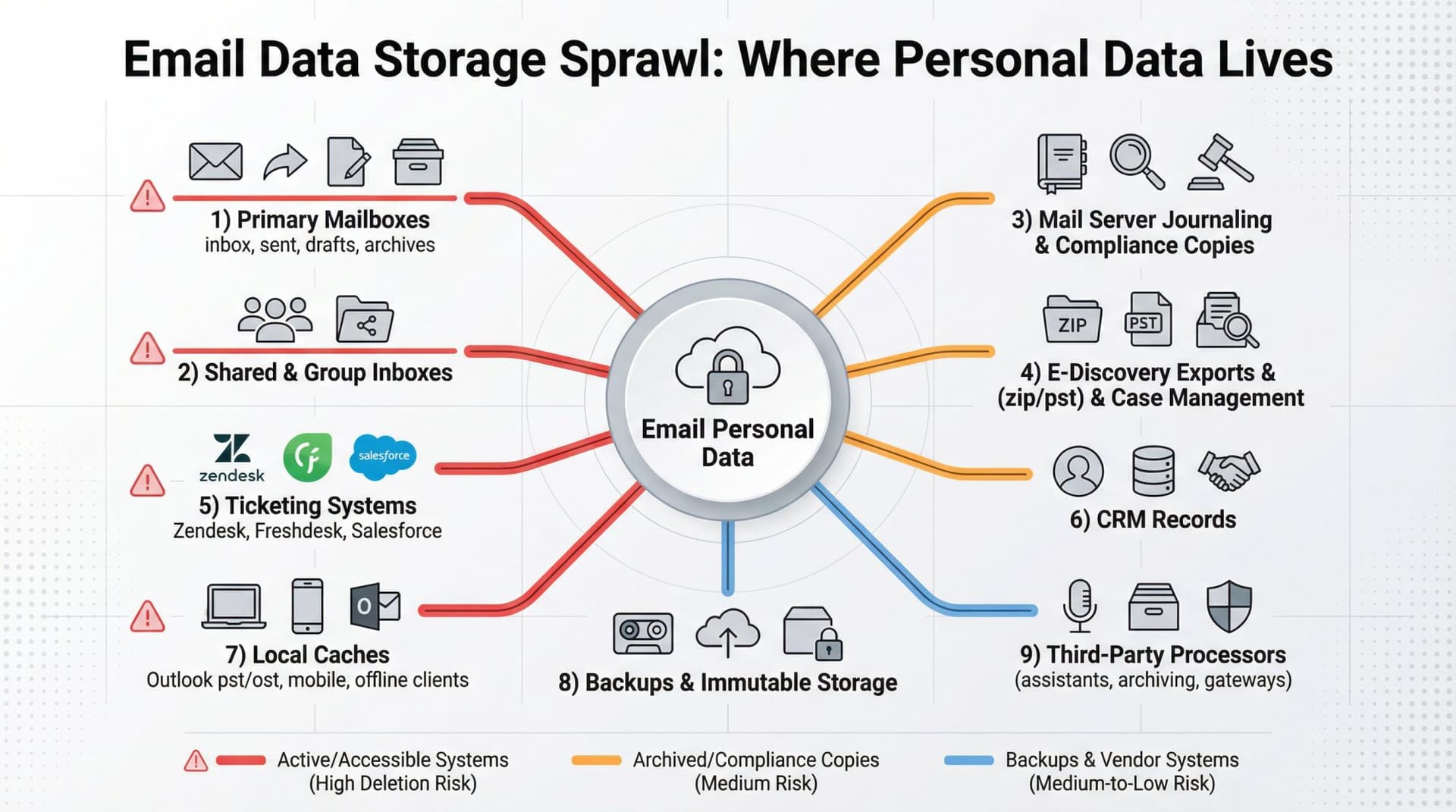
Email personal data typically lives in your inbox, sent folder, drafts, and archives, as well as shared mailboxes and group inboxes. It also shows up in mail server journaling or compliance copies, e-discovery exports (zip/pst files) and case management tools, and ticketing systems fed by email like Zendesk, Freshdesk, or Salesforce cases. CRM records created from emails, local caches (Outlook pst/ost files, mobile mail apps, and offline clients), backups and immutable storage, and third-party processors such as email assistants, archiving services, and security gateways all hold copies too.
Your deletion program is only as good as your worst hidden copy.
How to Build an Email Deletion Policy That Works
How Do You Categorize Emails for Retention?
Start simple. Most teams get 80% of the benefit from categorizing emails into buckets like customer support and incident threads, sales pipeline and customer communications, contracts and legal negotiations, finance records (invoices, receipts, tax documents), HR communications (recruiting, employee relations), internal operations (vendor quotes, scheduling), security and access requests, marketing subscriptions and outreach logs, and noise like newsletters, promotions, and cold outreach.
Why this matters: storage limitation is purpose-based. Categories make "purpose" real and operational.
What Legal Basis Do You Need for Each Email Type?
The following examples are not legal advice, but they reflect common patterns:
| Category | Purpose | Lawful Basis |
|---|---|---|
| Support | Deliver service, handle disputes | Contract + legitimate interests |
| Finance/tax | Recordkeeping | Legal obligation |
| Marketing lists | Customer engagement | Consent or legitimate interests |
For marketing, erasure and objection rights often apply strongly.
How Do You Trigger Email Deletion Automatically?
Your systems can measure common triggers automatically: date received, case closed, contract ended, last contact, employee left, or account closed. Pick triggers your systems can actually track. "Date received" is easy to automate. "Business relationship ended" might require manual review unless you have CRM integration.
How Long Should You Keep Different Email Types?
The ICO is explicit: you shouldn't keep data indefinitely "just in case," and you should be able to justify how long you keep it. The European Commission similarly says store for the shortest time possible, account for legal obligations, and establish time limits to erase or review.
When choosing retention periods, consider the operational need window (support escalation usually happens within weeks or months), any legal or regulatory requirements for tax, labor, or sector rules, your realistic legal-claims window based on jurisdiction and contract terms, and whether you can shorten retention by storing a smaller record like a ticket ID and resolution summary instead of the full thread.
| Question | What to Consider |
|---|---|
| What's the operational need window? | Support escalation usually happens within weeks or months |
| What's the legal or regulatory requirement? | Tax, labor, sector rules |
| What's your realistic legal-claims window? | Depends on jurisdiction and contract terms |
| Can you shorten by storing a smaller record? | Keep ticket ID and resolution summary, delete full thread |
What Should Happen to Emails After Retention Expires?
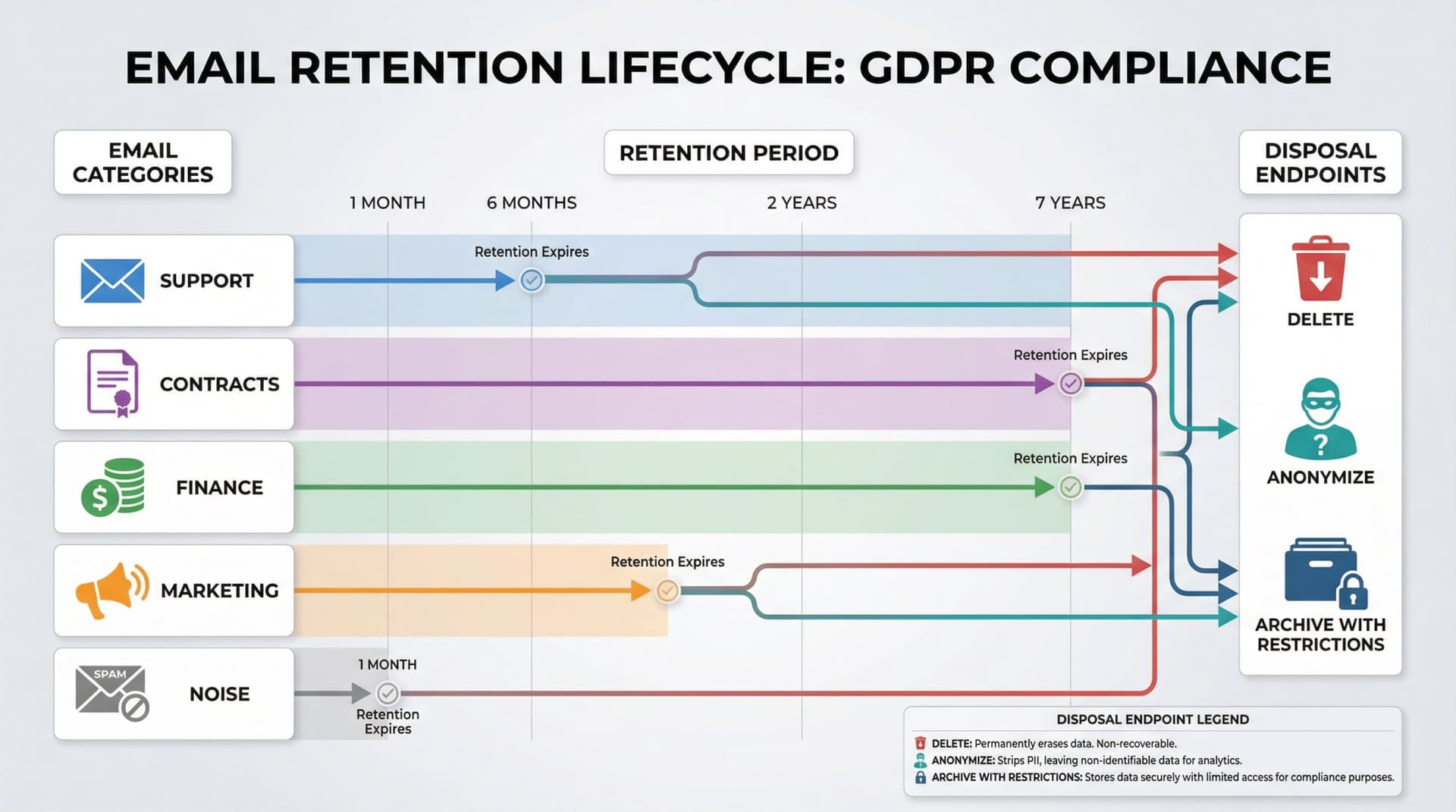
Once retention expires, you have three options. You can delete the emails outright, removing them from live systems and handling backups per schedule. You can anonymize them if you don't need identity information, so the data is no longer personal data under GDPR. Or you can restrict and archive with safeguards, but only if justified and with limited access, keeping in mind that this still counts as processing under GDPR.
How Do You Automate Email Deletion?
You want enforcement in the platform, not just policy documents.
In Google Workspace, Vault retention rules can automatically delete content after a period (depending on configuration), and holds can preserve deleted items. In Microsoft 365, Purview retention policies can "retain then delete" or delete after a period, with holds that prevent permanent deletion.
Automation prevents human oversight or procrastination from leading to GDPR violations.
How Do You Prove Your Email Deletion Works?
Your future self (or regulator) will want to know who approved retention periods, when it was last reviewed, what systems are in scope, and whether you can prove deletion actions ran. Article 30 records are often part of that accountability story.
How to Create an Email Retention Policy
Every organization should craft an email retention policy that aligns with GDPR's requirements. This policy defines how long you keep emails and when you dispose of them.
What Should Your Email Retention Policy Include?
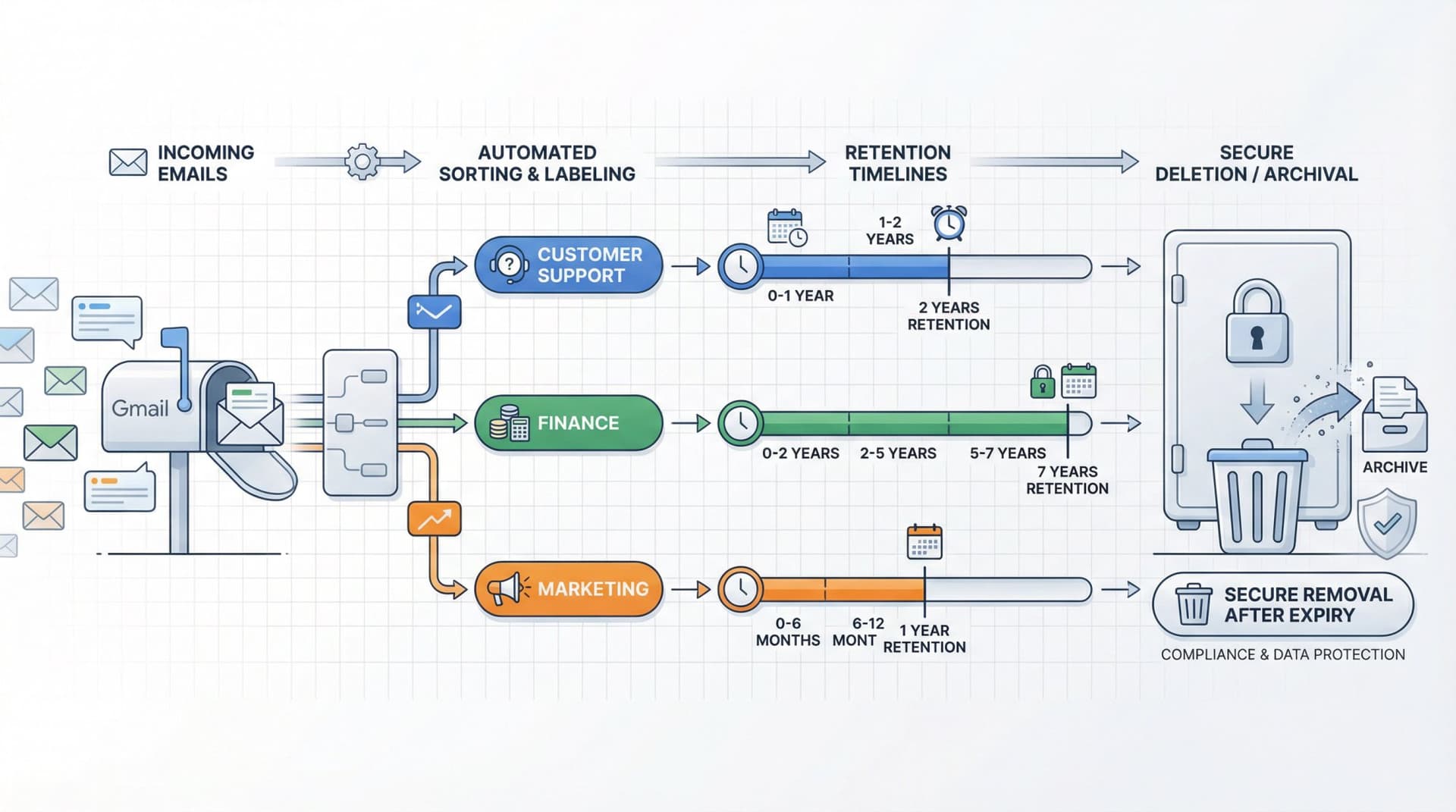
Start by mapping out categories of emails and setting maximum retention periods for each. For example, you might keep routine operational emails for one year, customer support emails for two years, and finance-related emails for seven years if required for audits. GDPR doesn't mandate specific timelines, but it does mandate that you justify whatever timeline you choose. Be able to answer: "Why are we keeping this email for X months or years?"
Your policy should also balance business needs against privacy. You might retain emails longer if needed for regulatory compliance or contractual obligations, but you'll delete or anonymize those that have outlived their purpose. Be ready to show regulators your rationale.
Certain laws or industries have their own email retention mandates, and GDPR allows exceptions to deletion when data must be kept to comply with other laws or for legal claims. A finance firm might need to keep certain communications for five to seven years under regulations, or an employer might retain specific emails for labor law purposes.
Companies often have retention rules for documents or databases but forget that emails contain personal data too. Make sure your records retention schedule explicitly covers emails and attachments.
Finally, train employees on the policy so they don't treat Outlook or Gmail as a permanent filing cabinet. Employee awareness is crucial because many GDPR email violations stem from unintentional habits rather than malice.
How to Automate Email Deletion for GDPR
Manually policing thousands of emails is impractical. Technology can enforce your deletion policies automatically.
How to Use Email Platform Retention Tools
If you use enterprise email services like Google Workspace or Microsoft 365, take advantage of their compliance settings.
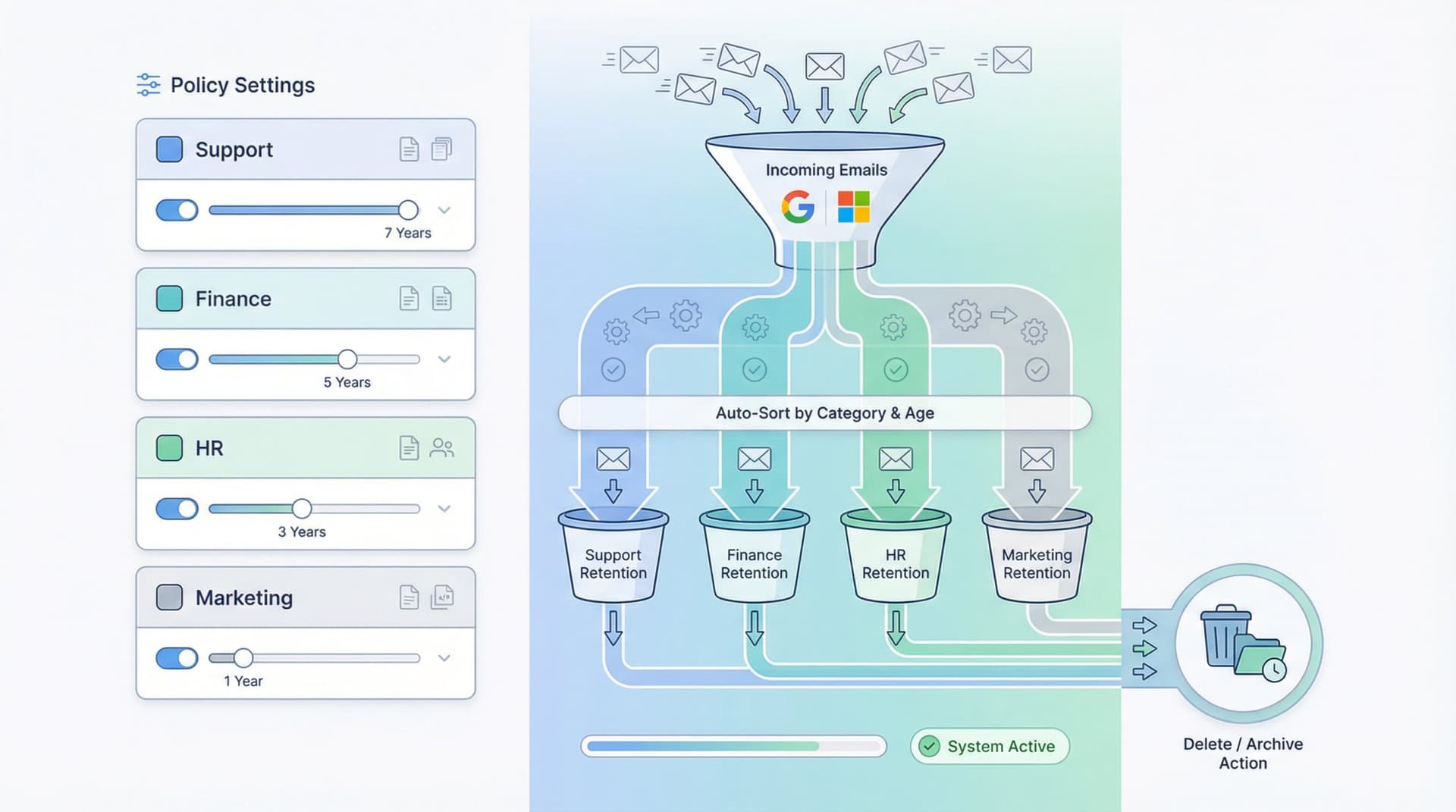
Google Workspace admins can set auto-deletion rules to purge or trash emails older than a specified number of days across all mailboxes. This is a native feature in the Admin Console's compliance settings, allowing retention periods from 30 days up to multi-year periods, after which emails are automatically deleted or moved to Trash.
Microsoft 365 offers retention policies via Compliance Center that can auto-delete emails after a set time. These tools ensure you technically can't quietly over-retain data because the system will purge it.
When Should You Archive Emails vs Delete Them?
In some industries, you might need to archive emails for e-discovery or compliance (like finance or healthcare). Use an archiving solution that supports retention rules and secure disposition of aged data. Modern cloud archiving platforms often let you set policies like "Archive all emails immediately, keep archives for three years, then automatically destroy or anonymize."
If you archive for business or legal needs, don't forget to purge the archives too once retention expires. GDPR violations can just as easily occur in an archive if data lingers past its justified lifespan.
How to Delete Emails at the Source
For many companies, a lot of inbox clutter comes from newsletters, promotions, and system notifications you never need to keep. Set up rules or use email management tools to automatically delete certain types of incoming mail.
At Inbox Zero, our bulk email unsubscriber lets you quickly identify and unsubscribe from newsletters and marketing emails you don't read. Our AI email assistant can also auto-archive or auto-delete categories of emails based on rules you define, preventing unnecessary personal data from ever accumulating. The goal is to stop the pile-up at its source.
How Often Should You Audit Email Deletion?
Schedule periodic reviews, quarterly or annually, where IT or data compliance teams audit email folders for older data that should be deleted. Spot-check that automated rules are working and catch any stragglers.
Why Default Email Settings Violate GDPR
Most email services do not delete old emails by default. Gmail will keep emails forever, even ten or more years, unless the user or admin actively removes them. The only built-in auto-cleaning is trash and spam folders (emptied after 30 days). If you do nothing, you're likely violating GDPR's storage limitation because your emails from 2015, 2016, and 2017 are all still there.
How to Handle GDPR Email Deletion Requests
Here's a practical workflow that won't collapse under load.
How Do You Identify a Valid Deletion Request?
People don't need to cite "Article 17." The ICO notes requests can be verbal or written and don't need magic words.
What Information Do You Need from the Requester?
Confirm identity if needed (proportionate to the risk). Clarify scope: which relationship, which email addresses, which timeframe, which systems.
When Must You Delete Email Data?
Common situations where erasure applies include cases where the data is no longer necessary, consent has been withdrawn, the individual objects to direct marketing, or the processing was unlawful.
When Can You Refuse to Delete Emails?
Erasure doesn't apply if processing is necessary for legal obligation, public interest tasks, legal claims, or freedom of expression or information.
How Do You Delete Emails from All Systems?
Deletion isn't limited to the mailbox. You need to delete from mailbox folders and archives, shared mailboxes or group inboxes, downstream systems that ingested the email (such as CRM, ticketing, and case management platforms), and vendor systems (processors) that hold copies. Processors are expected to assist with rights requests, so your vendor should have a process for this.
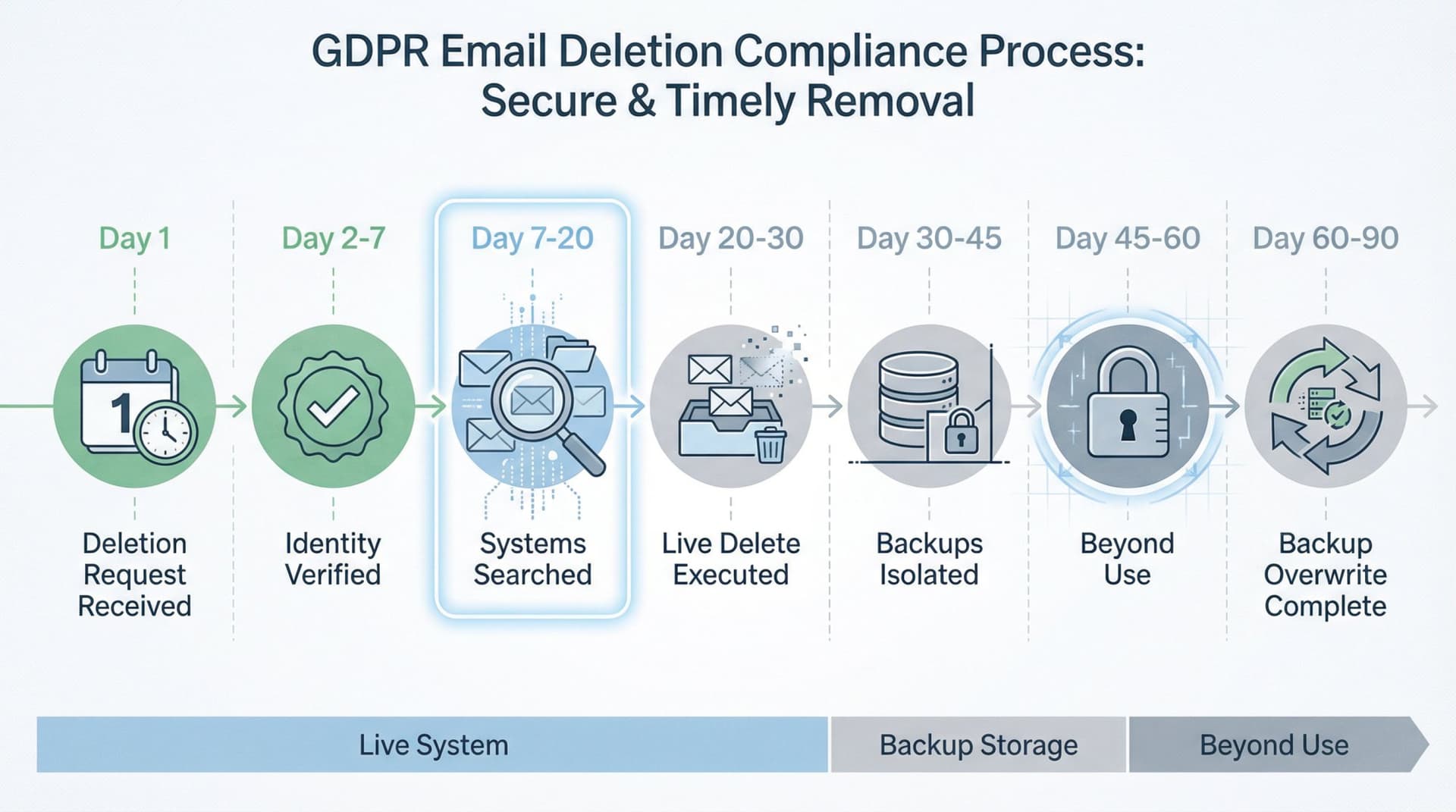
What About Backups When Deleting Email?
ICO guidance: You may delete instantly in live systems but backups may persist until overwritten. The key is putting data beyond use and having a defined schedule. Also be clear with the individual about what happens.
Who Else Needs to Know About Deleted Emails?
If you disclosed the data, you may need to inform recipients unless impossible or disproportionate.
How Long Do You Have to Delete Emails?
GDPR requires one month. You can extend for complex requests with notice to the requester. The ICO reinforces the one-month timeline and operational checklist thinking.
What Records Should You Keep of Deletions?
| Field | What to Record |
|---|---|
| Request date | When the clock started |
| Decision + reasoning | Why you complied or didn't |
| Systems searched | Where you looked |
| Deletion actions taken | What you deleted |
| Backup treatment | How you handled backups |
| Response sent | When you replied |
| Recipients notified | Who else was told |
This turns "we think we complied" into "we can prove we complied."
How to Delete Personal Data from Email Systems
When an individual invokes their GDPR right to erasure, companies need a game plan. Emails are often one of the trickiest sources to purge.
How Do You Find All Emails Containing Personal Data?
Identify which mailboxes might hold the person's data. This could include the individual's own email account (if they're an ex-employee or user of your email service) and any inboxes that received emails from or about them. Use search tools to find the person's name, email address, or other identifiers in emails.
Should You Delete or Anonymize Personal Data in Emails?
For any emails identified, you can permanently delete them by removing them entirely from the mailbox and ensuring they're also removed from any archives or backups. Alternatively, if an email must be kept for business reasons, you can anonymize or redact the personal data. In cases where you can't delete an email due to an exemption, you can isolate it in a secure archive with restricted access.
What About Email Attachments and Metadata?
Attached files like resumes, contracts, or photos might contain personal data too. If those were part of email conversations about the person, they need deletion as well.
Who Else Has the Email Data You're Deleting?
GDPR's Article 19 requires that when you erase data in response to a request, you should inform any third parties (processors or others) who might also have that data, so they can erase it too.
How Do You Handle Marketing Email Deletion Requests?
A special case arises in email marketing. If a subscriber asks to be forgotten, you'll delete them from your mailing lists and CRM. But you might retain their email address in a hashed "do not contact" list to ensure you don't accidentally re-add them in the future. This is a recognized exception by the ICO.
How Quickly Must You Delete Emails?
Aim to complete email-related deletions within the standard one-month window. If it's a large-scale request that might take longer, GDPR allows an extension to three months if necessary, but you must inform the requester within the first month and explain why. Always send a confirmation once done, outlining what was deleted and if anything was retained (with justification).
What Does "Beyond Use" Mean for Email Backups?
Two useful and very operational principles from ICO guidance: there's a big difference between permanently deleting data and merely taking it offline. Offline storage is still processing and must be justified. If it's appropriate to delete from a live system, you should also delete from backup, recognizing technical limits and ensuring data is beyond use if not immediately overwritten.
What Makes Email Backups "Beyond Use"?
For backups to qualify as "beyond use," several conditions need to be met. The backups should not be searchable for normal operations, and access should be restricted to restore-only scenarios. Restores should have a process to re-delete data that was erased (or to avoid restoring it where possible), and backups should have a documented overwrite or expiry schedule. You should be able to explain all of this in plain language to the requester.
How Do You Remove Email from Backups?
When complying with a deletion request, GDPR and EDPB guidance say you should remove the data from all systems "to the extent feasible," including archives and backups. You might not be able to surgically delete one person's emails from an old encrypted backup without restoring it. A common approach is to remove the data from all live systems and archives, and allow backups to age out.
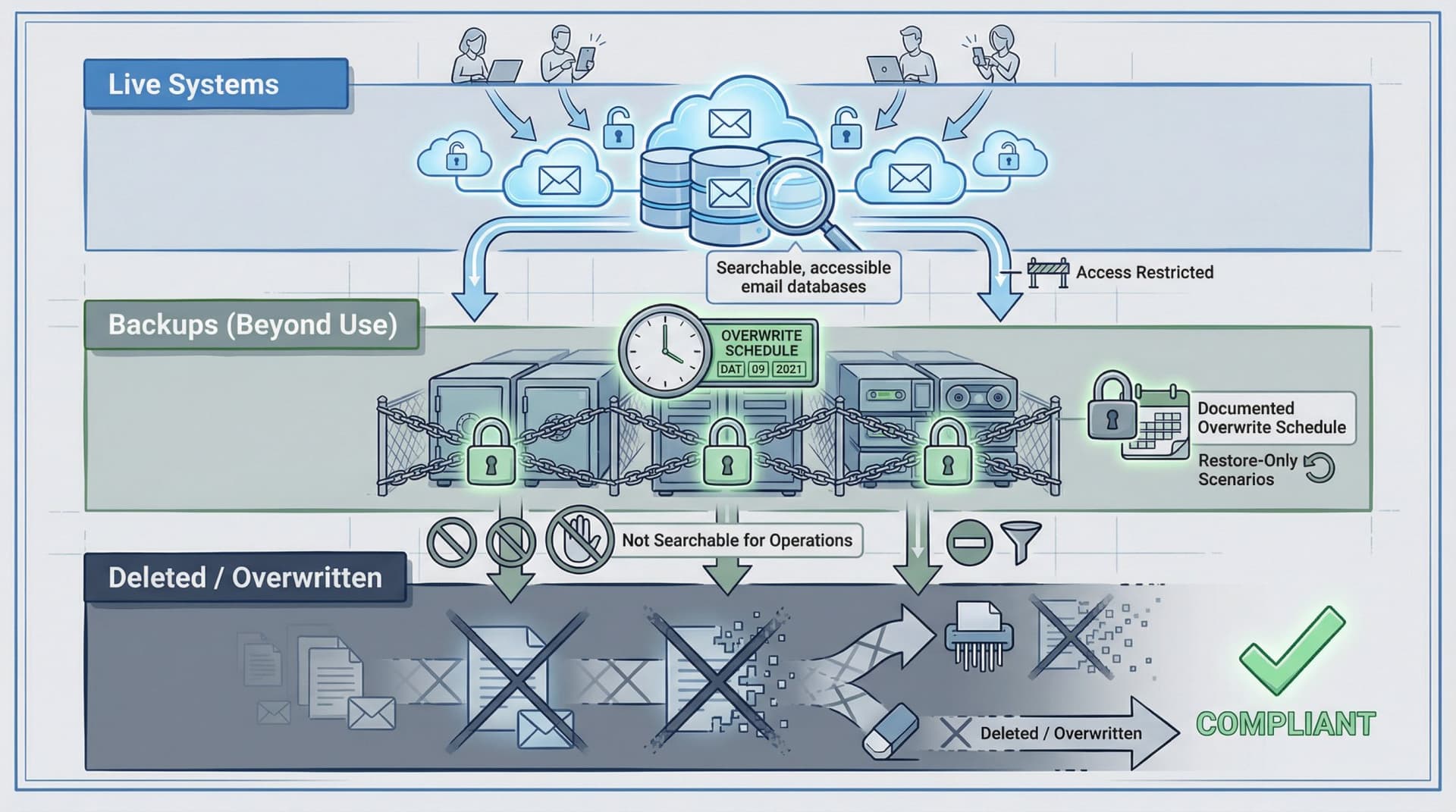
How Do You Prevent Deleted Email from Coming Back?
If personal data remains in backups, ensure it's not accessed or restored back into production. If a backup containing now-deleted emails must be used for disaster recovery, you should have procedures to re-delete that data after restoration.
What About Email Journals and Logs?
Many organizations have email journaling or security systems that copy or log all messages. When you delete emails, remember to expunge those records too if they contain personal data.
How Do You Handle Local Email Copies?
Consider whether users have locally stored emails (PST files, Outlook downloads, phone email caches). Company policy should forbid saving work emails outside controlled systems, but if it has happened, those need cleaning up as well when an erasure is required.
When Should You NOT Delete Emails?
You should have a "legal hold" switch: a process that stops deletion when needed for audit, litigation, or investigation.
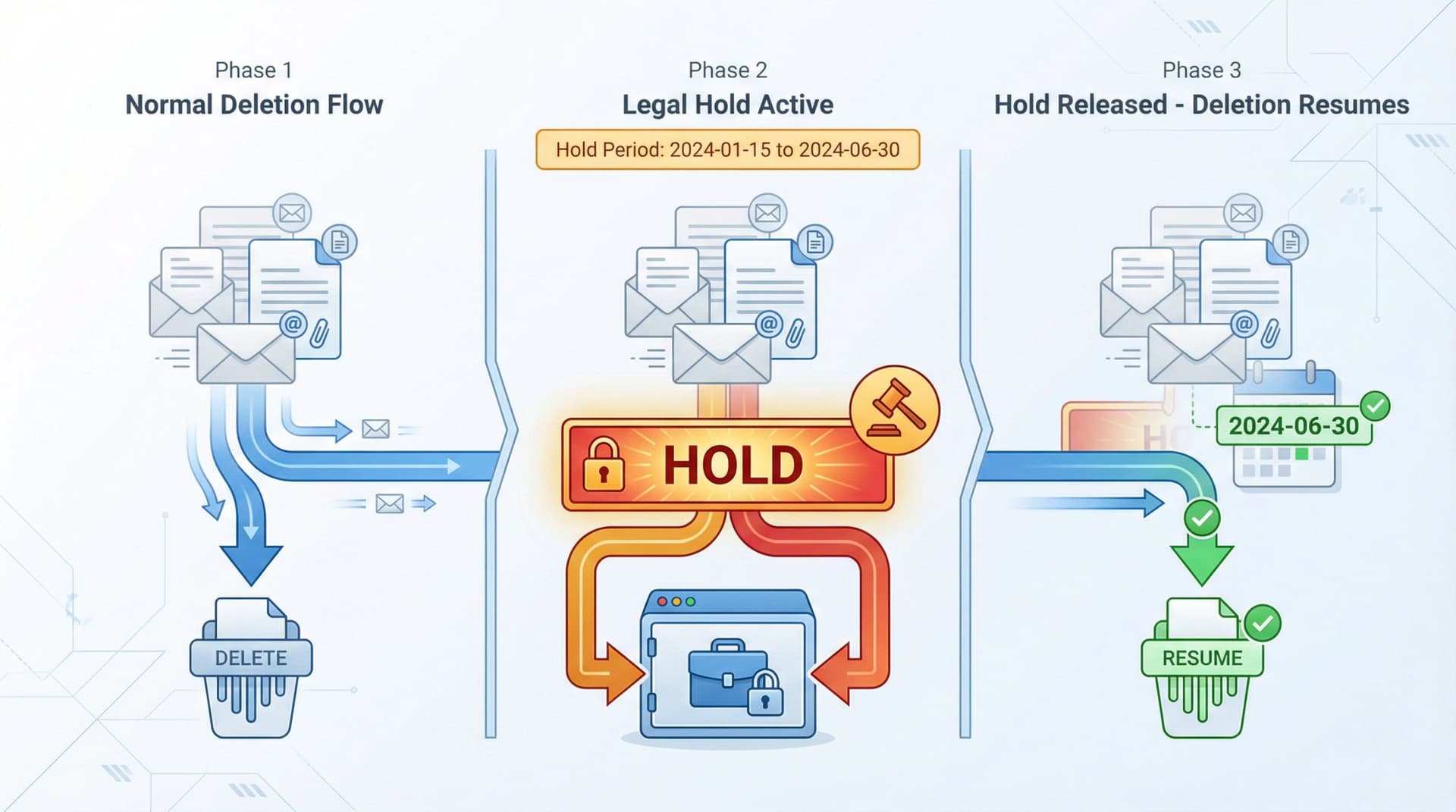
Even a UK government records policy calls out that processes must exist to ensure records pending audit, litigation, or investigation are not destroyed.
On Microsoft 365 specifically, litigation hold preserves mailbox content including deleted items, and retention or ediscovery settings can prevent permanent deletion.
Holds aren't "keep everything forever." They should be scoped and time-bound when possible, then released when the legal matter concludes.
How to Set Up Email Deletion in Google Workspace
Is Gmail Trash Deletion Enough for GDPR?
Gmail has its own deletion lifecycle. Users can recover messages from trash for up to 30 days, and after 30 days messages are permanently deleted from trash and can't be restored by users or admins (with some admin recovery options described separately). That's not a compliance policy. It's just how trash works.
How Do You Control Email Retention in Google Workspace?
Google Vault documentation explains how retention works and that retention rules can delete items after a defined period (even if the user didn't delete them), with holds changing what gets retained.
How to Organize Gmail for GDPR Compliance
The best pattern in Gmail is to label what matters, then apply policies based on those labels or categories.
At Inbox Zero, our AI email assistant can automatically label emails based on rules you define. This makes it much easier to set up category-based retention policies. For example, you can set up rules to label all customer support emails, then apply a two-year retention policy to that label in Google Vault.
How to Set Up Email Deletion in Microsoft 365
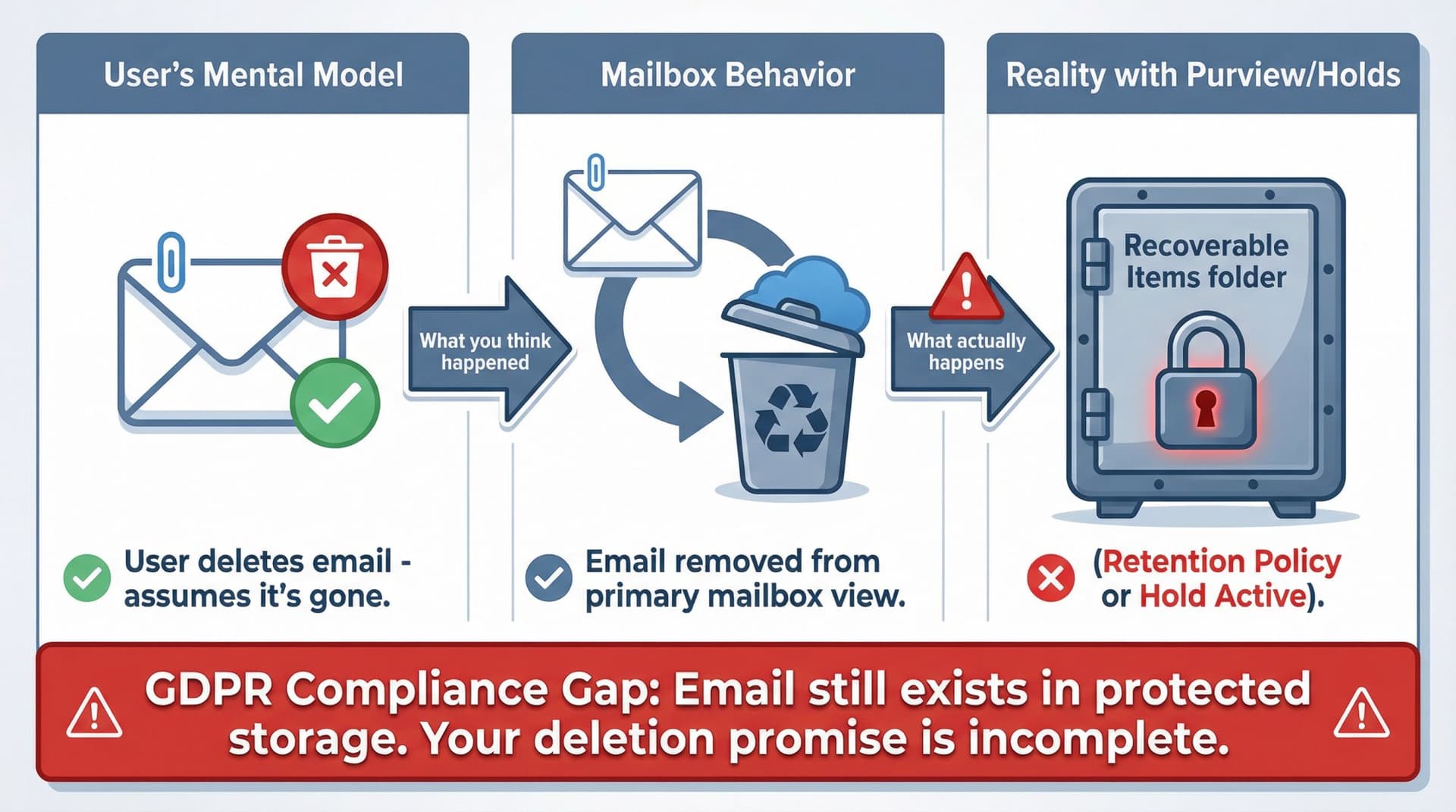
Microsoft 365 has powerful retention tooling, but the failure mode is common: "we deleted it" and it's still there because retention or hold settings preserved it.
What Are the Key Retention Tools in Microsoft 365?
Microsoft Purview retention policies can be configured to retain only, retain then delete after a period, or delete after a period. For Exchange, emails in the Recoverable Items folder will not be permanently deleted if they're subject to retention settings or an eDiscovery hold. Litigation hold preserves mailbox content, including deleted items, until the hold is removed (or for a specified duration).
The practical takeaway: your GDPR deletion process must include "check Purview retention and holds" as a required step, otherwise you'll promise deletion you didn't actually achieve.
What Email Deletion Mistakes Do Companies Make?
How to Handle "Delete Me" vs "Unsubscribe Me"
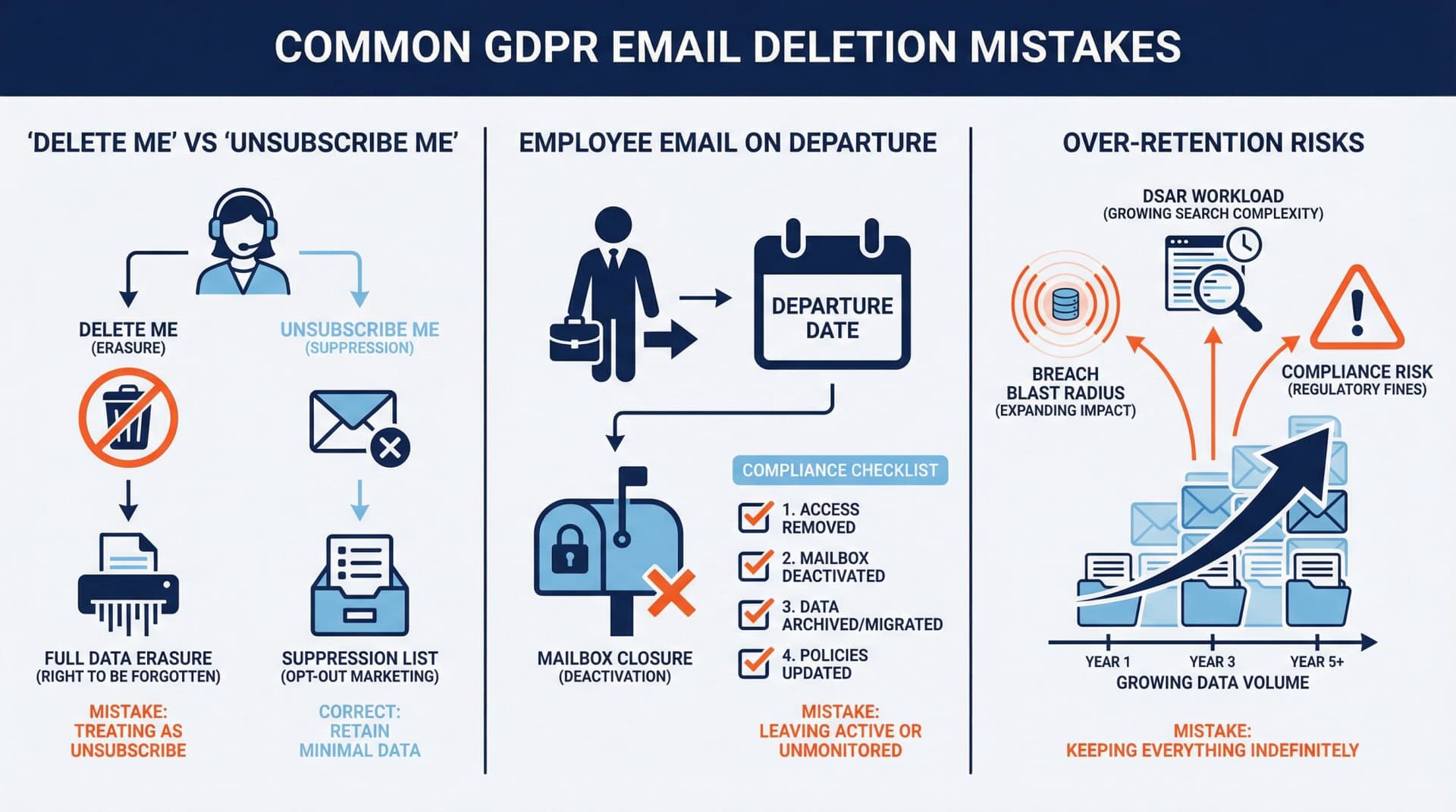
If someone objects to direct marketing, you often need to keep just enough info to ensure you don't contact them again (a suppression record). The ICO even gives an example: retain enough info about a former customer to stop future direct marketing. So you may delete marketing content, but keep a minimal "do-not-contact" flag.
What to Do With Employee Email When They Leave
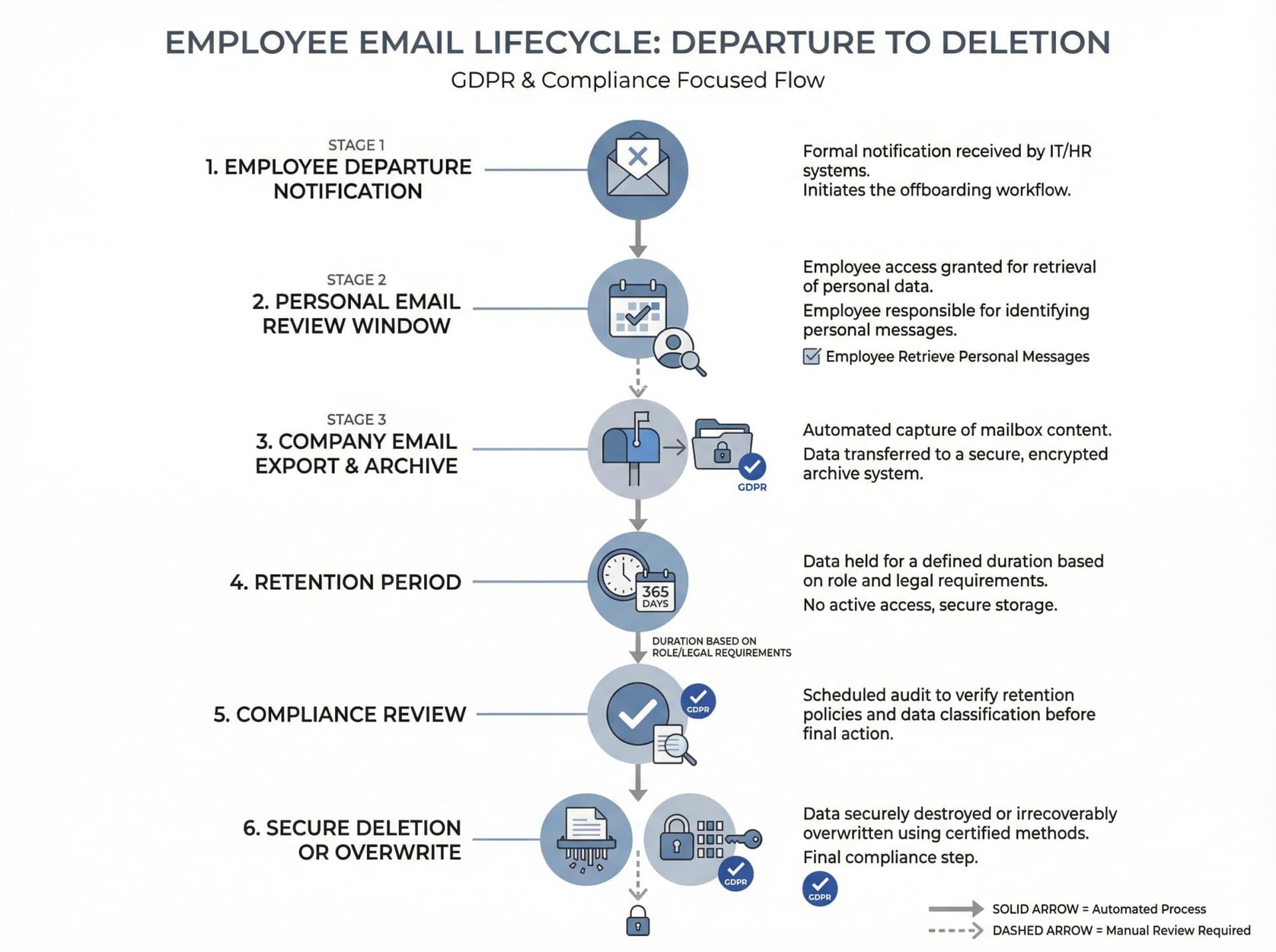
CNIL (France) gives practical guidance: employers should warn the employee of mailbox closure so they can sort or transfer personal messages. After the employee leaves, the employer must delete the employee's nominative email address. Even if you're not in France, the principle is solid: don't quietly keep ex-employee mailboxes alive forever.
Why "Keep Everything Forever" Fails GDPR
Over-retention increases breach blast radius (more data at risk), DSAR workload (you must search what you hold), and compliance risk because there is no lawful basis for "just in case" retention.
When Can You Refuse GDPR Email Deletion Requests?
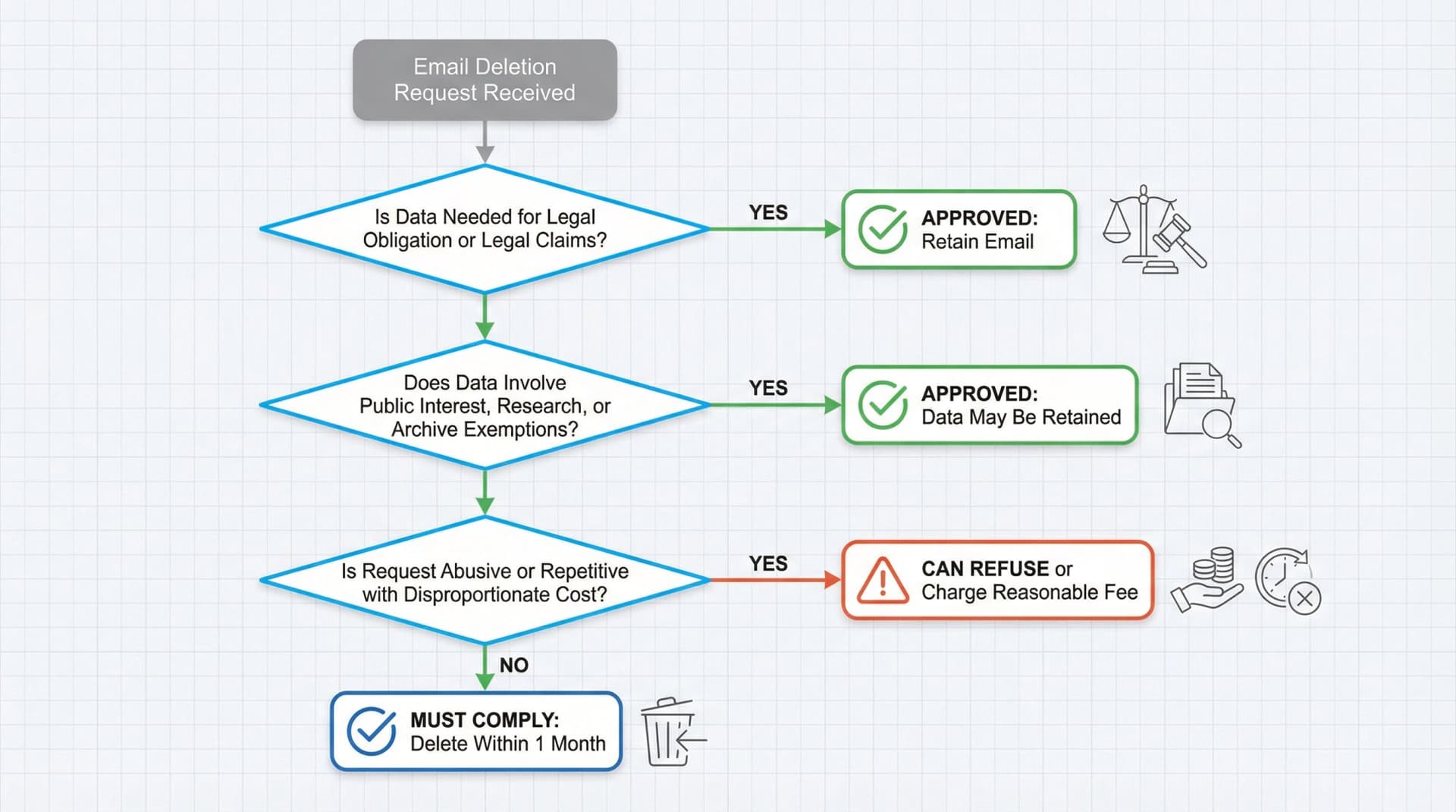
GDPR's deletion mandate is strong, but not absolute. Companies should know the main scenarios where you may decline or delay deletion.
Can You Keep Emails for Legal Reasons?
If an email must be retained to comply with another law or regulatory requirement, you can keep it despite a deletion request. Similarly, if the data is needed for establishing or defending against legal claims, you're allowed to retain it.
What About Public Interest or Research?
GDPR carves out that the right to erasure shouldn't infringe on freedom of expression or certain public interest archiving, scientific or statistical purposes.
How Do You Handle Abusive Deletion Requests?
If someone is clearly abusing their deletion rights (making repetitive, onerous requests), you can refuse or charge a reasonable fee. This is a high bar. Be cautious, as most requests won't meet it.
What About Employee Email When People Leave?
How Should You Handle Personal Emails at Work?
If personal use of work email is allowed or tolerated, those messages are personal data of the employee. Upon termination, best practice is to let the employee remove or forward personal communications and then ensure the account is closed and eventually deleted.
How Long Can You Keep Former Employee Emails?
Some emails a former employee sent or received need to be retained by the company. In these cases, export those needed emails to an archive or other mailbox before deleting the account.
What Should Your Policy Say About Employee Email?
Make it clear in your internal policies how long departed employees' emails are kept and for what purpose.
Can You Monitor or Access Employee Emails?
While not directly a deletion issue, note that if you plan to access or monitor employees' mail, privacy laws may require informing them and having a legal basis.
How to Master GDPR Email Compliance
How to Automate Email Compliance
Set up automated deletion for emails at the service level (Gmail, Outlook, etc.). This ensures compliance happens in the background. Automation prevents human oversight or procrastination from leading to GDPR violations.
How to Secure Emails You Must Keep
For emails you do retain long-term, encrypt them and limit who can access them. GDPR Article 32 emphasizes security of stored data. If you've segmented out emails that must be kept, put them in a secure archive with strict permissions.
How to Prove GDPR Email Compliance
Regulators may ask how you comply with GDPR. Being able to show "Here's our email retention policy, here's our deletion procedure, and our system automates cleanup" will go a long way.
How to Use Email Tools for GDPR Compliance
If you deploy AI email assistants or filters, configure them to support your compliance goals. Inbox Zero's AI assistant can help you set up rules to automatically label emails containing personal data that need special handling, or auto-delete categories of emails that have outlived their retention period.
How Often Should You Train Staff on Email Compliance?
Keep staff updated about data protection. Include email scenarios in your GDPR training. Simple mantra: if you don't need it, delete it.
How Often Should You Review Email Policies?
Laws and best practices evolve. Review your email deletion practices at least annually to ensure you're meeting the latest standards.
GDPR Email Retention Templates and Checklists
Email Retention Schedule Template
| Category | Purpose | Retention Trigger | Retention Period | End State | System Owner |
|---|---|---|---|---|---|
| Support threads | Deliver service + resolve disputes | Case closed | X months or years | Delete or anonymize | Support ops |
| Contracts | Enforce terms + legal claims | Contract end | X years | Restricted archive then delete | Legal |
| Finance or tax | Statutory recordkeeping | Fiscal year end | X years | Archive then delete | Finance |
| Recruiting | Hiring pipeline | Last candidate contact | X months | Delete or anonymize | HR |
| Marketing | Newsletters | Unsubscribe | Short | Delete content; keep suppression flag | Marketing |
Email Deletion Request Checklist
□ Logged request date (clock starts now)
□ Verified identity (if needed)
□ Clarified scope (addresses, systems, timeframe)
□ Assessed applicability (Article 17 conditions)
□ Checked exemptions (legal obligation, legal claims, etc.)
□ Executed deletion in live systems
□ Handled backups (beyond use + overwrite schedule)
□ Informed recipients if required
□ Responded within one month (or sent extension notice)
□ Recorded evidence (systems searched, actions taken)
How to Explain Backups in Your Policy
"When we erase personal data, we remove it from live systems promptly. The data may remain in encrypted backups until the backups are overwritten on our normal schedule. During that time, the data is put beyond use: it's not accessed for any operational purpose and is only retained to restore systems in the event of an incident."
Common GDPR Email Deletion Myths Debunked
Myth: GDPR Requires Deleting All Emails After 2 Years
GDPR says "no longer than necessary," and you must justify retention based on purpose and legal obligations. There's no universal two-year rule.
Myth: Archived Emails Aren't Subject to GDPR
Archiving is still processing under GDPR. You need a justification, and you should review and erase or anonymize when no longer needed.
Myth: Backups Don't Count for GDPR Compliance
You need a plan. Erase from live systems, put backup copies beyond use, and expire or overwrite on schedule.
Myth: Deleting from Inbox Means It's Gone
Not always. Retention settings and legal holds can preserve content (especially in Microsoft 365).
GDPR Email Compliance Checklist
If you can answer "yes" to these, you're in the right place:
□ We have an email retention schedule by category, with purpose and lawful basis
□ We have automated enforcement (Vault or Purview rules where relevant)
□ We can execute and prove deletions (logs + periodic review)
□ We have a DSAR or erasure workflow that includes shared mailboxes, downstream systems, and vendors
□ We have a backup policy that meets the "beyond use" standard
□ We have a legal hold process (and it's actually used)
□ We can respond within one month (or validly extend)

When Was This Guide Last Updated?
This guide is written for January 2026 operations.
Regulatory principles cited (GDPR articles) are stable, but regulator guidance can change over time. The ICO explicitly notes its right-to-erasure guidance is under review due to the Data (Use and Access) Act effective 19 June 2025.
Platform capabilities (Microsoft Purview, Google Vault) evolve. Always verify current features.
Your email retention program needs to be a living system, not a set-it-and-forget-it policy. Review annually, adjust based on regulatory updates, and continuously improve your technical controls.
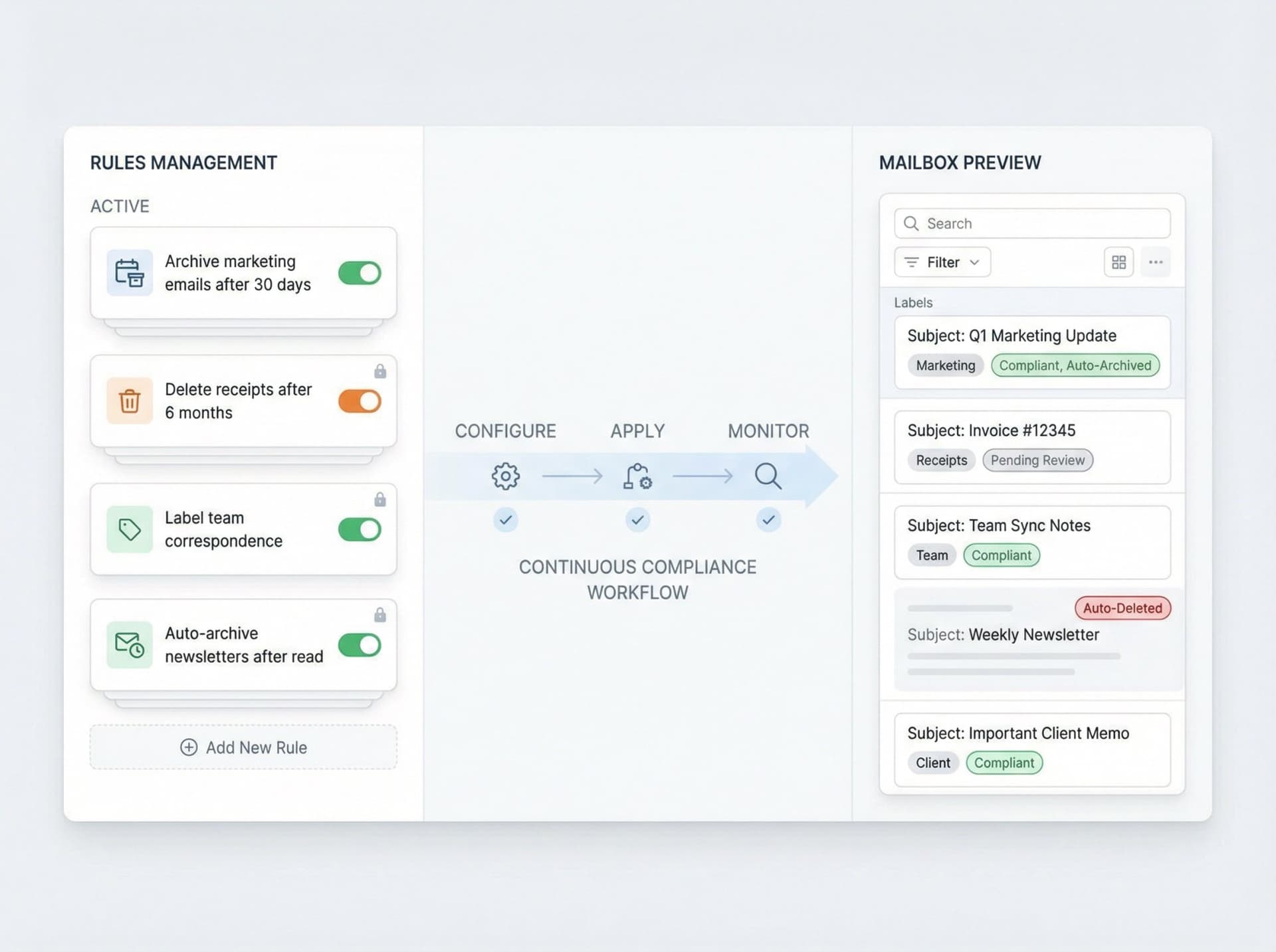
If you're looking to set up automated email management that supports your GDPR compliance efforts, Inbox Zero can help. Our AI email assistant lets you set up sophisticated rules for automatic labeling, archiving, and deletion based on the categories and retention policies you define. We handle the automation complexity while you maintain full control over what happens to your emails.
The goal isn't just compliance. It's building a sustainable email management system that reduces risk, improves security, and makes your team's life easier.

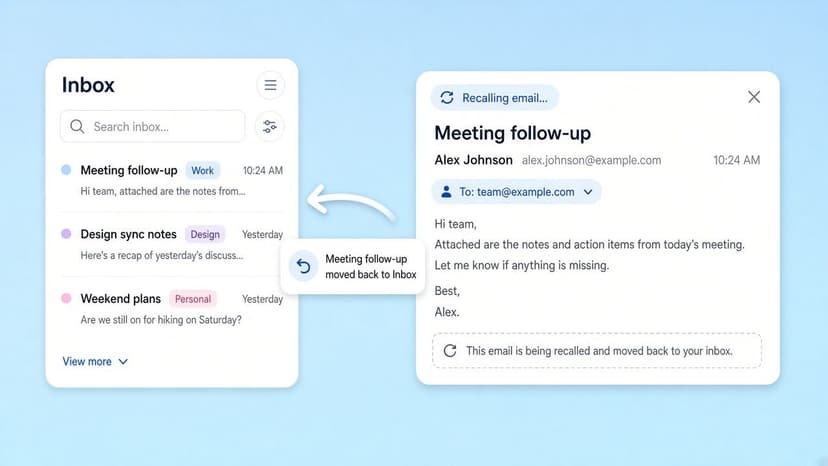
How to Recall an Email in Outlook (2026)
How to recall an email in Outlook step by step for new Outlook, classic Outlook, web, Mac, and mobile, plus when recall works and what to do when it doesn't.
2026-09-30T18:25:57.000Z
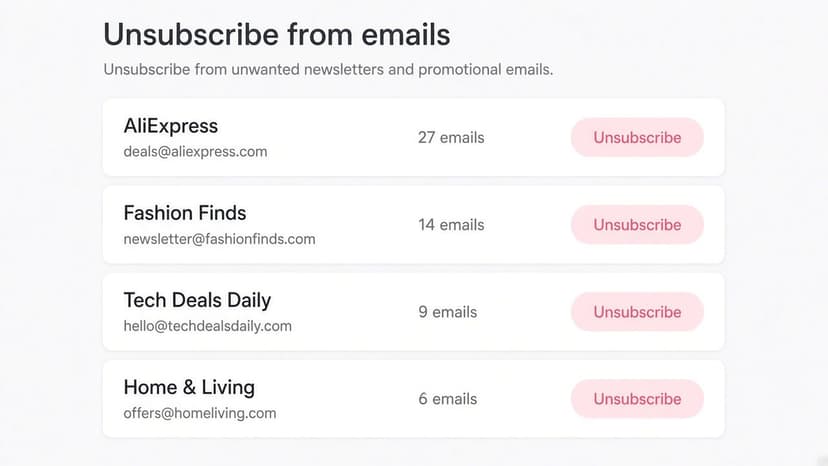
How to Stop AliExpress Emails (2026)
Stop AliExpress promotional emails: the unsubscribe link, notification settings in your AliExpress account, and what to do when the deals keep coming.
2026-09-30T18:25:57.000Z
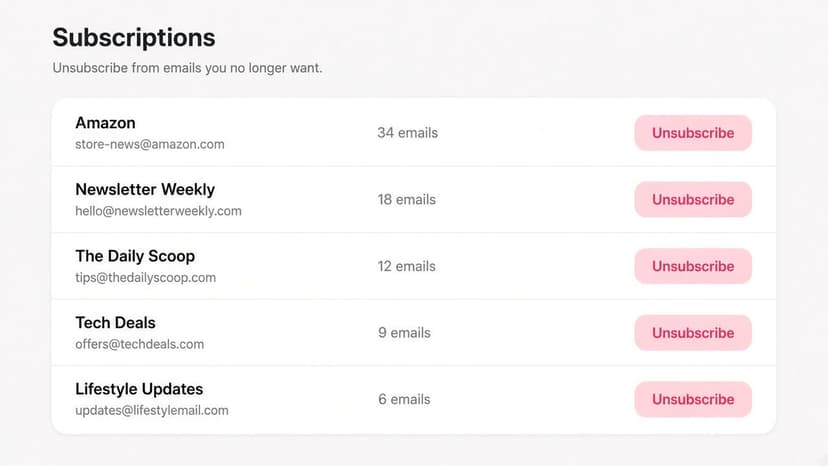
How to Stop Amazon Emails (2026)
Stop Amazon marketing emails with the Communication Preferences Center, manage Amazon email subscriptions, and handle order emails you can't switch off.
2026-09-30T18:25:57.000Z
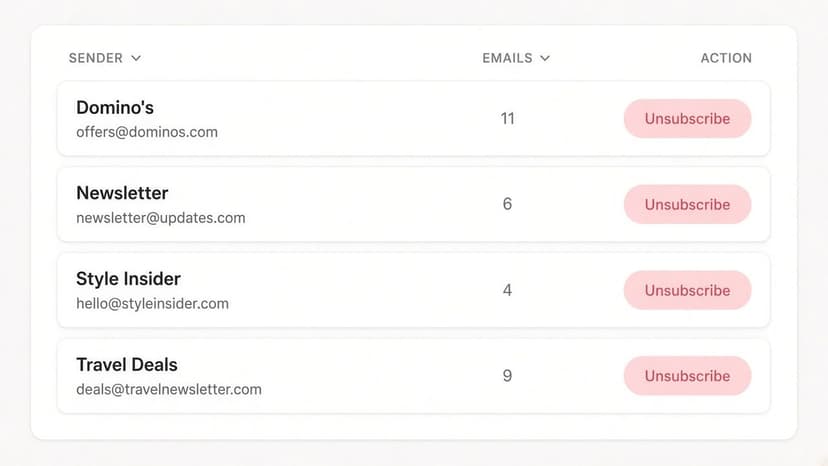
How to Stop Domino's Emails (2026)
Stop Domino's emails with Domino's official opt-out page, stop Domino's text offers, and know which rewards emails keep coming.
2026-09-30T18:25:57.000Z