Open Source Superhuman Alternative for Gmail & Outlook
Comparing Superhuman with Inbox Zero
A premium, keyboard-first email client for Gmail and Outlook with AI triage and drafting. After the Grammarly acquisition it ships inside the Superhuman suite, so Mail now comes bundled with Grammarly, Coda, and Go rather than sold on its own.
Inbox Zero and Superhuman both use AI to help you get through email faster. They part ways on a basic question: do you want a brand new email app, or do you want to keep the Gmail or Outlook you already use and add intelligence on top of it?
Superhuman is a separate client you move into. It is fast, it is polished, and it is built around the keyboard. Inbox Zero is not a client at all. It's an AI email assistant that connects to your existing inbox and adds AI drafting, automation rules, bulk cleanup, analytics, and more, without asking you to change where you read your mail.
An open source Superhuman alternative
Inbox Zero is open source. The full codebase is on GitHub, where more than 12,000 developers have starred it, so you can read exactly how your email is processed instead of taking a vendor's word for it. You can use the hosted version at getinboxzero.com or self-host it on your own infrastructure. Superhuman is closed source and only available as a hosted service.
It works with both Gmail (including Google Workspace) and Microsoft Outlook, the same two providers Superhuman supports.
Both are good at what they do. The right pick depends on what you value. If raw speed and a keyboard-driven workflow are the things you care about most, Superhuman is hard to beat. If you want automation, cleanup, analytics, and a lower price while keeping your current inbox, Inbox Zero does more for less, and it's one of the best AI email assistants on the market. Here is the feature by feature breakdown.
Pricing
Superhuman's pricing changed after Grammarly acquired it in 2025 and the parent company later rebranded to Superhuman. Mail is no longer sold as a simple standalone subscription. It now ships inside the Superhuman suite, alongside Grammarly, Coda, and the Superhuman Go assistant.
In practice there is a Starter plan around $30 per user per month and a Business plan around $40 per month, or roughly $33 per month if you pay annually. The Business tier is the one that bundles everything together. Inbox Zero starts at $20 per month.
| Plan | Monthly | Annual | Includes |
|---|---|---|---|
| Superhuman Starter | ~$30/mo | ~$25/mo | Mail, core AI features |
| Superhuman Business | ~$40/mo | ~$33/mo | Mail plus Grammarly, Coda, and Go |
| Inbox Zero | $20/mo | Full feature set |
Pricing here is directional, since the suite bundles several products and exact numbers shift with billing terms and team size. The shape is what matters: Superhuman sits at the premium end, you pay per seat, and the bundle pushes the price up rather than down. For a five person team the gap adds up quickly over a year.
For a closer look at the numbers, see our full Superhuman pricing breakdown. If you are also weighing Fyxer, we compare all three in Superhuman vs Fyxer.
The big difference: client vs layer
This is the decision underneath everything else, so it is worth being clear about.
Superhuman replaces your email app. You stop opening Gmail or the Outlook app and start living in Superhuman instead. That is the point. The whole experience is rebuilt for speed, and you give up your old client to get it.
Inbox Zero leaves your inbox where it is. You keep using Gmail or Outlook exactly as you do now, on every device, and Inbox Zero works in the background and through its own interface to sort, draft, automate, and clean up. Nobody on your team has to learn a new email app or change their habits.
Neither approach is wrong. Some people love moving into a faster, cleaner client. Others do not want to leave the inbox they already know, especially across a team. Know which camp you are in before you compare anything else.
Speed and keyboard workflow
Credit where it is due: this is Superhuman's home turf and it is excellent at it. The app is quick, the keyboard shortcuts cover almost every action, and power users can fly through a busy inbox without touching the mouse. If you have trained yourself to work by keyboard, it feels great.
Inbox Zero does not try to win on raw client speed, because it is not a client. It speeds you up a different way, by handling the email you would otherwise spend time on at all: sorting it, drafting the reply, archiving the noise, and reminding you about the threads that slipped. If your goal is fewer keystrokes, Superhuman wins. If your goal is fewer emails to deal with in the first place, that is Inbox Zero's angle.
Drafting replies
Both tools draft replies that sound like you, learning from your past email. Superhuman writes a complete draft in your style and can generate follow-ups without prompting. It is genuinely good.
Inbox Zero does the same and adds a knowledge base on top. You can tell the assistant exactly how to handle different situations, feed it your pricing, your policies, or other context, and connect more sources so the drafts get smarter over time. Most people will not need to go that deep. But if you want the assistant to know specifics about who it is writing to before it drafts, Inbox Zero supports that level of control.
Triage and categorization
Superhuman's Split Inbox separates your mail into tabs like Important, VIP, News, and Calendar, and its AI can auto archive marketing and cold pitches. It is a clean way to see what matters first.
Inbox Zero sorts incoming mail into categories too, and you can create your own, so a Travel label or a label for a specific client is something you set up yourself (Superhuman offers this through Custom Auto Labels). Where Inbox Zero goes further is actions: you can attach actions to a category, deciding what happens to an email once it lands, not just where it lands.
Custom rules and actions
This is where the two tools diverge most. Superhuman sorts and triages your mail. Inbox Zero lets you build rules that act on email automatically. A few examples of what people set up:
- When an email from an important client mentions "contract", mark it as priority and send a Slack notification
- Forward every receipt to your accountant automatically and label it as processed
- Archive newsletters after a week unless you have starred them
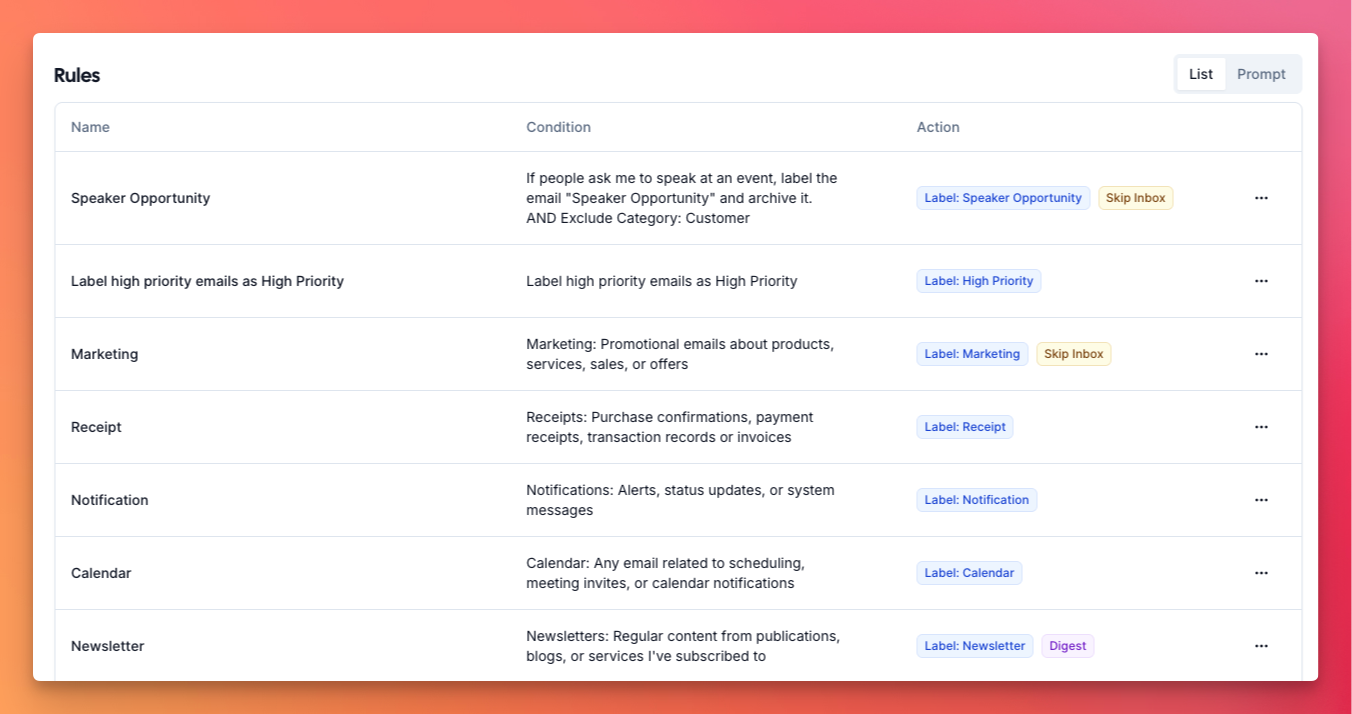
The built-in assistant can create these from plain English. Tell it "keep my inbox clean by archiving marketing emails older than a week" and it writes the rule for you. Superhuman has no equivalent. Its automation is the triage and auto archive it ships with, not rules you define.
Bulk unsubscribe and bulk archive
Both tools can unsubscribe, but they work differently, and the difference is real.
Superhuman has a one-click unsubscribe on a message, and it can unsubscribe from a whole domain, which is handy in the moment. What it does not have is a bulk view across all your senders.
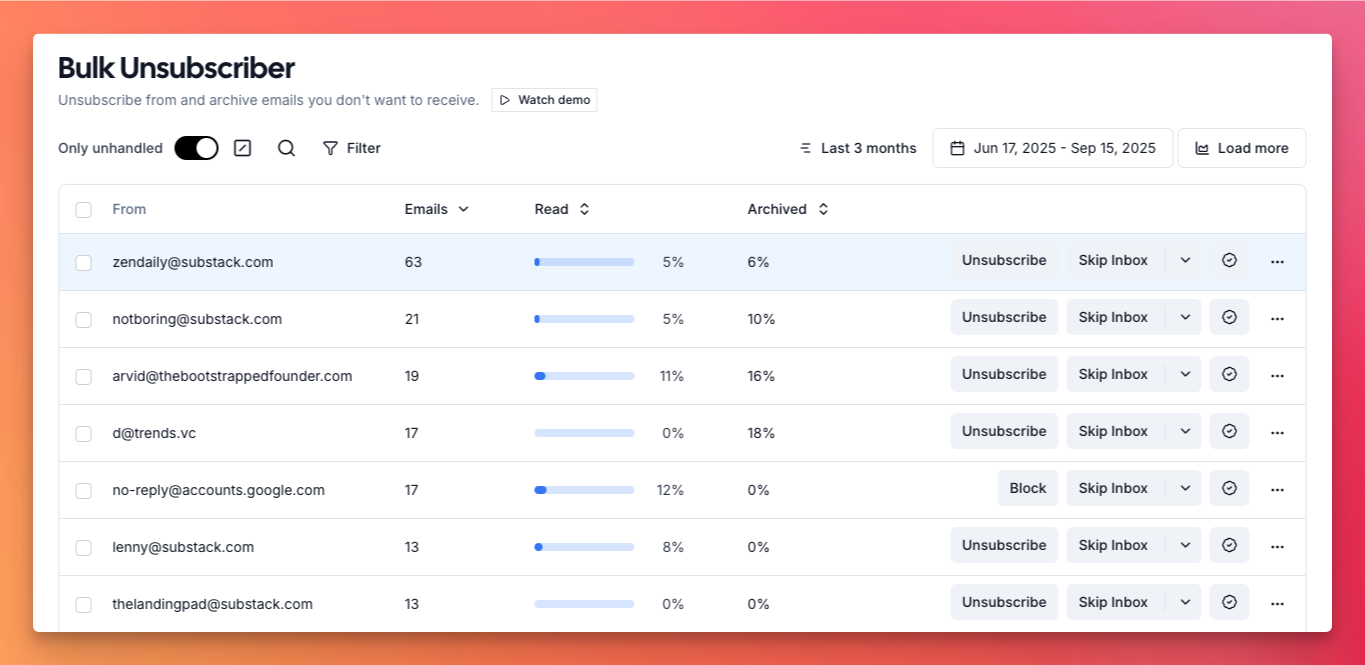
Inbox Zero's bulk unsubscribe shows you every sender you are subscribed to, along with how often they email and how much of it you actually open. That sender that sent 82 emails in three months and you opened 5% of the time is right there. Select it, unsubscribe, done, or clear a whole batch at once. Bulk archive does the same for clearing mail: archive every newsletter, or every marketing email, in one pass, even thousands at a time. If a flood of subscriptions is your main headache, this is the difference between handling them one at a time and clearing them in bulk with the data in front of you.
Analytics
Inbox Zero gives you a detailed view of your email: how many you are getting and sending, who emails you most, and how long you take to reply. The same analytics roll up to the organization level, so you can see which teammates are buried and where time is going across the team.
Superhuman is built around speed and triage rather than reporting, so it does not offer this kind of personal and org level analytics.
Follow-ups
Both products handle follow-ups. Superhuman can return an email to your inbox if nobody replied and draft a nudge for you.
Inbox Zero does that and adds two things. First, it also reminds you when you are the one who went quiet. An important email came in last week and you never replied, so it gets flagged as needing a follow-up. Second, if you have connected Slack or Microsoft Teams, Inbox Zero can ping you there, so the reminder does not just sit in the inbox you are already behind on.
Scheduling meetings
Both can help with scheduling. If someone emails asking to meet at 5pm tomorrow, Inbox Zero checks your real calendar availability and replies accordingly. Ask "when are you free this week?" and it comes back with actual open slots. You can also drop in your existing Calendly or cal.com link instead of building a new one.
Meeting briefs
Before an external call, Inbox Zero sends you a brief. It researches who is joining, pulls your email history with them, and surfaces the context that matters. This is most useful for people you have never spoken to, like a new prospect where you want as much background as possible before the call. It only does this for external meetings, so your inbox does not fill up with briefs for internal standups. Superhuman does not offer this.
Attachment organization
Inbox Zero can file your attachments automatically. Send all your receipts to a specific Google Drive folder, route contracts to a OneDrive folder, and so on. It is a power feature, but for founders, accountants, and lawyers it saves real time. Superhuman does not do this.
Slack, Telegram, and chat
On Inbox Zero's Pro plan you can connect Slack or Telegram, with Microsoft Teams coming soon. Emails that need a reply get pushed to you there, and you can reply straight from Slack with a send button. Meeting briefs and daily summaries can land in Slack too, so you stay on top of what matters without living in your inbox all day. Inbox Zero also has a built-in chat you can use to clean up your inbox and manage your account and settings. Superhuman includes its Superhuman Go assistant inside the app, but it does not push email into Slack or Telegram for you to act on there.
Open source and privacy
Inbox Zero is open source. You can see exactly how your email is processed, and large teams can self-host it for full control over their data. If you want to go further, you can point ChatGPT or Claude at the codebase and have it explain precisely how your emails are handled.
Superhuman is closed source, so you are trusting that they handle your email the way they say they do. Inbox Zero is SOC 2 compliant and supports SSO via SAML, so for security teams this really comes down to whether verifiable transparency and the option to self-host matter to you.
Mobile and platforms
Both work on Gmail and Outlook, and both have mobile apps. Superhuman has iOS and Android apps and runs on Mac, with Windows through the browser. Inbox Zero has an iOS app with Android on the way, plus a Tabs Chrome extension that adds tabs to the top of Gmail so you can see all your newsletters in one place and archive them without leaving your inbox.
Feature comparison
| Inbox Zero | Superhuman | |
|---|---|---|
| Works inside your existing inbox | ✅ | ❌ (separate client) |
| Keyboard-first speed | ❌ | ✅ |
| AI triage / Split Inbox | ✅ | ✅ |
| Draft replies in your voice | ✅ | ✅ |
| Draft customization (knowledge base) | ✅ | ❌ |
| Custom categories | ✅ | ✅ (Custom Auto Labels) |
| Custom rules and actions | ✅ | ❌ |
| Bulk unsubscribe report | ✅ | One-click only |
| Bulk archive | ✅ | Limited |
| Analytics (personal + org) | ✅ | ❌ |
| Follow-up reminders | ✅ | ✅ |
| Reminds you when you forgot to reply | ✅ | ❌ |
| Meeting briefs | ✅ | ❌ |
| Attachment organization | ✅ | ❌ |
| Scheduling on real availability | ✅ | ❌ |
| Slack / Telegram (reply from Slack) | ✅ | ❌ |
| AI chat / assistant | ✅ | ✅ (Superhuman Go) |
| Mobile app | ✅ iOS (Android soon) | ✅ iOS and Android |
| Chrome (Tabs) extension | ✅ | ❌ |
| Open source | ✅ | ❌ |
| Self-hosting | ✅ | ❌ |
| SOC 2 | ✅ | ✅ |
| SSO (SAML) | ✅ | ✅ |
| Google Workspace | ✅ | ✅ |
| Outlook (Microsoft) | ✅ | ✅ |
| Pricing | From $20/mo | ~$30 to $40/mo |
Who should pick which
Pick Superhuman if a fast, keyboard-driven client is the thing you care about most and you are happy to move out of Gmail or Outlook into a dedicated app. Speed-obsessed power users who live in their inbox all day are exactly who it is built for, and it does that job very well. Just go in knowing Mail now comes inside the broader suite, so you are paying premium bundle pricing for it.
Pick Inbox Zero if you want to keep your current inbox and add intelligence on top: custom rules and actions, bulk unsubscribe and archive, personal and org analytics, meeting briefs, follow-up reminders that cover both sides, Slack and Telegram, open source transparency or self-hosting, and a lower price at $20 per month. For most people, and especially for teams who do not want to switch email apps, that is the stronger fit.
Both offer free trials, and email is personal enough that trying them is the best way to decide. One thing to note: because Superhuman is a separate client and Inbox Zero layers onto your existing one, you can actually try Inbox Zero without giving up the inbox you have today.
Frequently asked questions
Is Superhuman worth the price?
If you are a power user who values a fast, keyboard-driven client and you will use the rest of the suite, many people feel it is. After the Grammarly acquisition, Mail comes bundled with Grammarly, Coda, and Go, so you are paying for more than email. If you mainly want to manage and automate your existing inbox, Inbox Zero covers that for $20 per month without switching clients.
Do I have to switch email clients to use Superhuman?
Yes. Superhuman is a separate email client that replaces Gmail or the Outlook app for you. Inbox Zero is different: it connects to your existing Gmail or Outlook and works on top of it, so you keep the inbox you already use.
Does Superhuman work with Outlook?
Yes. Superhuman supports both Gmail and Outlook, and so does Inbox Zero.
Does Superhuman have bulk unsubscribe?
Superhuman has a one-click unsubscribe on individual messages and can unsubscribe from a whole domain, but it does not show a bulk report across all your senders. Inbox Zero lists every sender you are subscribed to with how often they email and how much you open, so you can unsubscribe or auto archive in bulk.
How much does Superhuman cost in 2026?
Pricing is directional because Mail now ships inside the Superhuman suite, but expect roughly $30 per month for the Starter tier and around $40 per month (about $33 if billed annually) for the Business tier that bundles Grammarly, Coda, and Go. Inbox Zero starts at $20 per month.
What changed after Grammarly acquired Superhuman?
Grammarly acquired Superhuman in 2025 and later rebranded the parent company to Superhuman. Superhuman Mail is now part of the Superhuman suite rather than a simple standalone subscription, which means it is bundled with other products and priced accordingly.
Is Inbox Zero open source?
Yes. Inbox Zero is open source and can be self-hosted, so you can verify how your email is processed and large teams can keep everything on their own infrastructure. Superhuman is closed source. Both are SOC 2 compliant.
Does Inbox Zero have a mobile app?
Yes. Inbox Zero has an iOS app with Android on the way. Superhuman has both iOS and Android apps.
Can I try Inbox Zero without leaving my current email app?
Yes. Because Inbox Zero layers onto Gmail or Outlook instead of replacing it, you can connect it and keep using your inbox exactly as you do today. Trying Superhuman means moving into its client.
Ready to take control of your inbox without switching email apps? Try Inbox Zero for free and see how it handles yours.