Best Shortwave Alternative in 2026: Inbox Zero Comparison
Comparing Shortwave with Inbox Zero
An AI-native email client for Gmail, built by former members of Google's Inbox team. It does thread summaries, automatic bundling, and an AI assistant that can search and draft, but it replaces your email app and centers on Gmail.
Shortwave and Inbox Zero both put AI on top of your email, but they take different routes to get there. Shortwave is a full email client you open instead of Gmail. Inbox Zero is an AI email assistant that leaves your existing Gmail or Outlook in place and adds the AI on top. This is a fair, side by side look at where each one fits.
Shortwave is genuinely good at what it does. It was built by former members of Google's Inbox team, and you can feel that pedigree in the product. Thread summaries are clean, the bundling of similar emails is smart, and the AI assistant can search your mail and draft replies well. If what you want is a brand new AI inbox and you live in Gmail, you may love it.
The question is whether you want to switch email clients at all, and whether Gmail-only works for you. If you would rather keep the inbox you already use, or you are on Outlook, or you want bulk unsubscribe and custom automations, that is where Inbox Zero pulls ahead, and it stacks up well against the best AI email assistants overall. Here is the feature by feature breakdown.
Pricing
Shortwave has a real free tier, which is one of its strengths. Core features stay free, with a "Sent with Shortwave" line added to outgoing mail. Paid individual plans start with Personal at around $7 per month billed annually (roughly $8.50 monthly), which mainly adds full search history. The Pro plan is around $14 per month annually (roughly $18 monthly) and is where the AI assistant and AI write in your voice live. Business plans run higher per seat. Inbox Zero starts at $20 per month.
| Plan | Price | Includes |
|---|---|---|
| Shortwave Free | $0 | Core client, bundling, limited AI, "Sent with Shortwave" line |
| Shortwave Personal | ~$7/mo (annual) | Full search history, AI search |
| Shortwave Pro | ~$14/mo (annual) | AI assistant, AI write in your voice, multiple accounts |
| Inbox Zero | $20/mo | Full feature set |
Treat the Shortwave numbers as directional, since the plans have shifted over time. The honest read on price: Shortwave can be cheaper at the entry level, and its free tier is more generous than ours. What you trade for that is a Gmail-centric client and a narrower set of inbox automation features. The comparison below is about features, not just dollars.
How they fit into your day
This is the biggest difference, so it goes first. Shortwave is a separate app. You stop opening Gmail and start opening Shortwave instead, on web, desktop, or mobile. For some people that is exactly what they want: a fresh, fast, AI-first inbox.
Inbox Zero does not replace your client. You keep using Gmail or Outlook the way you always have, and Inbox Zero works alongside it, sorting mail, drafting replies, and running your rules in the background. Nothing about your daily habits changes. If switching clients feels like a lot, this matters.
Gmail and Outlook
Shortwave is built around Gmail and Google Workspace. It has added ways to connect some other providers, but for non-Gmail accounts like Outlook.com, Yahoo, or iCloud it works by forwarding your mail into a Gmail account and using that. Microsoft 365 and Exchange are not supported. So in practice Shortwave is a Gmail product.
Inbox Zero supports Gmail and Outlook (Microsoft) natively, no forwarding tricks. If your work runs on Microsoft 365, that is a clean reason to choose Inbox Zero: see how it works as an AI email assistant for Outlook.
AI summaries and bundling
Shortwave is strong here. It writes a short summary at the top of long threads so you can catch up fast, and it automatically bundles similar emails, like newsletters or notifications, so your inbox is tidier. These are two of its best features and they work well.
Inbox Zero approaches the same goal from a different angle. Instead of bundling inside a new client, it categorizes incoming mail with labels in your real inbox, and you can create your own categories on top of the defaults. The result is similar, less noise, but it happens in the Gmail or Outlook you already have rather than in a separate app.
AI assistant and chat
Both products have an AI assistant you can talk to. In Shortwave, the assistant can search across your mail and draft replies, and it is one of the reasons people like the app.
Inbox Zero has a built-in AI chat as well. You use it to clean up and manage your inbox, and also to handle your account and settings, so you can change how the assistant behaves just by asking. The two overlap on search and drafting; Inbox Zero leans more toward managing the inbox and the automation around it.
Drafting replies
Both learn from your email history and write replies that sound like you. On Shortwave this is part of the Pro tier ("AI write in your voice"), and it is good.
Inbox Zero does the same and adds a knowledge base. You can tell the assistant how to handle specific situations, feed it the context it needs, and connect other sources so drafts get smarter over time. Most people will not need to go that deep, but if you want the assistant to know your pricing, your policies, or details from your CRM before it drafts, Inbox Zero supports that.
Bulk unsubscribe and bulk archive
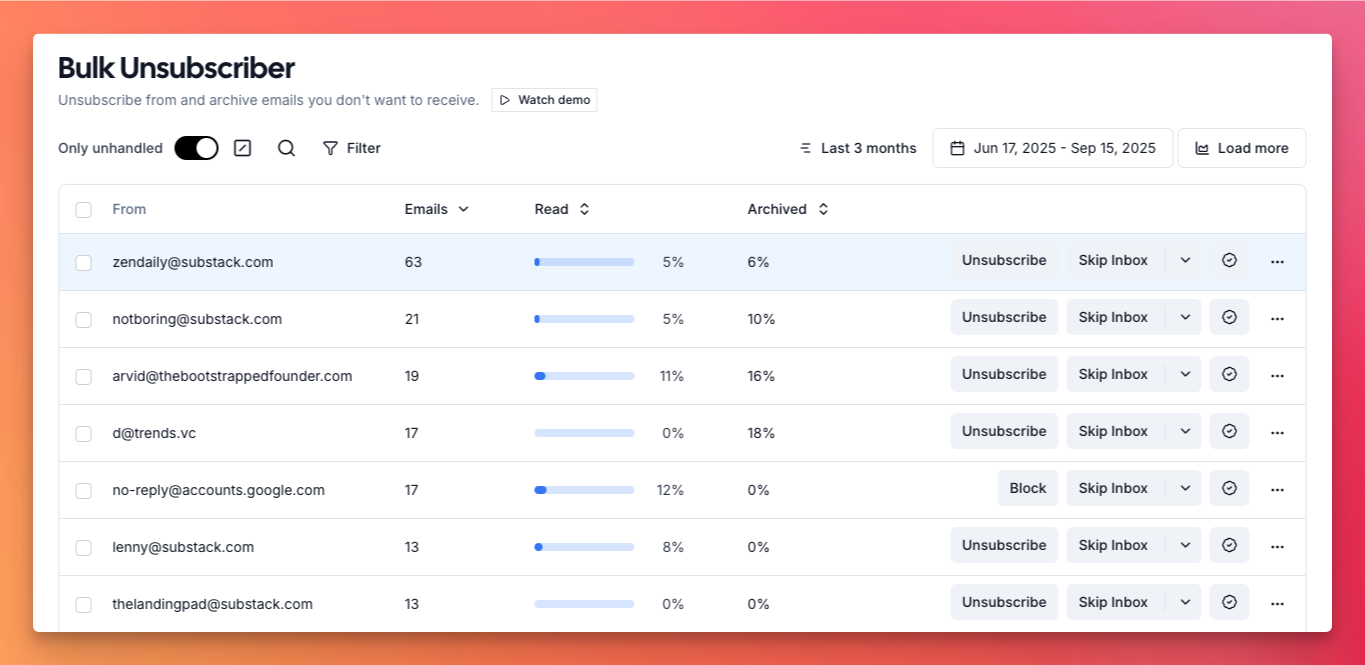
This is Inbox Zero only, and it is one of the fastest ways to clean out a messy inbox. Shortwave can bundle newsletters so they bother you less, but it does not give you a true bulk unsubscribe.
Bulk unsubscribe shows you every sender you are subscribed to, how often they email, and how much of it you actually open. That sender that sent 82 emails in three months and you opened 5% of the time? Select it, unsubscribe, done. Bulk archive does the same for clearing mail out, thousands of emails in a single pass. Bundling hides the clutter; unsubscribing removes it.
Custom rules and actions
Shortwave has automations and AI-powered filters that can sort and label incoming mail, and they are useful. Where Inbox Zero goes further is in what happens after an email is sorted.
In Inbox Zero you decide the action, not just the label. A few examples people set up:
- When an email from an important client mentions "contract", mark it as priority and send a Slack notification
- Archive newsletters after a week unless you've starred them
- Forward every receipt to your accountant automatically and label it as processed
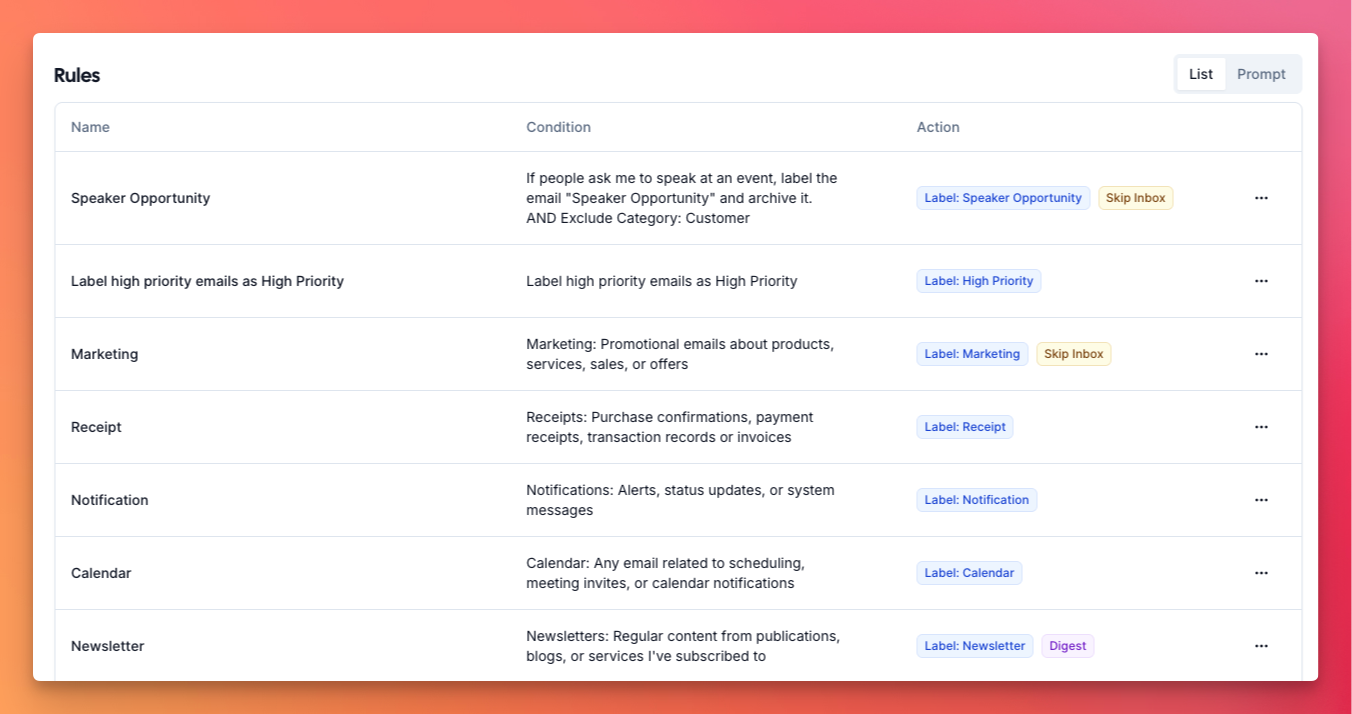
The built-in assistant can create these from plain English. Tell it "keep my inbox clean by archiving marketing emails older than a week" and it writes the rule for you.
Scheduling meetings
Both can help with scheduling. Shortwave offers send later and scheduling for sending mail at a chosen time.
Inbox Zero handles meeting scheduling against your real calendar. If someone emails asking to meet at 5pm tomorrow, it checks your availability and replies accordingly. Ask "when are you free this week?" and it comes back with actual open slots. You can also drop in your existing Calendly or cal.com link instead of building a new one.
Follow-ups
Inbox Zero drafts follow-ups when someone hasn't replied to you, and it also reminds you when you are the one who went quiet. An important email came in last week and you never replied, so it gets labeled as needing a follow-up. If you've connected Slack or Microsoft Teams, it can ping you there, so reminders don't just sit in the inbox you're already behind on. Shortwave's strength is keeping the inbox readable rather than chasing replies for you.
Meeting briefs
Before an external call, Inbox Zero sends you a brief. It researches who's joining, pulls your email history with them, and surfaces the context that matters. This is most useful for people you've never spoken to, like a new prospect where you want as much background as possible before the call. It only does this for external meetings, so your inbox doesn't fill with briefs for internal standups. Shortwave doesn't offer this.
Inbox Zero also includes an AI meeting notetaker on its Plus plan. It joins your video calls, writes the notes with decisions and action items, emails you a recap, and drops a follow-up draft in your inbox. Shortwave has nothing comparable.
Attachment organization
Inbox Zero can file your attachments automatically. Send all your receipts to a specific Google Drive folder, route contracts to a OneDrive folder, and so on. It's a power feature, but for founders, accountants, and lawyers it saves real time. Shortwave doesn't do this.
Slack, Telegram, and mobile
On Inbox Zero's Pro plan you can connect Slack or Telegram, with Microsoft Teams coming soon. Emails that need a reply get pushed to you there, and you can reply straight from Slack with a send button. Meeting briefs and daily summaries can land in Slack too, so you stay on top of what matters without living in your inbox all day.
Inbox Zero has an iOS app, with Android on the way, plus a Tabs Chrome extension that adds tabs to the top of Gmail so you can see all your newsletters in one place and archive them without leaving your inbox. Shortwave has its own polished mobile apps, since it is a full client; it just does not push to Slack or Telegram the way Inbox Zero does.
Open source and privacy
Inbox Zero is open source. You can see exactly how your email is processed, and large teams can self-host it for full control over their data. If you want to go further, you can point ChatGPT or Claude at the codebase and have it explain precisely how your emails are handled.
Shortwave is closed source, so you're trusting that they handle your email the way they say they do. Both companies care about security; this comes down to whether verifiable transparency and self-hosting matter to you.
Feature comparison
| Inbox Zero | Shortwave | |
|---|---|---|
| Works inside your existing client | ✅ | ❌ (new client) |
| Native Gmail support | ✅ | ✅ |
| Native Outlook support | ✅ | ❌ (forwarding only) |
| AI thread summaries | Via labels | ✅ |
| Automatic bundling | Via categories | ✅ |
| AI assistant (search + draft) | ✅ | ✅ |
| Draft replies in your voice | ✅ | ✅ |
| Knowledge base for drafts | ✅ | ❌ |
| Custom categories | ✅ | Limited |
| Custom actions | ✅ | ❌ |
| Bulk unsubscribe | ✅ | ❌ |
| Bulk archive | ✅ | ❌ |
| Analytics (personal + org) | ✅ | Limited |
| Meeting scheduling on calendar | ✅ | Send later only |
| Follow-up reminders | ✅ | ❌ |
| Reminds you when you forgot to reply | ✅ | ❌ |
| Meeting briefs | ✅ | ❌ |
| Meeting notetaker | ✅ (Plus plan) | ❌ |
| Attachment organization | ✅ | ❌ |
| Slack / Telegram integration | ✅ | ❌ |
| Mobile app | ✅ (Android soon) | ✅ |
| Open source | ✅ | ❌ |
| Self-hosting | ✅ | ❌ |
| SOC 2 | ✅ | ✅ |
| SSO (SAML) | ✅ | ✅ |
| Free tier | ❌ | ✅ |
| Pricing | From $20/mo | Free, paid from ~$7/mo |
Who should pick which
Pick Shortwave if you want a brand new AI-native inbox to replace your email client, you live in Gmail, and AI summaries plus automatic bundling are the features you care about most. It does those well, and its free tier lets you try the core experience at no cost.
Pick Inbox Zero if you want to keep the Gmail or Outlook you already use, you're on Microsoft 365, or you want bulk unsubscribe and archive, custom rules and actions, deeper analytics, meeting briefs, Slack and Telegram, open source transparency, or self-hosting. For most people that's the longer list, and you don't have to learn a new client to get it.
Both let you try before you commit. Email is personal enough that trying them is the best way to decide. Because Shortwave is a separate client and Inbox Zero sits on top of your existing one, you can even run them on different accounts while you make up your mind.
Frequently asked questions
Is Shortwave safe to use?
Shortwave is SOC 2 compliant, which points to solid security practices. It's closed source, though, so you're trusting their description of how data is handled rather than being able to check it yourself. Inbox Zero is also SOC 2 compliant and open source, so the code is there to inspect or self-host.
Does Shortwave work with Outlook?
Not natively. Shortwave is built around Gmail and Google Workspace. For Outlook.com or other providers you forward your mail into a Gmail account and use that, and Microsoft 365 and Exchange are not supported. Inbox Zero supports both Gmail and Outlook directly.
Do I have to switch email clients to use Shortwave?
Yes. Shortwave is a full email client you open instead of Gmail. Inbox Zero is different: it works on top of the Gmail or Outlook you already use, so your daily habits don't change.
Does Shortwave have bulk unsubscribe?
No. Shortwave can bundle newsletters so they're less noisy, but it doesn't offer a true bulk unsubscribe or bulk archive. Inbox Zero does both, and can clear thousands of emails in one pass.
Is Shortwave free?
Shortwave has a free tier with core features, and outgoing mail includes a "Sent with Shortwave" line. The AI assistant and writing in your voice sit on the paid Pro plan. Inbox Zero starts at $20 per month and doesn't have a free tier, but it includes the full feature set.
Which has better AI summaries?
Shortwave is strong on thread summaries and automatic bundling inside its client. Inbox Zero reaches the same goal through categories and labels in your existing inbox, plus its assistant and automation. If summaries in a dedicated client are the priority, Shortwave is the closer fit.
Which is more private?
Inbox Zero, because it's open source and can be self-hosted. You can verify how email is processed instead of taking it on faith, and large teams can keep everything on their own infrastructure. Both are SOC 2 compliant.
Does either one have a meeting notetaker?
Inbox Zero does. On the Plus plan, the Inbox Zero Notetaker joins your video calls, writes the notes with decisions and action items, emails you a recap, and drafts the follow-up email for you. Shortwave doesn't have one.
Is Inbox Zero hard to set up?
No. You connect your Gmail or Outlook account and it starts sorting and drafting right away. Custom rules have a simple interface, and the built-in chat can set them up from a plain description. Self-hosting is the one path that takes some technical know-how.
Want AI on the inbox you already use? Try Inbox Zero for free and see how it handles yours.