Email Encryption Best Practices for Business in 2026
Learn how business email encryption actually works: 10 concrete best practices covering TLS, S/MIME, key management, and a 90-day rollout plan.

"We use Gmail, it's encrypted." If that line showed up in your last security audit, you're not alone. But that sentence is doing a lot of heavy lifting, and most of it is wrong.
Gmail does encrypt email. So does Outlook. But "encrypted" can mean three wildly different things depending on which layer you're talking about. The gaps between those layers are exactly where sensitive data leaks, compliance reviews go sideways, and IT teams end up scrambling after an incident they thought couldn't happen.
This is a practical playbook for business email encryption in 2026. We'll walk through 10 concrete best practices, starting from how email encryption actually works, then getting specific with DNS configurations, policy templates, and a 30-60-90 day rollout plan you can actually run. Whether you're an IT admin locking down a 50-person company or a compliance lead at a regulated enterprise, this is the stuff that matters. If you're also thinking about email management strategies alongside your encryption rollout, those two initiatives complement each other more than most teams realize.

How Does Business Email Encryption Work?
Before getting into best practices, you need to understand what email encryption actually does, because confusing the layers is the number one way businesses end up with a false sense of security.
Email is a store-and-forward system. A message typically passes through three hops:
-
Your device or email client sends it to your mail provider (submission)
-
Your provider's mail server relays it to the recipient's mail server (the SMTP hop)
-
The recipient's mail server delivers it to their email client
Encryption can exist at each of these stages, and they protect against different threats.

What Is Transport Encryption (TLS) and How Does It Work?
Think of this as "encrypting the pipes." TLS encrypts the connection between mail servers (and sometimes between your client and your server). It prevents network eavesdropping and many man-in-the-middle attacks.
The catch? Transport encryption is often best effort. According to Google Workspace's TLS documentation, Gmail tries TLS by default, but if the receiving server doesn't support TLS, Gmail can still deliver the email unencrypted. The message gets through. Nobody gets an error. And your sensitive data just traveled across the internet in plain text.
What Is Email Encryption at Rest and Who Controls the Keys?
This is what your email provider does with stored emails in their data centers. Major providers like Google and Microsoft encrypt stored mail as a baseline.
The critical question here is who controls the encryption keys. If the provider holds them, a provider-side compromise, insider threat, or lawful access request is a completely different problem than someone sniffing network traffic. Microsoft's documentation on Customer Key explains this clearly: Microsoft 365 data is encrypted at rest by default, and Customer Key gives organizations an additional layer where they control the root encryption keys. But Microsoft still uses those keys for services like search and eDiscovery (a tradeoff worth understanding before you deploy). For teams navigating eDiscovery email preservation, key control decisions here have real downstream consequences.
What Is End-to-End Email Encryption (S/MIME and OpenPGP)?
This is S/MIME or OpenPGP-style encryption, where the message content itself is encrypted so only the intended recipient can read it. No mail server, no provider, and no intermediary can see the plaintext.
It's the strongest confidentiality model. It's also the most operationally complex. The IETF published RFC 9787 in 2025 specifically addressing end-to-end email security, warning that existing standards are flexible enough to create "surprising failures" and usability traps that most teams won't catch until something breaks. Before committing to end-to-end encryption at scale, it's worth understanding what third-party app access to your email actually means from a security standpoint.
What Email Encryption Cannot Protect Against
Even perfect encryption can't protect against:
→ Misdelivery: Someone emails the wrong "John.Smith@..." and the message is encrypted beautifully to the wrong person
→ Phishing: Encryption protects confidentiality. It doesn't prove the sender is who they claim. Cold email and phishing attacks exploit this gap. Blocking cold emails is a complementary layer of protection your inbox strategy needs.
→ Recipient exfiltration: Once decrypted, the recipient can forward, screenshot, or copy/paste anything
→ Metadata exposure: From, To, Date, and often Subject remain visible regardless of encryption
So real email encryption best practices for business have to combine crypto and process. Encryption alone is never enough.
What "success" looks like: Sensitive mail is encrypted by default or on trigger. When encryption fails, it fails loud, not silently. You can prove it's working through reports and audits. People can still do their jobs without fighting certificates. And you know exactly where encryption stops, so you compensate with DLP, training, and authentication.
How to Enforce TLS Encryption for Business Email
This is the single biggest gap we see in business email encryption setups. Most companies assume TLS is handling things, but they've never actually verified it, and they certainly haven't enforced it.
Why Opportunistic TLS Isn't Enough for Business Email
SMTP was designed to deliver mail even in bad conditions. Many mail systems will try TLS, but if the other side can't negotiate an encrypted connection, they'll deliver the message unencrypted anyway. Google Workspace's documentation on TLS connections explicitly describes this behavior for Gmail.
If your organization handles contracts, invoices, health data, payroll, or regulated customer information, opportunistic TLS isn't enough. Organizations dealing with healthcare data should also review HIPAA-compliant email best practices alongside this transport security setup.

How MTA-STS and TLS-RPT Enforce Email Transport Security
MTA-STS (Mail Transfer Agent Strict Transport Security) lets your domain publish a policy telling senders: "If you can't deliver to me over a valid, encrypted TLS connection, don't deliver at all."
Google Workspace recommends enabling MTA-STS to require authentication checks and encryption for mail sent to your domain. Their documentation also calls out a critical detail: in enforce mode, MTA-STS expects connections that are both authenticated with a valid public certificate and encrypted with TLS 1.2 or higher.
TLS-RPT (TLS Reporting) is the visibility layer. It lets senders deliver daily reports about TLS failures and policy issues, so you can identify and fix problems before you enforce.
UK Government guidance on MTA-STS and TLS-RPT is direct about the right order: start with TLS-RPT monitoring to build confidence before switching MTA-STS to enforce.
Step-by-Step: How to Set Up MTA-STS and TLS-RPT
Here's the practical sequence:
-
Turn on TLS-RPT first. Monitor the failure reports for a few weeks
-
Publish your MTA-STS policy in testing mode
-
Fix the issues that surface in the reports (certificate problems, hostname mismatches, protocol mismatches)
-
Switch to enforce mode once you're confident
Google Workspace recommends exactly this "testing then enforce" approach using TLS reports as your feedback loop.
MTA-STS DNS Records and Policy File Templates
Here are the standard patterns. Adapt them to your domain and infrastructure.
TLS-RPT DNS record:
_smtp._tls.example.com TXT "v=TLSRPTv1; rua=mailto:tlsrpt@example.com"
MTA-STS DNS record:
_mta-sts.example.com TXT "v=STSv1; id=2026030201"
MTA-STS policy file (hosted at https://mta-sts.example.com/.well-known/mta-sts.txt):
version: STSv1
mode: testing
mx: mail.example.com
max_age: 86400
Microsoft's MTA-STS documentation confirms this model: MTA-STS works through a combination of a DNS TXT record and an HTTPS-hosted policy file, and the TXT record includes v=STSv1 and an id value that changes whenever the policy changes.
Common TLS Configuration Problems (and How to Fix Them)
Common failure causes include expired certificates, certificates that don't match hostnames, certificates from untrusted issuers, and servers that don't support modern TLS protocols. Google lists these as common SMTP security problems and explains why MTA-STS exists to address them.
This is exactly why you start in testing mode and watch TLS-RPT. You will find problems. That's the point. Once your transport security is solid, you'll also want email analytics to understand your overall email health and identify patterns that might signal configuration problems.
How to Require TLS Encryption for Specific Email Partners
Even with MTA-STS protecting your domain, not every sender supports it, and not every destination you send to is configured properly. For your highest-value relationships (banks, payroll providers, law firms, key vendors), you should set explicit "must use TLS" rules on the sending side.

How to Configure TLS Compliance in Google Workspace
Google Workspace has a Secure transport (TLS) compliance setting that can require a CA-signed certificate, verify the hostname, and test the TLS connection for specific domains or email addresses. This is how you turn "email to our payroll vendor must be encrypted" into something enforceable, not just a policy on paper.
How Microsoft 365 Handles Outbound TLS Enforcement
Microsoft's Exchange Online supports MTA-STS validations for outbound mail to MTA-STS-protected recipient domains. Outbound MTA-STS is effectively always on as part of the service's SMTP infrastructure.
The practical takeaway: your outbound encryption posture depends on the recipient domain's published policy, and misconfigurations like MX mismatches or certificate validation failures can legitimately prevent delivery.
That's good for security. But it means you need monitoring and escalation paths when a business-critical email bounces because a partner's TLS config is broken. Build that path before enforcement happens.
How to Upgrade Your Email Server to TLS 1.2 or Higher
This applies to every email server, gateway, and SMTP relay your organization runs.
Two authoritative signals you should know:
→ The IETF formally deprecated TLS 1.0 and TLS 1.1 in RFC 8996 (published January 2024)
→ NIST SP 800-52 Rev.2 treats TLS 1.2 as the minimum appropriate secure transport protocol and required support for TLS 1.3 by January 1, 2024
Your practical policy should be:
-
Minimum: TLS 1.2
-
Preferred: TLS 1.3
-
Disabled entirely: TLS 1.0 and TLS 1.1 everywhere you control

If a partner's mail server can't negotiate TLS 1.2 or higher, that's not a "legacy compatibility" issue. It's a business risk conversation, and you should escalate it to whoever owns that vendor relationship.
S/MIME vs. Message Encryption: Which Option Is Right for You?
Once transport security is hardened, you still need a plan for emails that must remain confidential even if mail servers or accounts are compromised. There are three common approaches, and picking the right one depends on your specific workflow.
Microsoft Purview Message Encryption: How It Works
Microsoft's documentation on Purview Message Encryption describes a system that lets you send encrypted mail to recipients inside and outside your organization. It works with common email services and can be triggered by mail flow rules, sensitivity labels, or keyword conditions. (Worth noting: Microsoft explicitly states that the older Office 365 Message Encryption, or OME, has been deprecated. Use Purview.)
When it works well:
-
Sending encrypted email to external recipients who don't use your platform
-
Policy-driven encryption (encrypt based on keywords, sensitivity labels, or conditions)
-
You want less certificate complexity
Tradeoffs:
-
Recipients often see a portal or link-based experience (not a seamless inbox experience)
-
It's a managed encryption scheme, not true end-to-end in the S/MIME sense
S/MIME for Enterprise Email: When to Use It
S/MIME is the most widely supported end-to-end encryption standard in business environments, especially for Outlook and Exchange. Microsoft Support is clear about the requirements: both sender and recipient need mail applications that support S/MIME, and S/MIME provides both encryption and digital signatures.
When it works well:
-
Regulated communications where you need signing and encryption
-
You can manage certificates centrally through a PKI or MDM
-
Both parties are enterprise-grade email users
Tradeoffs:
-
Certificate lifecycle management (issuance, renewal, revocation) is a real operational burden
-
Recipient onboarding can be painful if they don't already have S/MIME configured
-
If certificates aren't installed correctly, UX breaks in confusing ways
Also worth keeping in mind: public S/MIME certificate issuance has evolving baseline requirements from the CA/Browser Forum. If you rely on public CAs and automated issuance, track those requirements because they change.
OpenPGP for Email: When It Makes Sense
OpenPGP is standardized in RFC 9580 (July 2024). It's powerful, well-understood by security communities, and fully decentralized.
When it works well:
-
Technical teams, security researchers, high-risk workflows
-
Both sides already run PGP tooling and manage their own keys
Tradeoffs:
-
Key distribution and trust verification are hard to scale
-
The IETF explicitly warns about usability pitfalls in end-to-end email security implementations. The UX failure modes are real

Email Encryption Comparison: Choosing the Right Method
| Scenario | Recommended Approach |
|---|---|
| Default business email | TLS + MTA-STS/TLS-RPT + DLP |
| Sensitive, high-volume external comms | Policy-based encryption (Purview or equivalent) |
| High-sensitivity, high-assurance, known counterparties | S/MIME (signed + encrypted) |
| Niche high-risk workflows with technical users | OpenPGP |
Don't overcomplicate it. Most businesses need strong transport encryption as their baseline, policy-based message encryption for sensitive external communications, and S/MIME only where the regulatory or confidentiality requirements justify the operational overhead.
Email Encryption Key Management: The Part Teams Get Wrong
Encryption is the easy part. Keys are where it gets hard.

S/MIME Key Management: What You Need to Plan For
If you go the S/MIME route, you need clear answers to these questions before you start:
→ Who issues certificates? Internal CA or public CA?
→ How do certificates get onto devices? MDM push, manual user install, smart cards?
→ What's the renewal process? Automatic provisioning or manual fire drill every 12 months?
→ Do you need key escrow? If an employee leaves or you get a legal hold, can you still decrypt their messages?
Microsoft's Outlook guidance on S/MIME reflects the reality: users need a "digital ID" certificate installed, and different clients have different setup paths. This isn't something you can just flip on. Enterprise IT teams should also have a clear email retention policy that accounts for encrypted messages and key lifecycle management.
Customer-Managed Keys at Rest: The Real Tradeoffs
This isn't end-to-end encryption, but it meaningfully changes who controls what. Microsoft's Customer Key documentation explicitly frames the model as an "added layer of encryption" where you control the root keys, but you also authorize Microsoft to use those keys for value-added services like eDiscovery and search indexing.
That's a tradeoff you should make consciously, not discover after deployment.
How to Monitor Email Encryption and Detect Silent Failures
You want to catch two things:
First: your domain is receiving mail over insecure connections. TLS-RPT solves this. Google describes TLS reporting as daily reports about connection problems external servers find when sending mail to your domain. The UK Government's guidance on MTA-STS and TLS-RPT emphasizes using these reports to fix issues before enforcing MTA-STS.
Second: your outbound policies are bouncing mail due to enforcement. This one is trickier. Your helpdesk and security team need shared visibility. When MTA-STS enforcement causes a business-critical email to bounce, the incident shouldn't look like "email is broken." It should look like "our partner's TLS is misconfigured, and here's the escalation path."
Build that escalation path before you flip MTA-STS to enforce. Your future self will thank you.

To get real visibility into your email traffic patterns and identify anomalies, Inbox Zero's email analytics gives you trends on send/receive counts, top senders, top domains, and more. The kind of data that makes security monitoring proactive instead of reactive.
How to Test Your Mail Server's TLS Configuration
You don't need expensive tools to catch basic TLS misconfigurations. A single OpenSSL command gets you a long way.
Google Workspace documentation actually provides this exact approach for extracting TLS certificates from SMTP servers:
openssl s_client -starttls smtp -connect mail.example.com:25
What you're checking for:
-
Successful STARTTLS negotiation
-
Valid certificate chain
-
Correct hostname / Subject Alternative Name (SAN)
-
TLS 1.2+ support
Then validate your MTA-STS setup:
-
DNS TXT record exists and contains the correct
idvalue -
HTTPS policy file is reachable at the expected URL with a valid certificate
-
The policy file's
mxentries match your actual MX records

Do this before switching to enforce mode. This is a 15-minute check that can save you days of debugging bounced email.
Email Encryption vs. Authentication: Why You Need Both
This is where many "encrypted email" programs fall apart. Encryption and authentication solve different problems:
| What It Protects | The Threat It Addresses | |
|---|---|---|
| Encryption | Confidentiality | No one can read the message in transit |
| Authentication | Identity | The sender is actually who they claim to be |
Google explicitly recommends deploying DKIM, SPF, and DMARC alongside MTA-STS. If you skip authentication while focusing on encryption, you can end up encrypting and delivering convincingly spoofed email. That's arguably worse than no encryption, because it gives recipients false confidence.
Authentication is also tightly linked to deliverability. Mastering email deliverability means getting DKIM, SPF, and DMARC right first. That foundation supports your encryption program, not the other way around.

Bottom line: Encryption without authentication is incomplete security. Deploy SPF, DKIM, and DMARC before (or alongside) your encryption rollout.
How to Write an Email Encryption Policy for Your Team
The best encryption technology in the world is useless if nobody follows the rules. Here's a simple data classification framework that works in real businesses because it's teachable.

Email Data Classification: A Policy Template That Works
| Classification | Email Rules |
|---|---|
| Public | Normal email. No restrictions |
| Internal | Normal email with TLS baseline enforced |
| Confidential | Must use enforced TLS to approved domains OR message encryption (Purview/S/MIME). No forwarding to personal email. Attachments must be encrypted or shared via approved secure file sharing |
| Restricted | No restricted data in email body. Use secure portal or file share with access controls. If email is absolutely required, must be end-to-end encrypted (S/MIME/OpenPGP) with an approved recipient list |
And then add the one rule that saves an enormous amount of pain:
If encryption fails, the message must not send silently.
That single rule is the reason MTA-STS and enforcement settings exist. Silent failures are the enemy of every email encryption program. Make "fail loud" your default.
Regulated industries face additional requirements beyond this baseline. Here's where to look:
→ Companies subject to financial regulations: SOX email audit trail requirements and GDPR email deletion rules
→ Government contractors in the US: FedRAMP email requirements
These compliance layers sit on top of your encryption policy, not separate from it.
How AI Email Tools Affect Your Encryption Strategy
This is the blind spot most teams miss in 2026. You've locked down your transport encryption, set up MTA-STS, published your DMARC records, and written your data classification policy. But then someone on the team connects an AI email assistant, and suddenly email content is flowing through a third-party processing pipeline you never evaluated.
If you use any email automation tool (including AI assistants, auto-responders, or workflow integrations), you need answers to these questions before you deploy:
→ Can the tool read message bodies? If so, all message bodies, or only specific threads?
→ Where does it process content? On your infrastructure, in a specific cloud region, or wherever the AI provider operates?
→ Is content stored, and for how long?
→ Can you self-host the tool or bring your own API keys for the AI model?
→ What happens when the tool encounters an end-to-end encrypted message it can't decrypt?
The practical reality is that strong end-to-end encryption will reduce what any automation tool can "understand" unless decryption happens in the same trusted environment. So your encryption strategy and your automation strategy need to talk to each other. Understanding security risks when giving third-party tools access to your email is critical before deploying any email integration in a regulated environment.

How Inbox Zero Approaches Security for Email Automation
At Inbox Zero, we built our email automation with security-conscious organizations in mind. Because if you're investing in email encryption, you shouldn't have to choose between security and productivity.
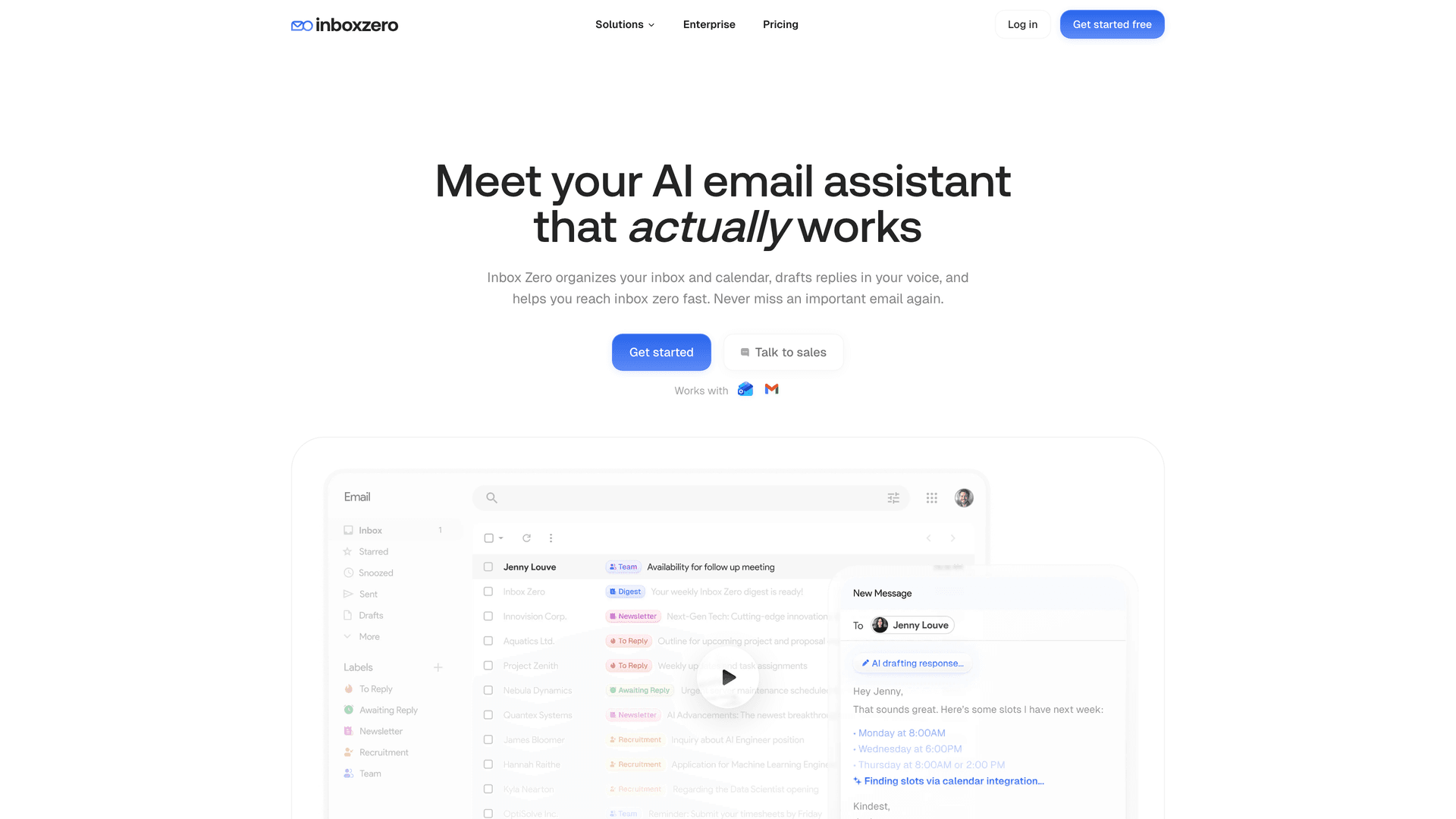
SOC 2 compliance and CASA Tier 2 approval. Our Trust Center lists our SOC 2 Type 2 compliance status, 20 published internal policies, and 17 security controls including TLS, secure code practices, incident response, device security, and 2FA. We're also CASA Tier 2 approved, which is Google's Cloud Application Security Assessment program. Tier 2 verification involves authorized lab scanning and assessor review, and it's required for apps accessing sensitive Gmail scopes. You can also explore our blog post on SOC 2 compliant email tools to understand what compliance certifications actually mean for email security.

OAuth-based access, not stored credentials. Inbox Zero connects to Gmail and Microsoft through OAuth-driven API access. We don't ask for your email password or store full email body content permanently. Our Privacy Policy details exactly what's stored and what isn't. (We always recommend verifying against your own threat model.)
Bring your own AI keys. For organizations that need control over where email content is processed, Inbox Zero supports bringing your own API keys for Anthropic, OpenAI, Google, Groq, and OpenRouter. Self-hosted deployments can even run fully local models through Ollama, which means email content never leaves your infrastructure. Check our documentation for the full setup guide, including the self-hosting quick start and LLM configuration options.
Open source and self-hostable. Our entire codebase is open source on GitHub. You can audit the code, review the OAuth scopes we request, and self-host the entire platform if your security requirements demand it. For enterprise deployments, this means your security team can verify exactly what the tool does with email data. Teams evaluating open source options should also read our guide to the best open source email automation tools.
AI-powered automation that works within your security framework. Our AI automation is built to work with your existing Gmail or Outlook setup, using OAuth and standard scopes rather than running a parallel mailbox. The AI Personal Assistant lets you set rules in plain English: "label all contracts as Confidential," "archive newsletters after 7 days," without giving the tool unfettered access to your email.
Cold email and spam protection. Our Cold Email Blocker helps keep unsolicited outreach out of your inbox, which is a complementary layer of protection for security-conscious organizations. The blocker documentation explains how it uses AI classification without storing full email content.
Client-side Chrome extension. Our Inbox Zero Tabs for Gmail extension runs entirely in your browser with no data collection and no external server calls. All settings are stored locally. You can create custom tabs like "Needs Encryption," "Contracts," "HR," or "Sensitive" using Gmail search queries to organize your encrypted email workflows without any data leaving your browser. If your team is evaluating email automation tools alongside an encryption rollout, Inbox Zero is designed to work within your security framework, not around it.
How to Roll Out Email Encryption: A 30-60-90 Day Plan
Theory is great. Execution is what matters. Here's a phased plan you can hand to your IT team and actually run.
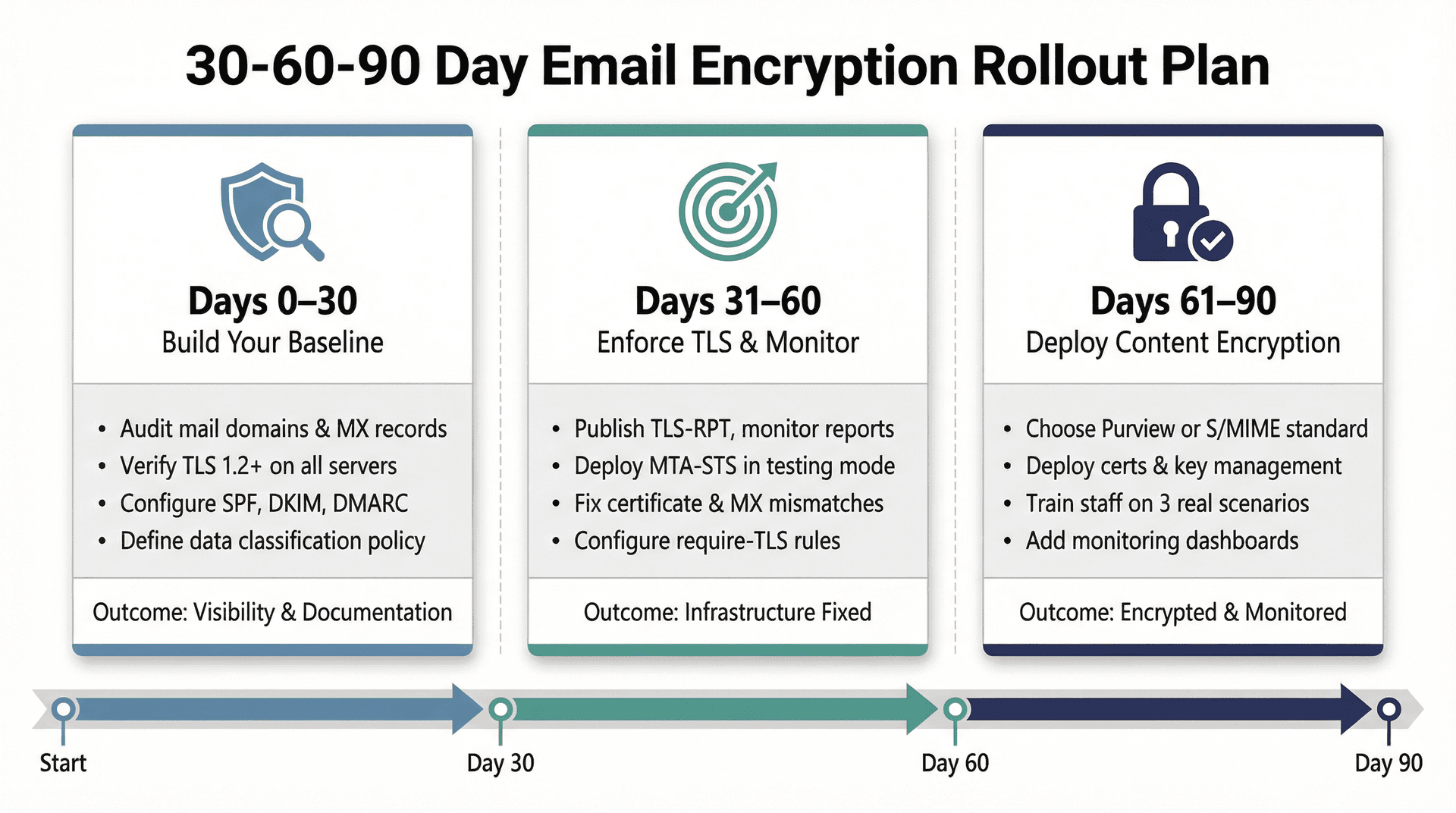
Days 0-30: Build Your Email Encryption Baseline
→ Inventory every mail domain, MX record, gateway, and relay your organization uses
→ Confirm TLS 1.2+ support on every server you control
→ Turn on SPF, DKIM, and DMARC if they're not already configured
→ Define your data classification policy (use the table above as a starting point) and get sign-off on "what must be encrypted"
This phase is about knowing what you have and locking down the fundamentals. No enforcement yet. Just visibility and documentation. An email retention policy template helps formalize how long different categories of email are kept, which directly informs your encryption requirements.
Days 31-60: Enforce TLS and Monitor Email Transport Security
→ Publish TLS-RPT and start monitoring reports. UK Government guidance on MTA-STS and TLS-RPT recommends this as the first step before any enforcement
→ Publish MTA-STS in testing mode. Google Workspace's MTA-STS documentation describes the testing-then-enforce approach
→ Fix certificate and MX mismatches that surface in reports
→ Identify your critical partners and configure "require TLS" rules (Google secure transport compliance for Workspace, Microsoft connectors for Exchange Online)
This phase is about catching failures, fixing infrastructure, and building confidence before you enforce. Use email analytics to track delivery trends and surface anomalies during this monitoring window.
Days 61-90: Deploy Content Encryption for Sensitive Email
→ Choose your content encryption standard based on the decision framework above:
- [Purview Message Encryption](https://learn.microsoft.com/en-us/purview/ome) for broad external use

- [S/MIME](https://support.microsoft.com/en-us/office/encrypt-messages-by-using-s-mime-in-outlook-web-app-2e57e4bd-4cc2-4531-9a39-426e7c873e26) for high-assurance regulated workflows
→ Deploy certificates and key management processes
→ Train staff with three concrete scenarios: payroll, legal, HR. Don't give them a 40-page manual. Give them three examples and a one-page cheat sheet
→ Add monitoring dashboards, helpdesk playbooks, and incident response triggers for encryption failures
→ Evaluate your AI and automation tools against the questions in Best Practice 10. If you're looking for an email assistant that fits into an encryption-conscious environment, try Inbox Zero with automation turned off for the first week while you calibrate
By day 90, you should have enforced transport encryption, content encryption for your most sensitive workflows, a policy your team can actually follow, and monitoring that tells you when something breaks. If you want to go further on overall inbox hygiene, cleaning your inbox of noise and unnecessary volume makes encrypted communication flows easier to audit and manage.
Email Encryption FAQs: Common Business Questions Answered

Does the Gmail Lock Icon Mean End-to-End Encryption?
Not necessarily. The lock icon in Gmail typically means the message is being sent over TLS, which is transport encryption. That's between mail servers, not end-to-end. Google Workspace documentation confirms that Gmail can still deliver messages unencrypted if the recipient's server doesn't support TLS, unless you enforce TLS through compliance settings. The lock icon is a signal, not a guarantee.
Does Email Encryption Prevent Phishing Attacks?
No. Encryption helps with confidentiality, not identity. It doesn't prove the sender is who they claim to be. That's what authentication controls like DKIM, SPF, and DMARC are for. Encryption and authentication are different security layers, and you need both. For inbox-level protection against unwanted inbound traffic, blocking cold emails addresses the unsolicited outreach problem that encryption won't touch.
Why Not Encrypt All Business Email End-to-End?
Because key distribution, client compatibility, archiving requirements, and usability become serious bottlenecks at scale. The IETF's 2025 guidance on end-to-end email security (RFC 9787) essentially says: end-to-end email encryption is valuable, but it's easy to get wrong in ways that users won't notice until something fails. For most organizations, the right answer is strong transport encryption as the default, with end-to-end encryption applied selectively to the workflows that truly need it. For a broader look at email management tips that make secure workflows sustainable, see our guide.
Building a Complete Business Email Encryption Strategy
Email encryption isn't a single checkbox. It's a layered system that requires the right combination of transport security, content encryption, monitoring, policy, and human training. Get any one of those layers wrong, and you've got a gap that attackers, auditors, or simple accidents will find.
Start with the fundamentals: enforce TLS via MTA-STS, modernize your TLS versions, deploy SPF/DKIM/DMARC, and write a data classification policy. Then layer in content encryption where it matters, build monitoring that catches silent failures, and make sure your AI tools and automation aren't punching holes in the security framework you just built.

The inbox zero method is about more than an empty inbox. It's about having a system that handles your email with intention. Applied to security, that same intentionality means treating encryption as a program, not a one-time setup. Clean your inbox of noise so the messages that matter, contracts, regulated communications, sensitive data, are easy to identify and treat appropriately.
If you're looking for an email automation tool that respects your encryption strategy instead of undermining it, Inbox Zero was built for exactly this situation. SOC 2 compliant, open source, self-hostable, and designed so your security team can verify everything. Start for free and see how it fits into your workflow.
This guide was researched using sources accessed in March 2026. Vendor features, admin console paths, and pricing change over time. For high-stakes implementations (healthcare, finance, government contracts), treat this as the foundation and verify your specific setup against your provider's current documentation and your legal or compliance requirements.
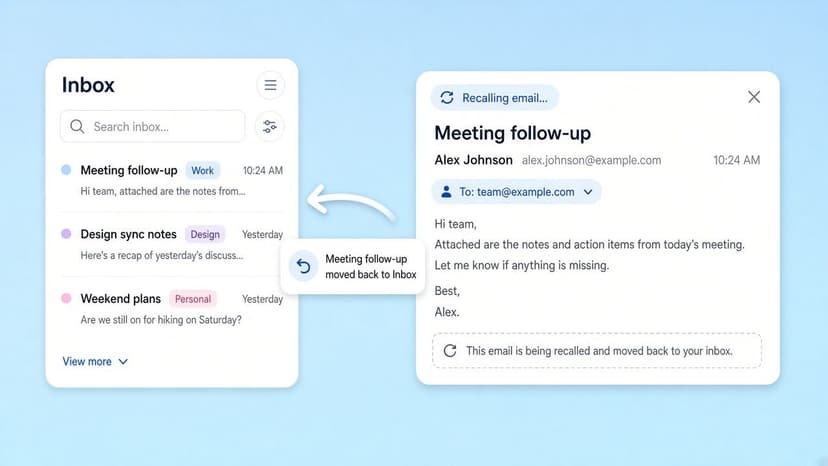
How to Recall an Email in Outlook (2026)
How to recall an email in Outlook step by step for new Outlook, classic Outlook, web, Mac, and mobile, plus when recall works and what to do when it doesn't.
2026-09-30T18:25:57.000Z
How to Stop AliExpress Emails (2026)
Stop AliExpress promotional emails: the unsubscribe link, notification settings in your AliExpress account, and what to do when the deals keep coming.
2026-09-30T18:25:57.000Z
How to Stop Amazon Emails (2026)
Stop Amazon marketing emails with the Communication Preferences Center, manage Amazon email subscriptions, and handle order emails you can't switch off.
2026-09-30T18:25:57.000Z
How to Stop Domino's Emails (2026)
Stop Domino's emails with Domino's official opt-out page, stop Domino's text offers, and know which rewards emails keep coming.
2026-09-30T18:25:57.000Z